
24/7 Customer Support

Free returns

Same-day & Next-day Delivery

Quality Guaranteed

Unlock Your Welcome Offers: FREE Delivery | Up to 80% OFF | Free 30-day JoyPlus trial
Download the APP
Choosing HyperX gaming accessories is not simply a matter of selecting the product with the most RGB lighting or the longest list of features. UK gamers need to consider layout, device compatibility, wireless standards, charging requirements and everyday durability before paying.
A suitable keyboard for a desktop PC may not be convenient for a student carrying equipment between halls and home. Likewise, an Xbox controller charger will not solve a Nintendo Switch charging problem. This guide explains the specifications that matter and matches selected products to different gaming lifestyles.
Wireless products often quote a maximum battery life under specific conditions. RGB lighting, high polling rates, voice chat and frequent Bluetooth use can reduce practical runtime. For example, the HyperX Alloy Rise 75 Wireless Keyboard lists up to 80 hours with RGB enabled and up to 1,500 hours with lighting switched off.
Treat battery figures as usage-dependent estimates rather than guarantees. Check whether the quoted figure applies with lighting, wireless mode or other features active.
A compact keyboard can free up desk space, but a 65% or 75% layout may differ from the full-size keyboard you currently use. UK shoppers should also check whether the product has a UK layout. The Alloy Origins 65 listed here uses a US layout, while the Alloy Rise 75 is specified as a UK model.
Compatibility can also vary between consoles. A gaming headset may support PC, PlayStation, Xbox or Nintendo Switch in different ways, particularly when using a USB wireless dongle. Always check the product listing and connection method before ordering.
A 2.4GHz wireless gaming mouse normally uses a USB receiver for low-latency connection, while Bluetooth is more convenient for laptops and mobile devices. Some gaming headsets offer both, but consoles may only support selected connection methods.
Wired equipment avoids battery management, but the cable can create drag or restrict movement. Wireless equipment offers a cleaner desk, although it requires charging and sensible receiver placement.
For a HyperX gaming keyboard, consider:
When comparing a HyperX wireless gaming mouse or lightweight gaming mouse, check whether the shape suits your hand and grip. An ergonomic right-handed design may feel less suitable for left-handed users.
Adjustable DPI allows sensitivity changes, while programmable buttons can support different game controls. PTFE feet and a flexible cable may reduce friction on a clean mouse mat. For wireless models, confirm whether the mouse supports Bluetooth as well as 2.4GHz, and check how it charges.
A wireless gaming headset should be assessed for:
For HyperX gaming earbuds, check the supplied ear tip sizes, charging case and whether the USB-C dongle fits your device without obstructing other ports.
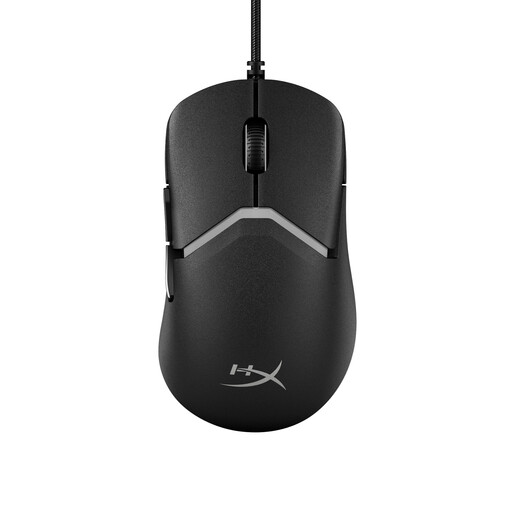
Why This Fits Their Persona: A wired mouse avoids battery charging and wireless receiver concerns, making it a straightforward choice for a first PC or laptop gaming setup.
The USB connection removes uncertainty around battery life, while adjustable DPI and programmable buttons provide useful control without requiring a wireless model.
High-precision sensor, adjustable DPI, PTFE feet and a soft cable designed to reduce drag.
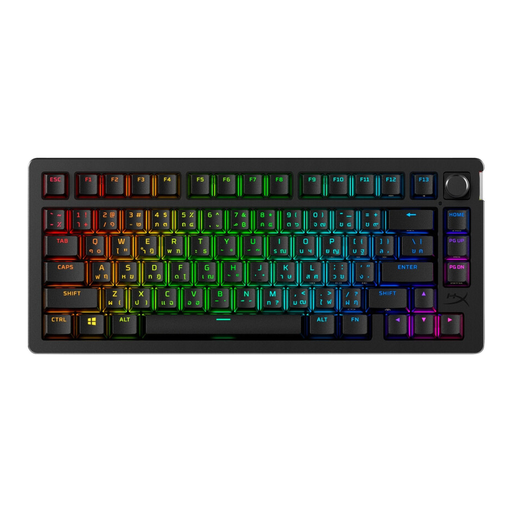
Why This Fits Their Persona: It suits PC and PlayStation players who want a compact UK-layout keyboard with wireless flexibility and customisation options.
The listing states the UK version, dual 2.4GHz and Bluetooth modes, and battery figures for both RGB-on and RGB-off use.
75% layout, hot-swappable switches, per-key RGB, a rotary volume control and onboard memory for up to 10 profiles.
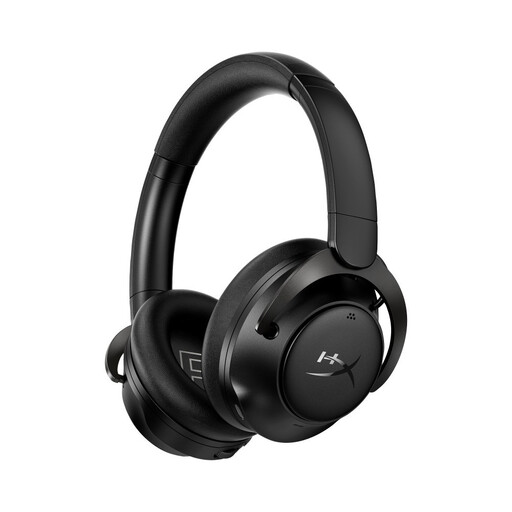
Why This Fits Their Persona: The dual-wireless design works for players who move between gaming, calls, music and multiple devices at home or while commuting.
It does not rely on a single connection type: 2.4GHz is provided for gaming and Bluetooth for compatible everyday devices.
Over-ear memory foam cushions, a rechargeable battery, USB wireless dongle and a noise-cancelling microphone.
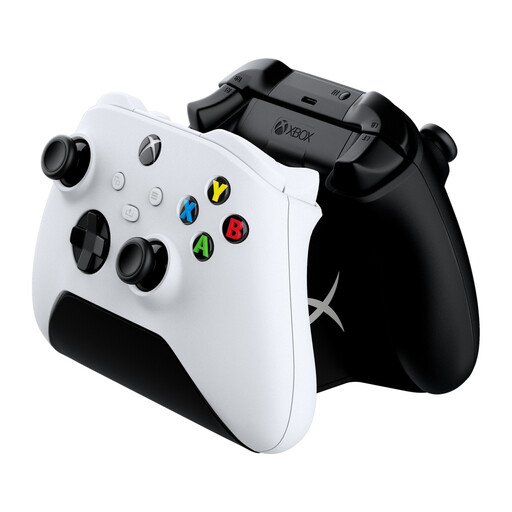
Why This Fits Their Persona: Xbox households can replace disposable AA batteries with a dedicated charging station for two compatible wireless controllers.
The product is designed for Xbox Series X|S and Xbox One wireless controllers, includes two battery packs and uses a UK power plug.
Two controllers charge simultaneously, with LED indicators and a weighted, compact base.
We have compiled a complete, real-time list of products that fully satisfy these strict selection criteria and UK safety regulations.
For commuters and students, the HyperX Knight Backpack offers 22.6 litres of capacity, a padded sleeve for laptops up to 16 inches, organiser pockets and a clamshell opening. Its water-resistant 600D polyester exterior is useful for daily travel, but it should not be treated as fully waterproof protection.
The lighter HyperX Delta Backpack has a stated 17.8-litre capacity and weighs 498g, with a trolley pass-through and sternum support. It may suit users carrying a laptop, cables and smaller peripherals rather than a complete tournament kit.
Nintendo Switch owners can consider the HyperX ChargePlay Quad 2, which charges up to four Joy-Con controllers and provides separate LED indicators. Check the included cable and power-adaptor requirements before installation, particularly if your setup does not already have a suitable 5V/2A USB adaptor.
Compatibility depends on the product and connection method. A charging station is platform-specific, while a headset or mouse may use USB, Bluetooth or a supplied wireless dongle. Check the individual product listing before purchase, especially for Xbox support.
A wired mouse does not need charging or replacement batteries, so its ongoing power cost is minimal. A rechargeable wireless mouse avoids disposable batteries but needs periodic charging. The practical choice depends on whether cable-free movement is worth the additional charging routine.
Lifespan depends on usage, cleaning, storage and battery care. The Alloy Rise 75 listing specifies switches rated for up to 80 million keystrokes, but that figure refers to switch durability rather than the entire keyboard. Rechargeable batteries gradually lose capacity over time, so follow the supplied charging and safety instructions.