
24/7 Customer Support

Free returns

Same-day & Next-day Delivery

Quality Guaranteed

Unlock Your Welcome Offers: FREE Delivery | Up to 80% OFF | Free 30-day JoyPlus trial
Download the APP
As a Joybuy Product Recommendation Officer, my role is to help you navigate the crowded market of home technology. When it comes to choosing an indoor security camera, it’s easy to get lost in technical jargon and marketing promises. Many UK residents end up with a device that either underperforms or comes with unexpected costs. This guide will help you identify the key features that truly matter and avoid the common pitfalls, ensuring you find a camera that provides genuine peace of mind.
Before looking at what to buy, it’s crucial to understand what to avoid. Many shoppers are caught out by these common issues:
To make a smart choice, focus on these three practical specifications. They determine the real-world performance of any indoor security camera.
Instead of just looking at the resolution number (e.g., 1080p, 2K), consider the overall image quality. A good home security camera should provide a clear, recognisable image of a person from across a typical room.
A camera’s view determines how much of your space it can monitor. A static camera is fine for a small area, but for larger rooms or more dynamic situations like monitoring children or pets, you need wider coverage.
The "smart" features are what turn a simple camera into a useful security tool. These are managed through a camera with app on your smartphone.
Based on these practical criteria, here are a few indoor cameras suited to different needs and budgets.
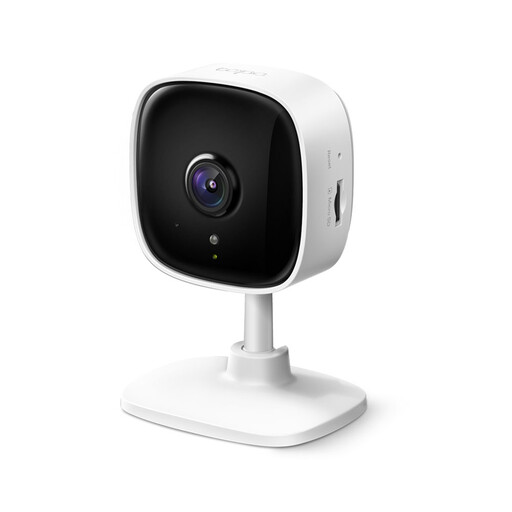
Why This Fits Their Persona: This camera is ideal for anyone in the UK needing reliable, basic monitoring without a large initial investment. It's perfect for keeping an eye on a front door from the inside or monitoring a single room while you're at work.
It supports local storage via a microSD card (up to 512GB), allowing you to record footage and receive motion alerts without being forced into a monthly subscription.
Delivers clear 1080p video and has a solid night vision range of up to 10 metres. It also includes two-way audio and motion detection alerts, covering all the essential features well.
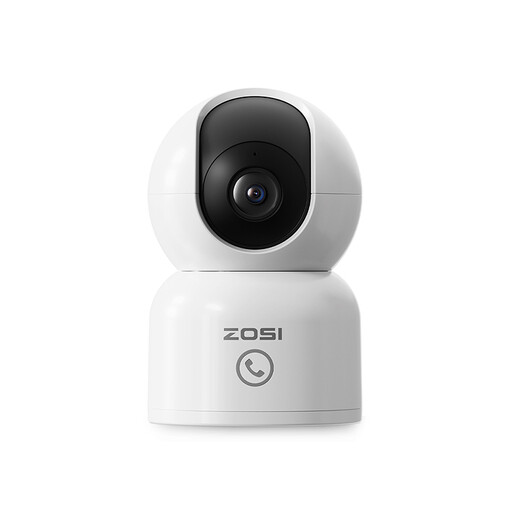
Why This Fits Their Persona: This camera is built for active monitoring. The 360° auto-tracking follows a pet or toddler around the room, while the one-touch call button allows children or elderly relatives to easily contact you on your phone.
Its 2.5K (4MP) resolution provides extra detail without the extreme bandwidth demands of 4K, offering a practical step-up in clarity. It also supports local microSD card storage to avoid mandatory cloud fees.
The combination of AI-powered 360° motion tracking and a one-touch call button makes it a highly interactive device for staying connected with family and pets, not just for passive surveillance.
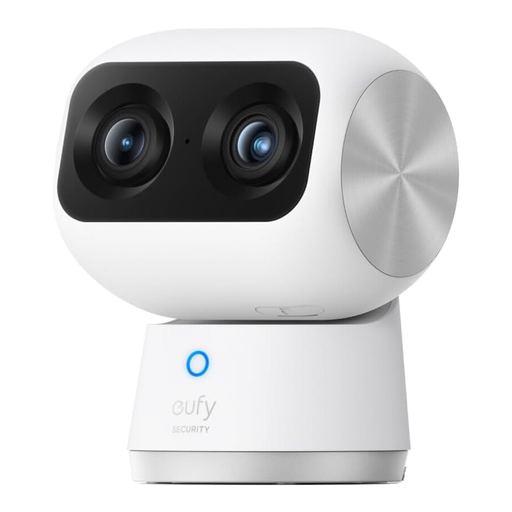
Why This Fits Their Persona: For those who want high-end performance and features, this camera delivers. The dual-lens system provides both a wide 4K overview and a zoomed-in 2K view simultaneously, while dual-band Wi-Fi 6 ensures a stable, fast connection.
It sidesteps the resolution trap by pairing a high-quality 4K sensor with a second telephoto lens for a genuinely useful 8x hybrid zoom. On-device AI processing for human/pet detection and local storage options mean core smart features work without a subscription.
The dual-camera system is its standout feature, allowing you to monitor the entire room and zoom in on details at the same time. The excellent night vision and intelligent tracking complete a powerful package.
We have compiled a complete, real-time list of products that fully satisfy these strict selection criteria and UK safety regulations.
Here are answers to a few common questions UK buyers have about indoor cameras.
No, you do not. Many reputable cameras, including those highlighted above, offer local storage via a microSD card. This allows you to record video, review footage and receive motion alerts without any monthly fees. Subscriptions typically offer extended cloud storage (e.g., 30 days) and sometimes more advanced AI features, but they should be an optional extra, not a necessity for core functions.
This depends on the resolution and how often it records. A 1080p camera streaming continuously might use 1-2 GB of data per day, while a 4K camera could use significantly more. However, most users set their cameras to record only when motion is detected. In this mode, data usage is much lower and will depend on the amount of activity in your home. It’s unlikely to have a major impact on your home broadband bill unless you are streaming live 24/7.
While you can, it often leads to poor results. During the day, you may get glare and reflections from the glass. At night, the camera's own infrared LEDs will reflect off the window, creating a white-out effect that makes it impossible to see outside. For this specific use, you should look for a dedicated window security camera with anti-glare technology or disable the camera's IR lights and rely on external lighting. Alternatively, an outdoor-rated camera is the proper tool for monitoring the exterior of your property.