
24/7 Customer Support

Free returns

Same-day & Next-day Delivery

Quality Guaranteed

Unlock Your Welcome Offers: FREE Delivery | Up to 80% OFF | Free 30-day JoyPlus trial
Download the APP
An indoor security camera can help you check on pets, children, elderly relatives or an empty room from your phone. However, the headline specification rarely tells the whole story. A high-resolution camera may still be inconvenient if it only works with one Wi-Fi band, while a low-cost model can become expensive if cloud recording requires a monthly subscription.
This guide explains the practical details to check before buying a Wi-Fi indoor camera, baby monitor camera or indoor CCTV camera for a UK home.
Terms such as “2K” and “4MP” describe image detail, but they do not guarantee that one camera will cover an entire room. A fixed lens may leave areas outside its field of view, whereas a 360° pan and tilt camera can be moved remotely.
Check both the resolution and movement range. For example, the Tapo TC71 offers 2K 3MP video, 360° horizontal movement and 114° vertical movement. A camera with a wide fixed lens may be more suitable for a small room, but pan and tilt is useful where pets or people move around.
Many cameras support local microSD recording, but cloud backup, extended video history or advanced alerts may cost extra. Confirm whether the memory card is included, the maximum supported capacity and what the app charges for cloud services.
The JOOAN C17C supports a microSD card up to 256GB, while cloud storage is optional and paid. The eufy C220 also supports local recording, with a microSD card up to 128GB, and lists local security without a monthly recording fee.
AI human detection camera features can help distinguish people from general movement, but alerts depend on lighting, camera position, Wi-Fi performance and the app’s settings. Human, pet, baby-crying and vehicle detection are not identical functions, so select the alert type that matches your household.
Also check whether recording is continuous or event-based. A motion detection camera may save clips only after movement is detected, which uses less storage but may not provide a complete record.
For general room monitoring, 1080p can be adequate when the camera is close to the subject. 2K security camera models provide more pixels for viewing faces, pet activity or room details, particularly when using digital zoom. Resolution alone cannot prevent blur, so look for a suitable frame rate, good positioning and a clear night vision specification.
Night vision may be infrared, colour or a selectable combination. Infrared is often useful in a dark nursery, while colour night vision generally needs some available light. Check the stated range: examples in this category include approximately 6 metres, 10 metres and 12 metres, depending on the model.
A plug-in security camera avoids battery charging, making it practical for continuous monitoring. It does require a nearby socket and careful cable placement. Most indoor models use 2.4GHz Wi-Fi because it travels further through walls. Dual-band models also support 5GHz, which can offer faster local transmission but usually has a shorter range.
Before buying, check whether the camera supports your router’s band. Some models, such as the CINMOORE 2.5K camera, support 2.4GHz only, while the JOOAN C17C supports both 2.4GHz and 5GHz Wi-Fi.
A camera with phone app access should allow live viewing, playback and alerts without an unnecessarily complicated setup. Check whether multiple household members can access the camera and whether recordings remain local.
Useful privacy features include privacy mode, privacy masking and customisable activity zones. Position the camera so it does not unnecessarily record neighbours’ windows, communal areas or private spaces. If your camera captures beyond your private home boundary, UK data protection and privacy obligations may apply. Review current guidance from the Information Commissioner’s Office and use privacy zones where available.
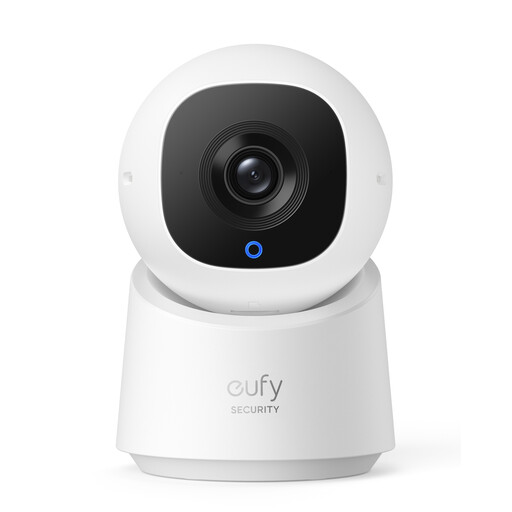
Why This Fits Their Persona: A practical starting point for renters, flat owners and anyone wanting 2K indoor monitoring without relying on a monthly recording plan.
It specifies local microSD recording up to 128GB and a privacy mode, helping reduce dependence on cloud storage and limiting recording when required.
2K video, 360° pan and tilt, on-device human detection and two-way audio.
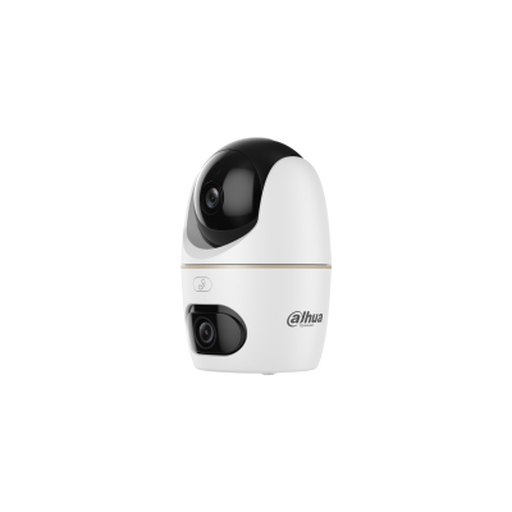
Why This Fits Their Persona: Suitable for larger rooms or households wanting detailed footage from dual lenses and broader monitoring functionality.
Its specification lists the resolution of both lenses, Wi-Fi 6 support, microSD storage up to 256GB and privacy mode, making the ongoing setup clearer.
Two 5MP lenses, human and pet detection, two-way audio and infrared or warm-light illumination up to 30 metres as specified.
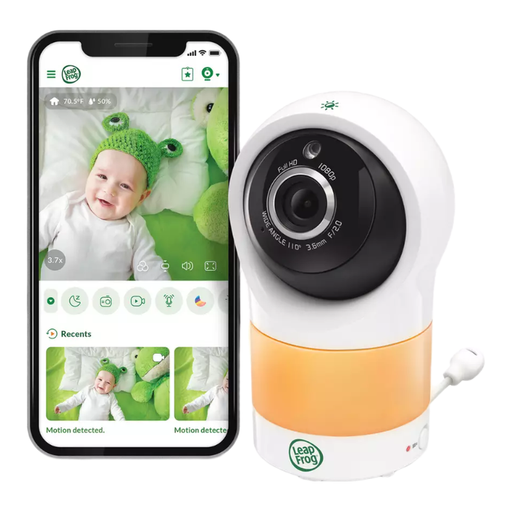
Why This Fits Their Persona: Designed around nursery monitoring, with a parent-focused feature set for households checking room conditions as well as video.
The listed features go beyond generic motion alerts, including a temperature and humidity sensor, motion-triggered recording and colour night vision.
Motorised 360° horizontal and 152° vertical adjustment, 10x digital zoom, two-way communication and app access without an additional subscription according to the product information.
We have compiled a complete, real-time list of products that fully satisfy these strict selection criteria and UK safety regulations.
Most plug-in cameras use modest power, but they run continuously when left on. Actual consumption varies by resolution, night vision, movement and recording mode. Check the product’s power rating and use the supplied adapter rather than an unsuitable replacement.
No, but it is useful for local playback and continuous recording where supported. Cards are commonly sold separately, and capacity varies by model. Event recording uses less storage than 24/7 recording, while higher-resolution video fills a card more quickly.
Yes, some models include features such as night vision, two-way audio, room sensors, lullabies or a dedicated parent screen. A standard home security camera can provide remote app viewing, but families should still keep cords out of reach and remember that a camera is an aid, not a substitute for responsible adult supervision.