
24/7 Customer Support

Free returns

Same-day & Next-day Delivery

Quality Guaranteed

Unlock Your Welcome Offers: FREE Delivery | Up to 80% OFF | Free 30-day JoyPlus trial
Download the APP
Keeping an eye on your home when you are not there provides valuable peace of mind. Whether you want to check in on a pet during the workday, monitor your baby’s nursery or simply add a layer of security to your living space, a modern indoor security camera is an accessible and effective solution.
However, the market is filled with options, each with a different set of features and potential hidden costs. This guide is designed to help you understand the key features to look for, so you can choose a camera that fits your needs and budget without the marketing hype. We will explore what makes a good wifi security camera and highlight some recommended models.
Before diving into specific products, it is useful to understand the core features that will impact your experience. Focusing on these will help you find a camera that serves you well for years to come.
The primary function of a security camera is to see what is happening. Video resolution is a key factor here. While 1080p (Full HD) is a common standard that provides clear, detailed images, some newer models offer 2K or 4MP resolution for even greater sharpness.
Equally important is the camera's performance in the dark. A good night vision camera uses infrared LEDs to capture clear black-and-white footage in low-light or no-light conditions. This ensures your monitoring is effective 24/7, whether you are checking a sleeping baby or investigating a strange noise at night.
A static camera can only see one specific area. For monitoring a whole room, a pan tilt camera is far more versatile. These models can be remotely rotated horizontally (pan) and vertically (tilt) using an app on your phone. A 360 camera often refers to a model with a full 360-degree panning range, leaving no blind spots. The ability to control the camera remotely via a home camera with app is a standard feature that gives you complete control from anywhere with an internet connection.
How your camera stores video footage is a critical consideration that directly affects long-term cost. Many brands heavily promote cloud storage, which often requires a monthly subscription fee to save and access recordings.
For those who prefer to avoid recurring payments, a no subscription security camera is an excellent alternative. These cameras feature a slot for a microSD card, allowing you to store footage locally. You own the storage and the recordings, with no ongoing fees required for the basic function of saving video.
Here are a few indoor cameras that offer a strong combination of features, performance and value.
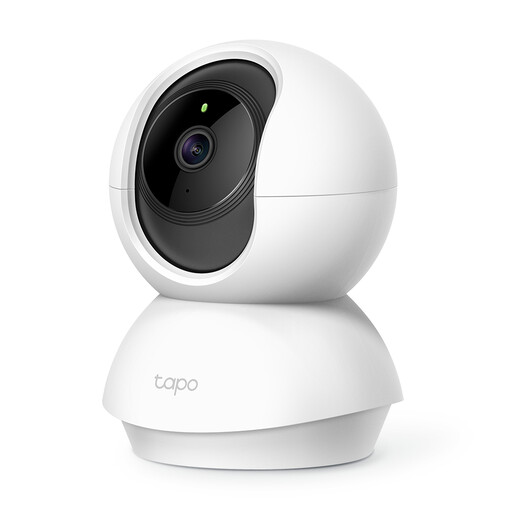
Why It Stands Out The Tapo C200 is a popular choice due to its balance of essential features and affordability. It delivers crisp 1080p video and offers extensive room coverage with its 360° horizontal pan and 114° vertical tilt. A standout feature for parents is its ability to detect a baby crying and send an immediate notification. For storage, it supports a microSD card up to 512GB, making it a great option for those wanting to avoid monthly fees.
Pros
Who is it for? This camera is an excellent starting point for anyone new to home security. It is particularly well-suited for new parents looking for a versatile baby monitor or for general-purpose indoor monitoring without a complex setup.
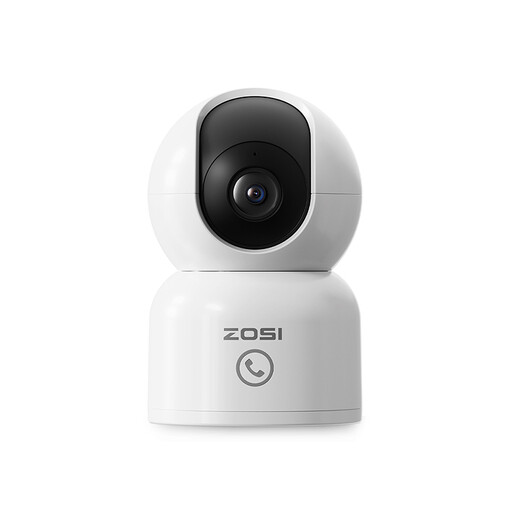
Why It Stands Out The ZOSI camera steps up the video quality with its 2.5K 4MP resolution, capturing finer details than standard 1080p models. Its key feature is the AI-powered auto-tracking, which can automatically follow a person or pet as they move across the room. It also includes a unique "One-Touch Call" button on the camera itself, allowing a child or elderly relative to easily initiate a call to your phone.
Pros
Who is it for? This is an ideal pet camera for owners who want to see what their furry friends are up to. The auto-tracking keeps them in frame and the two-way audio lets you interact. It is also a thoughtful choice for monitoring elderly relatives, thanks to the simple one-touch call feature.

Why It Stands Out The JOOAN camera introduces a feature not commonly seen on indoor cameras: a built-in 2.8-inch screen. This transforms the device from a simple monitoring tool into a two-way video communication hub. You can make video calls to the camera from your app and someone in the room can see you on the screen. It also supports both 2.4GHz and 5GHz WiFi for more flexible network connections and offers colour night vision for more detail in low light.
Pros
Who is it for? This camera is perfect for families who want a more interactive way to stay connected. It is great for checking in with children after school or for having a visual conversation with an elderly parent, offering more connection than a simple audio call.
The models highlighted here are excellent examples of what is available, but the market is always growing. Many users prioritise avoiding monthly fees and manufacturers have responded with a wide range of cameras that rely on local storage.
If you want to compare more models with this feature, you can explore our full range of SD card security cameras to find more options that suit your needs.
Yes, absolutely. Many models are designed to function as a no subscription security camera. They achieve this by including a microSD card slot. Footage is recorded and stored directly on the card, which you can access through the app. This gives you full control over your data without any recurring cloud storage fees.
Traditionally, baby monitors came with a dedicated parent unit for viewing. However, modern indoor security cameras often serve as a more advanced baby monitor. They offer features like high-definition video, crying detection alerts sent to your phone, two-way audio and the ability to check the feed from anywhere via a home camera with app. This makes them a more flexible and often more affordable choice.
Privacy is a valid concern. To protect your privacy, look for cameras that offer a dedicated "Privacy Mode" in their app, which deactivates recording and streaming with a single tap. Some models even have a physical lens cover. Additionally, always secure your account with a strong, unique password and enable two-factor authentication if available. Keeping the camera's firmware updated also ensures you have the latest security patches.