
24/7 Customer Support

Free returns

Same-day & Next-day Delivery

Quality Guaranteed

Unlock Your Welcome Offers: FREE Delivery | Up to 80% OFF | Free 30-day JoyPlus trial
Download the APP
Keeping an eye on your home, pets or loved ones has never been more straightforward, but the sheer number of options can be overwhelming. Whether you're in a rented flat where drilling is forbidden, a homeowner wanting to check on a new puppy or a carer needing a reliable way to monitor an elderly relative, finding the right device is key. This guide is designed to cut through the marketing clutter and help you understand the features that truly matter for your specific needs, making it easier to choose a suitable indoor WiFi security camera.
We'll walk through the essential considerations for UK residents and highlight a few standout models that address common challenges, from monitoring through glass to covering an entire room with a single device.
Choosing a camera isn't just about video quality. Modern devices offer a host of features designed for convenience and peace of mind. Here are a few practical points to consider.
For many UK residents, especially those in flats or rented accommodation, drilling holes for mounting hardware is simply not an option. This has led to a rise in demand for a no-drill flat camera UK residents can use without violating their tenancy agreement. Look for cameras that are either freestanding or come with strong, non-damaging adhesives. A window security camera for renters is another excellent choice, allowing you to monitor the exterior of your property from the inside without any permanent fixtures.
A modern security camera should do more than just record. Smart AI detection camera technology can distinguish between people, pets and irrelevant motion like rustling curtains, significantly reducing the number of false alerts sent to your phone. For monitoring after dark, a colour night vision security camera provides far more detail than traditional black-and-white infrared footage, making it easier to identify people or objects. And if you're looking for a pet camera with two way audio, this feature allows you to hear what's happening and speak through the camera, perfect for comforting an anxious pet or communicating with family members.
A static camera can only see one specific area. If you need to monitor a large, open-plan space, a 360 pan tilt indoor camera is a versatile option. Controlled via your smartphone, it can rotate horizontally and tilt vertically to eliminate blind spots. For the ultimate in home coverage, a mobile security robot takes this a step further. These devices can physically drive around your home on a schedule or under your remote control, allowing you to check multiple rooms with a single, untethered device.
Based on features that solve common user problems, here are a few recommendations that stand out for their practicality and innovative design.
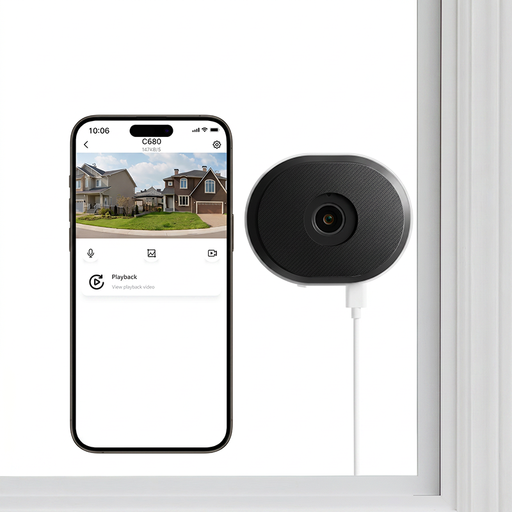
Why It Stands Out The ZOSI C680 directly solves one of the biggest frustrations with indoor cameras: glare when pointing them through a window. Its specialised anti-glare lens technology is designed to cut through reflections from sunlight and indoor lights, delivering clear footage of the outside without the usual whiteout effect. This makes it a uniquely effective solution for monitoring driveways or front gardens from inside.
Pros
Who is it for? This camera is an ideal choice for renters or homeowners in flats and terraced houses who want to monitor the exterior of their property without installing an outdoor camera.
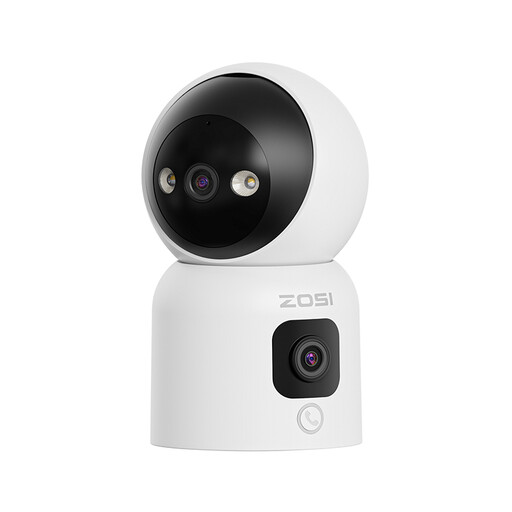
Why It Stands Out This device combines two cameras in one: a 360° pan-tilt lens for active tracking and a second, fixed wide-angle lens for a constant overview. Its most unique feature is the one-touch calling function. A simple press of a button on the camera or an "OK" hand gesture initiates a video call to the app, making it incredibly easy for children or elderly relatives to get in touch.
Pros
Who is it for? Families looking for a multi-purpose device that functions as a high-quality baby monitor, pet camera and an easy way to stay connected with less tech-savvy family members.
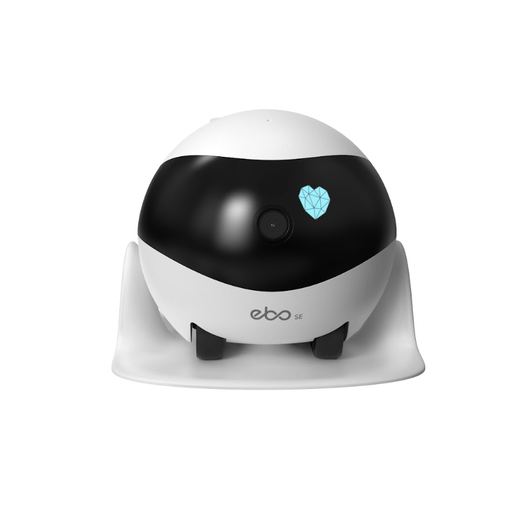
Why It Stands Out The ENABOT SE is not a stationary camera; it's a mobile security robot that can roam your entire home. You can drive it remotely from your phone to check on specific areas or set it to perform automatic patrols. Its low profile allows it to navigate under furniture, ensuring there are no blind spots. This is a truly innovative approach to home monitoring.
Pros
Who is it for? Pet owners who want to do more than just watch their furry friends and homeowners who desire the flexibility to check any room in the house without installing multiple cameras.
The models above represent just a fraction of the innovative solutions available. If your needs are different or you'd like to compare a wider variety of features and price points, there are many other devices to consider.
To explore a broader selection, browse our full collection of WiFi remote control cameras.
Many modern cameras are designed to work without a mandatory subscription. Models like the ones featured here offer local storage via a microSD card, meaning you can record and save footage without any monthly fees. Cloud storage is typically offered as an optional extra for those who want off-site backup of their recordings.
You can, but a standard indoor camera will likely produce poor results, especially at night. The infrared (IR) lights used for night vision reflect off the glass, creating a bright glare that obscures the view. For this purpose, it's important to choose a specialised window security camera for renters, like the ZOSI C680, which uses anti-glare technology to provide a clear image.
Not at all. Most contemporary plug-in cameras are designed for simple, do-it-yourself installation. The process usually involves plugging the camera into a power socket, downloading a companion app on your smartphone and following the on-screen instructions to connect the device to your home WiFi network. The entire setup can often be completed in minutes without any tools.