Occasional letter printer in a small room
You mainly need A4 appointment letters or forms at short notice and want printing, scanning and copying without setting aside much desk space.


For occasional appointment letters, start with an A4 inkjet all-in-one that fits your space and can print, scan and copy. Prioritise Wi-Fi Direct if you cannot rely on the flat’s network; automatic double-sided printing and a larger paper cassette matter more if you also print regular multi-page coursework. Check the exact model’s cartridge conditions, subscription terms and duplex mode before choosing.
You mainly need A4 appointment letters or forms at short notice and want printing, scanning and copying without setting aside much desk space.
You send documents from a phone or tablet and need to consider how you will print if you cannot use the flat’s wireless network.
You need appointment letters too, but print enough multi-page coursework or forms for automatic double-sided printing and paper capacity to affect your routine.
For appointment letters in a student flat, decide which need would most affect your choice, then check that feature on the exact printer model.
| Concern | What to check | Who this matters to |
|---|---|---|
| Cartridges and subscriptions | Check the cartridge family and stated page-yield basis, plus any ink-plan renewal terms. | If I print letters only occasionally, I want to understand what keeping the printer ready involves. Around 33% of consumers put cartridge and subscription commitments first. |
| Space and all-in-one functions | Check A4 print, scan and copy functions, and the space needed with paper loaded. | In a small room, I need one device for letters and forms without giving it a large permanent workspace. Around 27% of consumers prioritise space and all-in-one functions. |
| Printing without flat Wi-Fi | Confirm Wi-Fi Direct on the exact model and a print method compatible with your device. | If I cannot connect a printer to the shared network, sending a letter from my phone still needs to be practical. Around 27% of consumers make network-independent printing their primary concern. |
| Recurring paperwork | Check whether A4 duplexing is automatic and whether the paper cassette suits your workload. | When coursework adds regular multi-page documents, I would rather avoid turning sheets and refilling paper so often. Around 13% of consumers put easier paper handling first. |
A shared or restricted network may prevent the usual Wi-Fi setup from working when you need to print a letter.
Check for a direct-print option on the exact model. Epson lists Wi-Fi Direct for the Expression Home XP-2200, but wireless capability alone does not establish that feature.
Ink replacement and an optional subscription can matter even when you print infrequently. Canon lists 100 plain-paper pages for each standard black and colour cartridge in the PIXMA TS3750i under its stated test conditions; HP says the cited DeskJet 2820e Instant Ink trial becomes chargeable unless cancelled.
Compare the cartridges and their stated yield conditions with your expected printing, and read any plan renewal terms before signing up.
Manual duplexing means turning and reloading sheets yourself, which matters more for recurring multi-page work.
Check the stated duplex mode: Canon lists manual duplexing for the PIXMA TS3750i, while Epson lists automatic A4 duplexing for the Expression Home XP-5200.
Epson identifies faded output and blank pages among print-quality symptoms that may need attention.
For Epson models covered by its guidance, follow the documented Nozzle Check and Head Cleaning steps if print quality deteriorates.
The PIXMA TS3750i illustrates a compact A4 print, scan and copy option: Canon lists its tray-retracted dimensions as approximately 435 × 327 × 145 mm.
The Expression Home XP-2200 and XP-5200 address different needs alongside appointment-letter printing.
HP describes the DeskJet 2820e as a print, copy and scan model intended for up to three users and up to 100 pages per month.
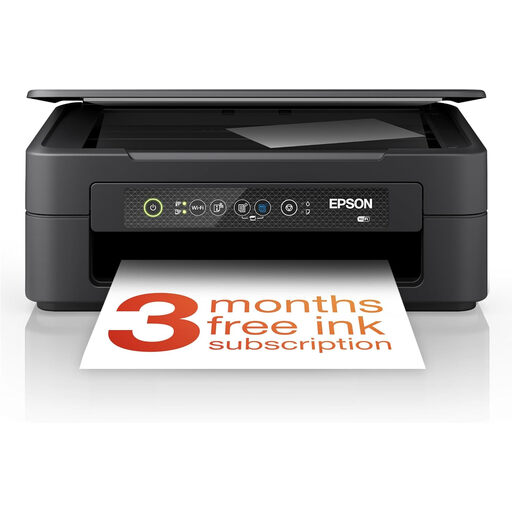
This inkjet all-in-one is relevant if you want to print A4 appointment letters and need a model-specific way to print without relying on the flat’s Wi-Fi. Confirm your device’s print method and the printer’s duplex mode before buying.
 No image available
Suitable for A4 appointment letters when you also want scanning and copying. Epson lists Wi-Fi Direct for the XP-2200, which can print without a wireless network; check that your phone’s intended print method is compatible. Confirm the duplex mode for this configuration before relying on automatic double-sided printing.
Yes, if the exact printer and your device support a suitable direct-print method. Epson lists Wi-Fi Direct for the Expression Home XP-2200, which allows printing without a wireless network; do not assume every wireless printer offers it.
It is less important for occasional single-page letters than for regular multi-page paperwork. Canon lists manual duplexing for the PIXMA TS3750i, whereas Epson lists automatic A4 duplexing for the Expression Home XP-5200; check the mode on the model you choose.
Follow Epson’s maintenance guidance for the affected model rather than repeatedly printing the important letter. For models covered by its guidance, Epson recommends a Nozzle Check followed by Head Cleaning through the printer driver’s Maintenance menu.
Check the terms for the exact printer configuration and any ink plan you choose. HP says the cited DeskJet 2820e’s Instant Ink trial becomes chargeable after three months unless cancelled, while HP+ requires an internet connection and Original HP Ink cartridges.