
24/7 Customer Support

Free returns

Same-day & Next-day Delivery

Quality Guaranteed

Unlock Your Welcome Offers: FREE Delivery | Up to 80% OFF | Free 30-day JoyPlus trial
Download the APP
A packed lunch, laptop and daily essentials can quickly become awkward to carry on a UK commute. A separate cool bag takes up another hand, while an ordinary laptop backpack may not protect food from leaks or temperature changes. An insulated laptop lunch backpack combines both functions, but not every design is equally practical.
Before buying, look beyond USB ports and large capacity claims. The most useful bag is one that matches your laptop size, meal routine and travel habits without becoming uncomfortable or difficult to clean.
Many listings use “waterproof” in prominent marketing text, although the specification may only state water-resistant fabric. Water-resistant Oxford fabric or polyester can help protect belongings from light rain and splashes, but it does not necessarily mean the backpack can withstand prolonged heavy rain or immersion.
Check whether the product has covered zips, sealed seams and a stated waterproof rating. If these details are not provided, treat the bag as suitable for everyday weather rather than guaranteed waterproof protection.
An insulated compartment with aluminium foil lining and foam padding can slow temperature change, but it is not a powered refrigerator. The stated performance depends on the food temperature when packed, the surrounding temperature, how often the compartment is opened and whether you use a freezer pack.
For the featured backpacks, the stated insulation period is approximately 2–4 hours, with capacity for up to 9 or 10 330ml cans depending on the model. This is more suitable for a commute, work shift, lecture day or short trip than for indefinite storage of temperature-sensitive food.
A USB charging backpack normally provides a cable and external port only. It still requires your own compatible power bank, which must be placed securely inside the bag. It should not be confused with a battery-powered backpack.
Check the cable route, power-bank pocket and whether the connector is accessible without opening the main compartment. Do not pinch the cable in a zip or overfill the bag around it.
Start with your laptop’s actual measurements rather than relying only on screen size. A 15.6-inch laptop backpack may accommodate many standard office laptops, but thickness and edge dimensions vary between models. Larger devices may need a 17-inch laptop backpack, with some designs supporting laptops up to 17.3 inches.
Look for:
If you carry a tablet, charger, notebook and headphones as well, allow room for these accessories without pressing against the laptop.
A practical laptop backpack with lunch compartment should keep food physically separate from electronics. Look for a wipe-clean lining, thick insulation and a compartment that closes securely.
A leak-proof insulated lunch bag or backpack compartment can reduce the risk of spills, but “leak-proof” should not be interpreted as permission to carry unsealed liquids. Use closed containers and bottles, keep the compartment upright where possible and wipe up spills promptly.
A collapsible compartment is useful for people who do not carry lunch every day. It can expand for packed meals, drinks or a grocery run, then fold down to create more room for work or college equipment.
A larger cooler backpack with laptop compartment can hold more, but it may become uncomfortable when filled with food, a laptop and chargers. Compare the empty weight and external measurements with your commute, locker or luggage allowance.
Useful features include:
For business travel, a travel backpack with cooler compartment should also fit comfortably beneath a seat or in the storage space you regularly use. Avoid overstuffing, as this can strain zips and seams.
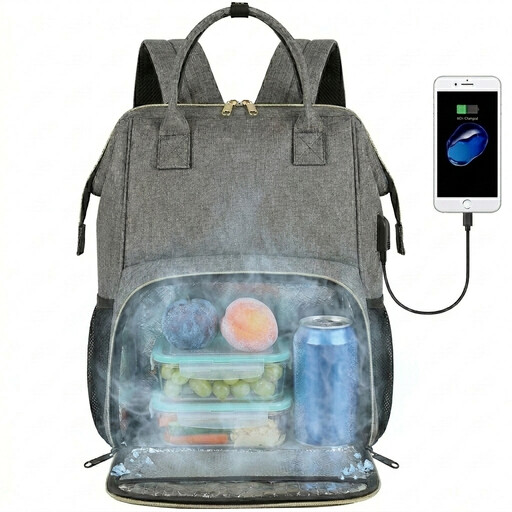
Why This Fits Their Persona: A straightforward choice for commuters, college students and office workers who need one compact bag for a 15.6-inch laptop, packed lunch and everyday items.
The insulated section has a cleanable aluminium foil lining and separate food storage, helping keep lunch away from the laptop compartment.
Water-resistant Oxford fabric, a 771g listed weight, USB port and insulated capacity of up to 9 330ml cans.
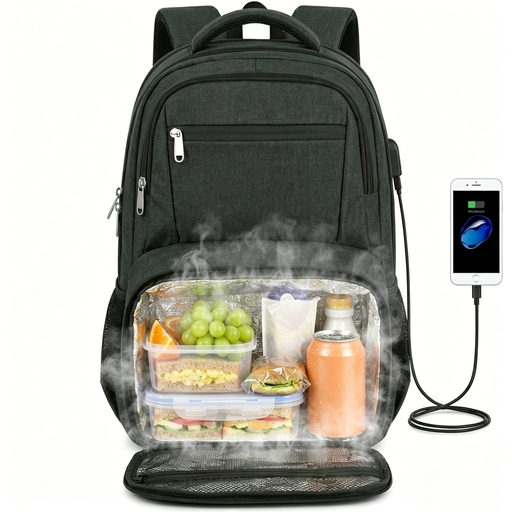
Why This Fits Their Persona: Suitable for business commuters and travellers carrying a larger laptop, lunch, documents and accessories between offices, campuses and transport hubs.
The collapsible insulated compartment can be reduced when not needed, avoiding a permanently bulky lunch area during lighter workdays.
Fits laptops up to 17.3 inches, includes a luggage strap, 180-degree opening, anti-theft back pocket and space for up to 10 330ml cans.
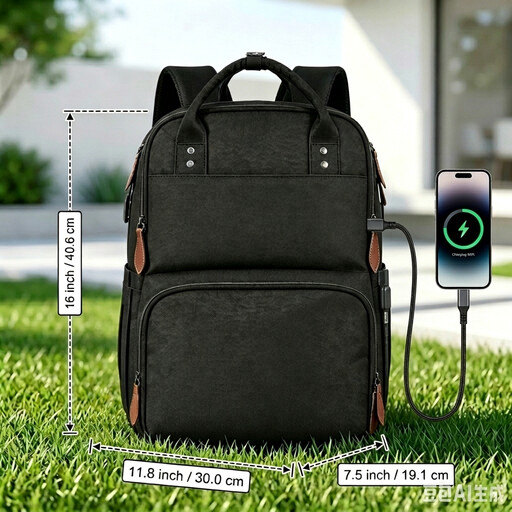
Why This Fits Their Persona: A flexible option for people combining work, university, outdoor activities or short trips with regular meal and drink storage.
Its convertible lunch area can fold down when empty, while the wipe-clean liner and separate laptop section address cleaning and spill concerns.
Water-resistant fabric, USB port, luggage strap, shoulder-strap card pocket, anti-theft back pocket and insulation for up to 10 cans.
To extend the useful life of a lunch backpack:
We have compiled a complete, real-time list of products that fully satisfy these strict selection criteria and UK safety regulations.
It depends on the food and conditions. The products listed state approximately 2–4 hours of insulation, so they are generally suited to a morning commute, lunchtime storage or a shorter outing. For longer periods, use suitable chilled food practices and an appropriate ice pack. An insulated backpack should not be treated as a refrigerator.
No. The USB port and internal cable require a separate power bank. Check that your power bank fits securely in an internal pocket and follow the product’s cable-safety instructions. Charging performance will depend on the power bank and connected device.
Measure your laptop, including its thickness, then compare those measurements with the listed sleeve dimensions. Choose a 15.6-inch laptop backpack for standard-sized work or study devices where the fit is confirmed. A 17-inch laptop backpack is more appropriate for larger laptops, but its bigger external dimensions and heavier loaded weight should be considered for daily commuting.