What matters when choosing
For interactive fiction in a bright room, assess game input, screen readability and physical controls separately: changing the controller will not remove display reflections.
| Concern |
What to check |
Who this matters to |
| Device and game support |
Match the controller to your device, then check the individual game’s controller support and menu controls. |
I want to use the same controller for my intended device without losing access to the game’s choices; around 46% of consumers would put confirmed device and game support first. |
| Bright-room readability |
Check for reflections on the screen and whether changing its position or the room lighting helps. |
When light falls across the text, I need to read the options clearly before changing how I select them; roughly 36% of consumers would prioritise screen readability. |
| Adaptable controls |
Check whether you can reach and remap the commands you use, and whether alternative inputs are compatible. |
If a fixed layout makes repeated choices difficult, I need controls I can position or operate differently; about 18% of consumers would make adaptable controls their primary concern. |
Joybuy controllers for these setups
These controllers cover Xbox and PC layouts, plus phone-focused choices. Choose by your device and the controls you can use comfortably, then confirm that your interactive-fiction game accepts controller input; screen glare needs a separate fix.
 No image available
Xbox Wireless Controller – Carbon Black
Consider this conventional controller for Xbox, Windows PC, Android or iOS play, provided your game supports its input. Check that its directional controls and button layout suit repeated menu choices.
View on Joybuy
 No image available
Microsoft Xbox Elite Wireless Controller Series 2 – Xbox One S, Xbox Series X|S and PC
Consider this Xbox or PC option if you want to adjust where frequently used commands sit. Confirm the controls you need for the exact Series 2 variant and check the game’s menu input before relying on it.
View on Joybuy
 No image available
Turtle Beach PDP Victrix Pro BFG Wireless Controller – Xbox Series X|S, Xbox One and Windows 10/11 PC, Black
For Xbox or Windows PC play, this is worth considering if repositioning frequently used controls matters to you. Check that the available layout suits your hands and that your game accepts controller input.
View on Joybuy
 No image available
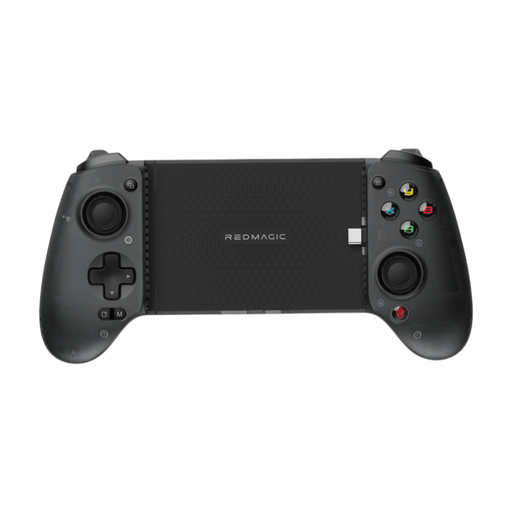
REDMAGIC Shadow Blade Gamepad 2.0 – USB-C iPhone and Android
For phone-based play, check that your exact iPhone or Android device has a compatible USB-C connection and that the game supports controller input. Its phone-held layout does not address reflections on the screen.
View on Joybuy
 No image available
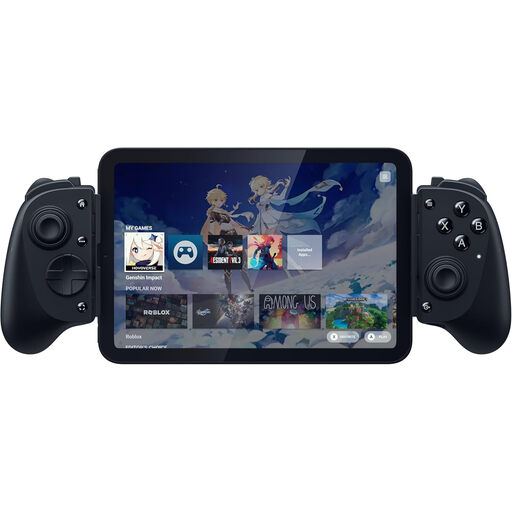
Razer Kishi V3 Pro full-size mobile controller (8-inch)
For mobile play, check your exact phone or tablet model against the controller’s fit and connection requirements, as well as the game’s input support. A cable for direct wired PC play is sold separately.
View on Joybuy
Common questions
Will a new controller make interactive fiction easier to see in a bright room?
No—a controller changes how you navigate choices, not how the screen displays text. If reflections are the problem, adjust the screen’s position or angle and control the light falling on it before changing controllers.
Does every PC interactive-fiction game work with a controller?
No. Steam Support says gamepad-only input styles work only with games that support gamepads. Check the individual title and its menu controls before depending on a controller as your sole input method.
Which conventional controller should I check for my device?
Start with device compatibility, then check the game: Microsoft Xbox lists the Xbox Wireless Controller for Xbox, Windows PC, Android and iOS; PlayStation lists DualSense for PS5, PC, Mac and mobile devices; and 8BitDo specifies Windows and Android for the Ultimate 2C Wireless Controller. Device compatibility alone does not confirm support in your chosen game.
When is an adaptive controller worth considering?
Consider an adaptive setup when a standard grip, button position or fixed layout makes the game difficult to operate. Xbox’s Adaptive Controller and PlayStation’s PS5 Access controller offer different configurable inputs; work out which commands, accessories and platform compatibility your setup requires.
What should I do with an old controller?
Use an appropriate electronics-recycling route rather than treating it as ordinary household waste. UK government guidance on waste electrical and electronic equipment addresses recovery, reuse and recycling of electrical products and components.


