PC players who want to play away from the desk
If you want to navigate story choices with a controller on Windows or Steam, check the individual game first. Valve notes that gamepad-only input styles work only with games that support gamepads.


Check the specific interactive-fiction game and launcher before choosing a controller: a gamepad configuration cannot make gamepad-only commands work in a game without gamepad support. Then match the controller to your device and the controls you need to use; an Xbox-layout pad, a PS5 controller and an adaptive setup solve different parts of that decision.
If you want to navigate story choices with a controller on Windows or Steam, check the individual game first. Valve notes that gamepad-only input styles work only with games that support gamepads.
If you play on a console, computer and mobile device, compare the controller’s stated platforms and connection methods with each device you intend to use. Microsoft Xbox, PlayStation and 8BitDo specify different combinations for their controllers.
If a conventional two-handed pad is uncomfortable or inaccessible, look at remapping and the physical position of the controls. Microsoft Xbox and PlayStation also describe adaptive controllers that can be configured around different inputs.
For interactive fiction, establish how the game accepts input before comparing controllers. Device compatibility and the physical layout matter only if you can use them for the actions the game requires.
| Concern | What to check | Who this matters to |
|---|---|---|
| Gamepad support | Check the exact game and launcher for controller input. Valve says gamepad-only configurations work only with gamepad-supported games. | I want to make story choices without reaching for a keyboard, so the game must accept the inputs I plan to use. Around 40% of consumers put gamepad support first. |
| Device and connection | Match the controller’s stated platforms and connection method to your device; check configuration requirements separately from play. | Moving between my devices is useful only if the controller connects to the ones I actually play on. For around 30% of consumers, that match is the primary concern. |
| Button layout | Check whether remapping works on your platform and whether the resulting layout works in the game. | I use the same choice and menu actions repeatedly and want them on convenient buttons. Around 20% of consumers prioritise changing the layout. |
| Accessible controls | Identify the inputs and physical arrangement you need, including any separate switches, mounts or other accessories. | Holding a standard pad or reaching its buttons may not work for me, so the physical setup comes before familiar controls. This is the main concern for around 10% of consumers. |
A controller configuration cannot supply gamepad-only commands to a game that does not support them, as Valve explains.
Check the exact title and launcher, then test the intended inputs before relying on a controller instead of a keyboard and mouse.
Being able to connect over Bluetooth does not mean every configuration feature works over Bluetooth. Microsoft Xbox says most Xbox Accessories app features are not supported through that connection.
Check how you will both play and configure the controller; confirm whether you need USB or an Xbox Wireless Adapter for your setup.
The Xbox Adaptive Controller connects external inputs rather than replacing every player’s handheld controller with one fixed layout.
List the actions you need and the controls you can comfortably operate, then check the full setup against your platform.
Microsoft Xbox says compatible assistive devices are sold separately, so the required switches, buttons, mounts or joysticks may need to be obtained separately.
Controllers and batteries are electrical waste that needs appropriate disposal; GOV.UK advises against putting them in household rubbish.
Follow local guidance for electrical-waste and battery collection when the controller is no longer wanted.
Consider the Xbox Wireless Controller for an Xbox, Windows or supported mobile setup; the Xbox Adaptive Controller addresses a different need for configurable external inputs on Xbox and Windows.
DualSense is a route for PS5-centred play and is also listed by PlayStation for PC, Mac and mobile devices. The Access controller is a separate adaptive option for PS5.
The Ultimate 2C Wireless Controller is an option to examine for Windows or Android play when custom button mapping matters.
These options cover conventional gamepads and phone-mounted controllers for the devices indicated by their listings. Choose for your device and preferred layout only after checking whether your interactive-fiction game accepts controller input.
 Image unavailable
Consider this model if you want a wireless gamepad for the Xbox Series X|S, Xbox One or Windows 10/11 devices named in its title. Check the intended connection and the game’s input support before buying.
 Image unavailable
Consider the standard Xbox controller if you play on Xbox or Windows and may also use Android or iOS. Microsoft Xbox lists those platforms for the controller; check feature and connection compatibility on your exact device, as well as gamepad support in your game.
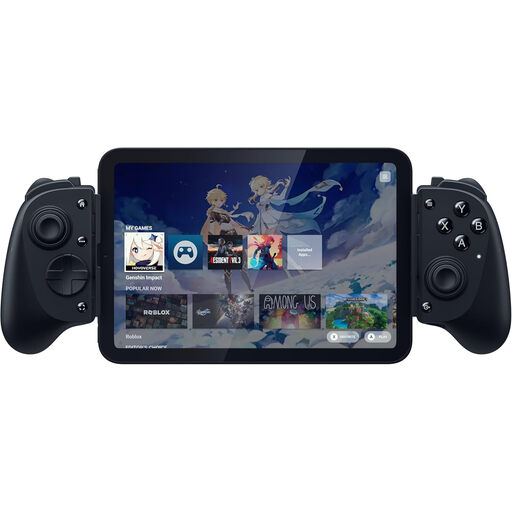 Image unavailable
A phone-mounted controller is worth considering if you mainly play interactive fiction on a mobile device. Check the fit of your exact device and whether your game accepts controller input; if you also plan to use this model with a PC, confirm the required connection and accessories.
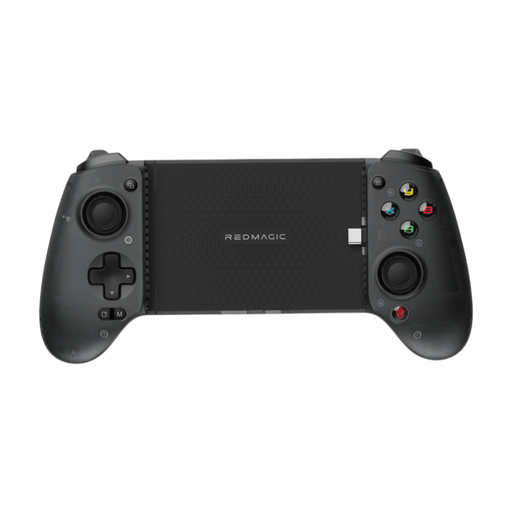 Image unavailable
This Type-C mobile gamepad is an option for phone-based play. Confirm that your exact phone fits and connects, and that the interactive-fiction game supports controller input.
 Image unavailable
Consider this wireless Xbox-style controller if you want a configurable layout. Confirm compatibility with your exact Xbox or PC setup before buying, then check whether your game accepts the intended inputs.
No: gamepad-only input requires a game that supports gamepads, as Valve explains. Check the exact title and launcher, especially if you intend to stop using keyboard or mouse input.
Do not assume every configuration feature will work over Bluetooth. Microsoft Xbox says most Xbox Accessories app features are not supported through that connection; check whether USB or an Xbox Wireless Adapter is needed for the changes you want to make.
Not necessarily. Microsoft Xbox describes its Adaptive Controller as a hub for external devices and says assistive devices are sold separately. Plan the switches, buttons or other controls around the actions you need to perform.
No. GOV.UK explains that these markings relate to a manufacturer’s view that a product meets relevant requirements for placing it on the Great Britain market; they do not establish game compatibility. Check the game’s input support and your device separately.