Small-desk keyboard-command players
If you repeatedly use a few keyboard commands, a mini controller may keep the desk clearer. Check that its keyboard-mapping mode works on your device and has enough inputs for the commands your game needs.


Choose a compact keyboard-mapping controller if your game’s essential commands fit its available buttons and its operating mode supports your device. For a game that explicitly supports controller input, a conventional PC-compatible gamepad is another route, but it takes more space. Check the individual title’s controls before buying: connecting a controller does not make every interactive-fiction game playable with one.
If you repeatedly use a few keyboard commands, a mini controller may keep the desk clearer. Check that its keyboard-mapping mode works on your device and has enough inputs for the commands your game needs.
A conventional Windows-compatible gamepad makes sense when the particular game lists controller support. Do not rely on it to replace text entry or pointer controls that the game still requires.
A DualSense may suit a setup that includes PS5 and compatible PC games. Check the chosen game’s input support and any connection requirements for features you intend to use.
Start with the game’s required inputs, then decide how much desk space and connection flexibility you need.
Choose it when: a small set of mapped keys covers the game’s essential commands and the controller’s operating mode supports your device.
Allow for: fewer closely spaced controls and no assumption of native gamepad support. 8BitDo lists Windows compatibility for the Micro in Keyboard mode only.
Choose it when: the individual PC game supports controller input and you want a full-size layout, potentially for other supported games too.
Allow for: more storage space than a mini controller; a standard gamepad will not resolve keyboard-only or pointer-dependent controls.
| Concern | What to check | Who this matters to |
|---|---|---|
| Game inputs and mapping | Check the title’s controller support and whether its essential keyboard, text or pointer commands can be accommodated. | If my story game needs commands beyond a few buttons, I need to know that before replacing the keyboard. Roughly 36% of consumers put workable game inputs first. |
| Desk and storage space | Compare dimensions and weight, alongside the smaller controller’s button layout and supported mode. | When the keyboard already fills my desk, I want a controller I can put aside easily, even if its controls are tighter. Keeping the footprint small comes first for roughly 29% of consumers. |
| PC connection | Confirm which wired, Bluetooth or 2.4 GHz modes the exact model supports on your operating system and whether a required accessory is included. | I would rather choose a connection that fits my PC setup than deal with another pairing step. Around 21% of consumers prioritise a suitable connection route. |
| Full-size, multi-device use | Check compatibility with each device and whether desired features depend on the game or connection method. | If I also play controller-supported games on another device, I may accept a larger pad for a familiar layout. For about 14% of consumers, that flexibility is the primary need. |
A controller can connect to your device while the game still requires keyboard, mouse or text input.
Check the exact title’s supported inputs and identify the commands you use most before choosing a controller.
8BitDo lists Windows compatibility for the Micro in Keyboard mode only, not as a conventional Windows gamepad mode.
Confirm the model’s operating-system and mode support, then check that mapped keys cover your game’s commands.
PlayStation says DualSense adaptive triggers need game support, while haptic feedback on PC requires USB. Neither feature establishes that a text-led game accepts controller input.
Prioritise the game’s controls, usable mappings and controller size before deciding whether those features matter to you.
The Xbox Wireless Controller is a conventional option to consider for controller-supported Windows PC games and an Xbox setup.
DualSense is relevant if you use a PS5 and also want to connect a controller to compatible PC, Mac or mobile games.
Compare the Micro for compact keyboard mapping with the Ultimate 2C Wireless Controller for a conventional Windows setup.
These conventional controllers are choices to consider for PC games that support controller input, including models for Xbox or PS5 crossover setups. If your game instead depends on mapped keyboard commands, check that need separately before choosing a full-size pad.
 No image available
Consider this wireless controller for a Windows PC or Xbox setup if your game supports controller input. Check its physical fit before choosing it for a small desk.
 No image available
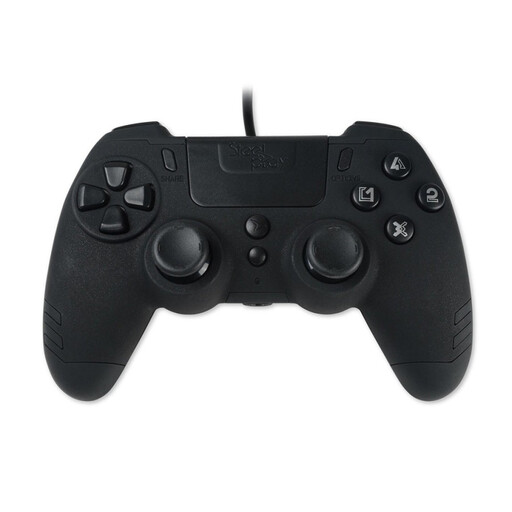
This wired controller may suit a PC desk setup where you prefer a cable to wireless pairing. Check its dimensions if storage space is tight, as well as the game’s controller support.
 No image available
Consider this conventional gamepad for a Windows title that explicitly supports controller input. Microsoft lists Bluetooth and button mapping for the Xbox Wireless Controller; check whether its full-size layout fits your desk.
 No image available
This variant is worth considering if you use a PS5 and play compatible PC games. PlayStation lists USB-C and Bluetooth connections for DualSense; check the individual game’s controller support and leave room for a conventional-size pad.
 No image available
Consider this controller if connection choice matters in your PC setup. Confirm which mode works with your device, whether the controller fits your desk and whether your game accepts controller input.
No: check the individual game’s listed inputs before buying. Valve’s Controller-Friendly browsing filters can help you find games by controller type, but they do not establish support for every interactive-fiction title.
It can cover essential commands only if those commands fit its available mapped inputs. For the 8BitDo Micro, 8BitDo lists Windows compatibility in Keyboard mode only; also consider whether your game still needs text entry or pointer control.
Choose a connection mode supported by both your exact controller and your device, then account for a cable or receiver on the desk. PlayStation lists USB-C and Bluetooth for DualSense on supported devices; 8BitDo lists wired and 2.4 GHz Windows use for the Ultimate 2C Wireless Controller, with Bluetooth listed for Android.
No. PlayStation says adaptive triggers need game support and haptic feedback on PC requires a USB connection. Check the title’s controller support before treating either feature as relevant to interactive fiction.