Check the individual game before buying a controller: support on your PC, console or phone does not mean its menus, choices and text entry will work well with one. If you want to avoid charging the controller from a scarce socket, an AA-powered Xbox Wireless Controller is worth considering; a DualSense suits PS5-led play if you can charge it between sessions. Where computer USB ports are scarce too, check the exact Bluetooth connection rather than assuming every wireless mode leaves a port free.
Who these choices suit
PC players with scarce charging access
If you play interactive fiction on Windows and do not want to reserve a wall socket for controller charging, the Xbox Wireless Controller offers Bluetooth and AA battery options. Microsoft notes that rechargeable AA cells must be charged outside the controller.
PS5 and multi-device story-game players
If PS5 is your main device but you also play on a listed PC, Mac or mobile device, DualSense can connect by Bluetooth or USB, according to PlayStation Support. Check the particular game and device: some controller functions depend on both.
Windows players short of USB ports
If a keyboard and other accessories already occupy your computer ports, distinguish Bluetooth from receiver-based wireless. For the 8BitDo Ultimate 2C Wireless, 8BitDo specifies a USB-A 2.4 GHz adapter or wired USB for Windows, and Bluetooth for Android.
What to check before buying
Start with the game: if its controls need a keyboard or substantial text entry, playing without a new controller may be simpler. If controller input is workable, choose a power arrangement and then check whether its connection uses a computer USB port.
| Concern |
Buying check |
Who this matters to |
| Game controls |
Check the exact title for controller support, workable menu navigation and any text entry that still needs a keyboard. |
If I mainly play choice-based games, I need to know that a controller can actually navigate this title before choosing one. Around 42% of consumers put game controls first. |
| Charging access |
Check whether the controller uses AA cells, a separate rechargeable pack or a built-in battery, and how you would charge it. |
With a wall socket already spoken for, I would rather manage replaceable or separately charged batteries than depend on charging the controller itself. Roughly 33% of consumers prioritise charging access. |
| Free USB ports |
Confirm the connection mode for your exact device; count the port needed by a cable or 2.4 GHz receiver. |
If my computer ports are occupied, I need a connection that leaves one free, provided my device supports it. About 25% of consumers make USB-port availability their main concern. |
Buying pitfalls
-
Assuming every interactive-fiction game accepts a controller
A controller that connects to your device may still be awkward or unusable for a particular game, especially when choices or text input rely on a keyboard. Steam lists controller support by game, while gamepad navigation in a Twine work depends on its implementation.
Check the title’s store listing, controls, documentation or developer guidance. Keep a keyboard or mouse available if the game requires text entry.
-
Confusing a shortage of sockets with a shortage of USB ports
A 2.4 GHz receiver or wired connection can occupy a computer port throughout play without occupying a wall socket.
Count free USB-A and USB-C ports separately from wall sockets, then confirm which connection the controller supports on your device. In particular, 8BitDo specifies the Ultimate 2C Wireless controller’s Bluetooth mode for Android, not Windows.
-
Choosing a battery type without a charging plan
A built-in battery eventually needs charging. An AA-powered Xbox Wireless Controller avoids charging the controller itself only while you have replacement cells or separately charged rechargeable AAs ready.
Decide where charging will happen between sessions and check which cables or battery accessories come with the controller you choose.
Using rechargeable AAs requires an external AA charger; choosing a USB-charged controller may also mean arranging a suitable cable and power source.
Relevant brands to consider
Xbox
The Xbox Wireless Controller is relevant to players considering Xbox consoles, Windows PC, Android or iOS, particularly when AA power and Bluetooth are useful.
- Microsoft specifies Xbox Wireless and Bluetooth connectivity, button mapping and AA or rechargeable-pack power options for the Xbox Wireless Controller.
- Rechargeable AA cells need an external charger; device compatibility does not establish support in an individual game.
PlayStation
DualSense is a route for PS5-led play with possible use on the compatible PCs, Macs and mobile devices listed by PlayStation Support.
- PlayStation Support lists Bluetooth and USB connection options on supported devices.
- The controller needs charging, and functions vary by game, device and connection; PC haptic feedback requires USB.
8BitDo
The Ultimate 2C Wireless is a Windows or Android option when its specified connection modes suit the ports and devices you have.
- 8BitDo specifies button mapping, Windows use through 2.4 GHz or wired USB, and Android use through Bluetooth.
- Its Windows wireless route uses a USB-A adapter, and the rechargeable controller still needs charging.
Joybuy controller options
These controllers offer AA-powered, rechargeable Bluetooth and USB-based choices for the device and power constraints discussed above. Check your game’s controls and each controller’s connection with your intended device before choosing.
 No image available
Xbox Wireless Controller – Robot White
Consider this model when you want to play a controller-supported game without charging the controller from a wall socket between sessions. Microsoft specifies AA battery and Bluetooth options for the Xbox Wireless Controller; rechargeable AA cells need charging separately.
View on Joybuy
 No image available
Microsoft Xbox One S Elite Wireless Controller Series 2
Consider this Xbox and PC controller if you can make time to charge it between sessions. Its built-in battery needs a USB charging opportunity; check that your game’s controls make use of a controller before choosing its additional controls.
View on Joybuy
 No image available
Machenike G3 V2 Tri-mode Controller – White
This tri-mode controller is worth checking if you want a choice of connections for PC or mobile play. Confirm which mode works with your exact device: using a 2.4 GHz receiver or wired USB-C connection takes a USB port, and the rechargeable battery needs charging.
View on Joybuy
 No image available
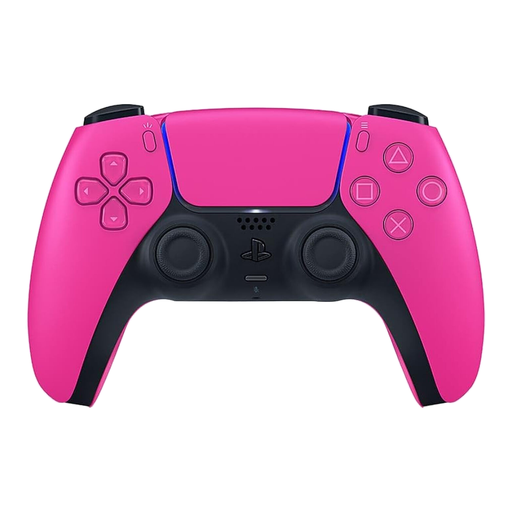
Sony PlayStation DualSense Wireless Controller V3 – Nova Pink
Consider this DualSense variant for PS5-led play, or for a supported game on a compatible PC, Mac or mobile device. PlayStation Support lists Bluetooth and USB connection options for DualSense; its built-in battery needs a charging opportunity.
View on Joybuy
 No image available
Turtle Beach PDP Victrix Pro BFG Wireless Controller – Black
Consider this Xbox and Windows controller if its connection suits the ports available on your device. For Windows, a 2.4 GHz receiver or wired connection uses a USB port; check the intended connection and allow for charging its rechargeable battery.
View on Joybuy
Questions about controller use
Will any controller work with an interactive-fiction game?
No: check the individual title’s controller support and whether its choices and text entry are usable without a keyboard. Steam provides controller-support filters, but the game’s own controls remain the deciding check; gamepad navigation in a Twine work depends on how that work was built.
What if I have only one usable wall socket?
An Xbox Wireless Controller using AA batteries can avoid charging the controller from that socket, provided you keep replacement cells or separately charged rechargeable AAs ready. Microsoft also lists a rechargeable-pack option; a built-in-battery controller such as DualSense needs a charging opportunity between sessions.
Does a wireless controller always leave my USB ports free?
No: Bluetooth can avoid a dedicated receiver if both the controller and your device support that connection, while 2.4 GHz wireless can require a USB receiver. For example, 8BitDo specifies a USB-A adapter for Ultimate 2C Wireless use on Windows and Bluetooth for Android.
Where should I take spent controller batteries?
Use an appropriate battery collection or take-back point. UK government waste-battery guidance describes collection and recycling requirements; check your local collection arrangements for a suitable place to hand over spent cells.


