
24/7 Customer Support

Free returns

Same-day & Next-day Delivery

Quality Guaranteed

Unlock Your Welcome Offers: FREE Delivery | Up to 80% OFF | Free 30-day JoyPlus trial
Download the APP
Interactive robot toys can offer far more than flashing lights and button-operated movement. Some respond to touch and sound, some introduce children to mechanical engineering, while advanced humanoid robots and robot dogs are designed for supervised technology demonstrations, education or commercial applications.
The difficulty is separating useful functionality from impressive-sounding marketing. Before choosing robot toys for kids, check how the product is controlled, what the battery system requires and whether the intended age and environment match your household.
The label AI robot can describe very different experiences. A toy may simply play recorded phrases, respond to remote-control commands or repeat a child’s voice. More advanced products may include voice recognition, cameras, mapping or app connectivity, but these features do not necessarily mean open-ended conversation or reliable independent decision-making.
Look for a clear description of the actual interaction method:
A programmable robot toy with clearly listed commands may provide more predictable play than a product described vaguely as “intelligent”.
A rechargeable battery can reduce the need to buy disposable cells, but you still need to check charging equipment, play duration and the batteries required by the remote control. Some products include the main battery but exclude the charging cable or require separate AA batteries.
For example, the Emotobot in Pink includes a rechargeable battery, but its USB-C charging cable is not included. The Clementoni Robo Sports Climber requires two AA batteries, which are also sold separately. These details can affect whether a gift is ready to use on opening day.
A compact remote control robot toy may work well in a living room, while a quadruped robot or humanoid robot can require a clear operating area. Moving joints, wheels and articulated limbs may create pinch, collision or trip hazards.
Advanced models should not be treated as ordinary children’s toys. The Unitree G1 and Go2 products are listed as unsuitable for under-14s, while the AGIBOT X2 safety information states that the device is not a toy and requires adult supervision.
Always follow the manufacturer’s stated age range rather than judging suitability from the product’s appearance. Small parts create a choking risk, while lithium batteries require careful handling. Keep new and used batteries away from young children, and dispose of used batteries promptly.
For toys sold in the UK, check the packaging and listing for relevant conformity marking, manufacturer information and UK or EU responsible-person details where applicable. A safety label does not remove the need for supervision, particularly when a toy contains detachable accessories or moving parts.
Different control systems suit different users:
A STEM robot kit may require assembly before it can move, but the building process can provide more meaningful mechanical learning than a ready-to-use toy.
Measure the intended play area before ordering. A small robot measuring around 20–30cm may be easier to use indoors. Larger machines can weigh several kilograms and require a clear, dry, stable surface.
For example, the Unitree Go2 Pro is listed at approximately 70cm × 31cm × 40cm and around 15kg including its battery. Its safety guidance recommends an open, clutter-free area and warns users not to touch the robot while it is moving. This is a very different purchase from a children’s robot designed for tabletop play.
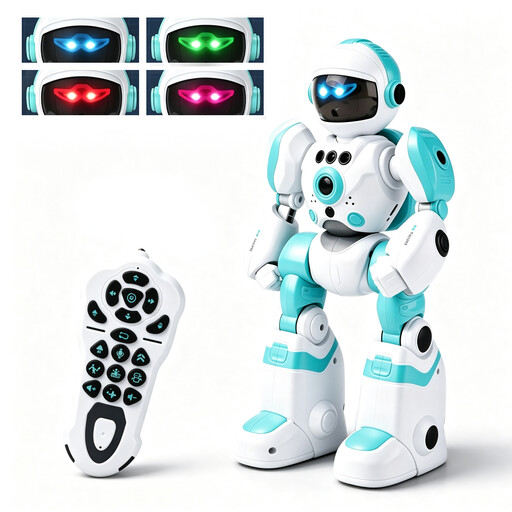
Why This Fits Their Persona: A practical entry point for children aged 3 and over who want lights, movement and simple programming without assembling a kit.
The listing identifies both remote and gesture control, action programming, battery requirements and the small-parts warning.
Four-colour LED eyes, recording and playback, music, dancing and a rechargeable 3.7V 200mAh battery.
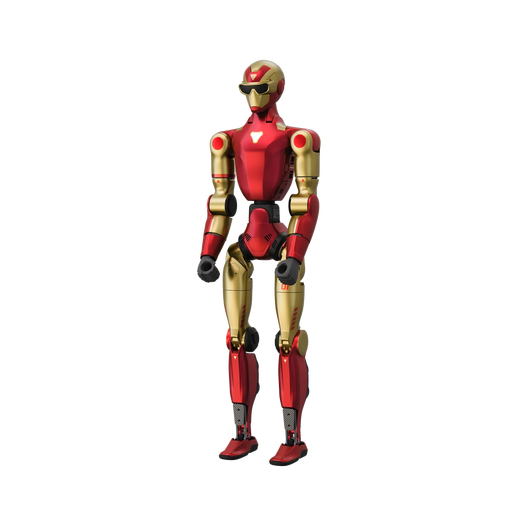
Why This Fits Their Persona: Suited to adult technology enthusiasts, educators and demonstration spaces seeking a humanoid platform rather than a children’s toy.
Its listing clearly identifies a monocular camera, 20 degrees of freedom and moving-part, battery and supervision warnings.
AI voice-model interaction and 20 articulated degrees of freedom, with a stated eight-month warranty period.
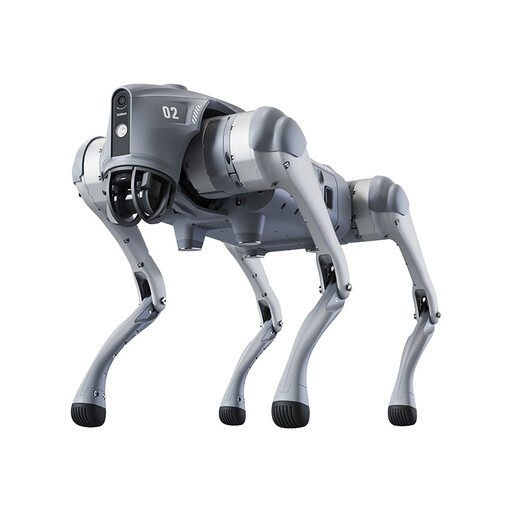
Why This Fits Their Persona: Designed for supervised demonstrations, technical exploration, content creation and potential inspection or patrol applications.
The specification sets out size, weight, operating speed, battery capacity, obstacle sensing and the under-14 safety restriction.
Listed features include 3D LiDAR, app control, graphical programming, voice interaction, remote control and up to 90 minutes of stated battery life.
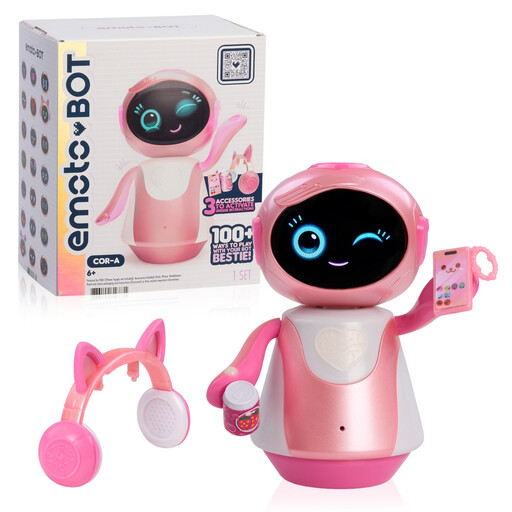
Why This Fits Their Persona: A social interactive robot pet-style companion for children aged 6 and over who enjoy conversation, music and imaginative play.
The product details explain its touch and sound sensors, languages, age guidance, rechargeable battery and small-parts warning.
A 2-inch animated LED screen, over 100 listed activities, four languages and optional pretend-play accessories.
We have compiled a complete, real-time list of products that fully meet these strict selection criteria and UK safety regulations.
Some are, but age guidance varies significantly. The Smart RC Robot Toy is listed for ages 3 and over, while Emotobot in Pink is for ages 6 and over. STEM kits such as the Robo Sports Climber are aimed at ages 8–14. Advanced humanoid and quadruped robots are not toys and are listed for users aged 14 and over, with adult supervision required.
Battery duration depends on movement, lights, sound and control features. Check the manufacturer’s stated capacity and operating time rather than assuming all rechargeable models perform similarly. Also confirm whether the charging cable and remote-control batteries are included.
Many STEM kits involve small parts, wiring, gears or battery compartments. Children should follow the illustrated manual and use the kit under direct adult supervision where the product warning recommends it. An adult can also help ensure that the finished robot is used only on a suitable surface and away from water, stairs and fragile objects.