For a rented or shared home, identify whether the problem is an inactive or inadequate broadband service, weak Wi-Fi in particular rooms, or a temporary wait for activation before choosing equipment. Ofcom distinguishes broadband service from in-home Wi-Fi: keep a working provider router if it meets your needs, consider mesh for room coverage, Ethernet for reachable fixed devices, or mobile hardware for a service gap only when the indoor signal, SIM and device arrangement suit the property.
Who this guide is for
Movers waiting for a connection
You need internet around move-in day but do not yet know when fixed service will be active. Check availability and activation first; a Wi-Fi upgrade cannot supply an internet connection on its own. Ofcom advises checking local broadband and mobile coverage when moving.
Housemates with weak Wi-Fi in some rooms
Your shared connection works, but bedrooms or other regularly used rooms have weak Wi-Fi. Check the gateway location and the rooms where you need coverage before deciding whether mesh placement could help.
Residents connecting fixed devices
You need a connection for a desk, console or another stationary device, or want to use your own router with existing equipment. Check the provider arrangement, available router ports and whether a removable cable can reach the device.
What to check before buying
A replacement Wi-Fi router
Consider it when: fixed service is working and you have confirmed a router-specific need and the provider’s connection requirements.
Trade-off: a new router will not improve an inadequate incoming broadband service, and provider support arrangements vary.
Mesh Wi-Fi
Consider it when: broadband works near the gateway but Wi-Fi is weak in rooms where you need it.
Trade-off: extra units need suitable placement and mesh does not upgrade the incoming service.
A mobile router or hotspot
Consider it when: fixed service is not active or suitable, and the chosen mobile network has usable reception indoors at the address.
Trade-off: check the SIM, mobile service, device version and power needs; coverage predictions do not guarantee reception in a particular room.
Ethernet cable or switch
Consider it when: a removable cable can reach a fixed device from a working router; add a switch if you need more wired ports.
Trade-off: plan a practical cable route that does not require prohibited alterations or create a trip hazard.
A travel router for sharing a connection
Consider it when: you have an authorised Ethernet, Wi-Fi or tethered connection to share during a short gap.
Trade-off: a travel router such as the GL.iNet GL-MT3000 needs an upstream connection; it is not a standalone SIM hotspot.
Ofcom advises checking coverage at the address and notes that Wi-Fi cannot outperform the broadband service feeding it. The figures below describe how consumers’ primary needs can differ; they are not market-wide purchase or adoption rates.
| Concern |
What to check when buying |
Who this matters to |
| Getting online at move-in |
Check fixed-service activation and existing equipment; for a mobile option, confirm the SIM and indoor coverage. |
If I need a connection as soon as I move in, I want to know whether fixed service will be active or whether mobile access is feasible. Around 29% of consumers put move-in access first. |
| Wi-Fi across rooms |
Check that broadband works near the gateway and identify the rooms where coverage is weak before choosing mesh. |
When the connection works in one room but not where I sleep or work, I need to assess placement across the home. Around 24% of consumers prioritise room coverage. |
| Independent mobile access |
Check indoor reception for the intended network and whether the device needs a SIM, another device or a separate power arrangement. |
If fixed service is delayed, I need a mobile device that can connect independently rather than one that only shares another device’s connection. Around 18% of consumers prioritise a mobile fallback. |
| Wired access for a fixed device |
Check the cable route, its reach and the number of LAN ports available on the router or switch. |
For a desk or other stationary device, I may prefer a wired connection if a removable cable can reach it. Around 17% of consumers prioritise wired access. |
| Using a different router |
Confirm the provider’s connection settings, required equipment and troubleshooting arrangements before replacing a shared gateway. |
If I want different router features, I need to know that my equipment will work with the existing connection and that I can still get support. Around 12% of consumers prioritise compatibility before replacing equipment. |
Common buying pitfalls
-
Buying stronger Wi-Fi to fix an inactive or inadequate broadband service
Ofcom distinguishes the broadband service from in-home Wi-Fi. Mesh or a replacement router cannot make the incoming service faster or activate a connection that is not live.
Check activation and the connection near the router before deciding whether the issue is Wi-Fi coverage or the service itself.
-
Assuming a travel router is a self-contained mobile hotspot
The GL.iNet GL-MT3000 supports ways to share an existing connection, including tethering. The TP-Link Archer NX200 has a SIM-based cellular route; these devices do not provide internet in the same way.
Identify where the internet will come from before buying: a SIM and mobile service, a phone supplying tethered data, or another authorised connection.
-
Replacing shared or provider equipment without checking first
Provider settings and troubleshooting arrangements differ. Community Fibre, for example, permits a compatible third-party router but says its standard router may be needed to troubleshoot a service issue.
Ask the provider about the required handoff, settings and equipment before replacing its gateway; an access-point arrangement may be an alternative when the original router needs to stay.
-
Treating advertised rates or a coverage map as a room-level guarantee
Building materials can affect Wi-Fi, while mobile coverage maps use predictions. A device’s stated maximum rate does not establish the service or reception available at a particular address.
Where possible, check the connection in the rooms where you plan to use it and check the intended mobile network at the property before choosing hardware.
Brands to consider
TP-Link
The cited UK product lines illustrate mesh, SIM-based routing and wired-port options; those are distinct solutions rather than interchangeable equipment.
- TP-Link specifies optional Ethernet backhaul for Deco X50, SIM-based access for Archer NX200 and five Gigabit ports for TL-SG105.
- These model features do not establish coverage, mobile performance or compatibility with a particular rental’s provider setup. TP-Link notes that Deco gateway features are unavailable in access-point mode.
ASUS
The RT-AX58U is an example of a standalone router with several operating modes for a buyer who has checked the provider handoff.
- ASUS lists router, access-point, repeater and AiMesh-node modes, along with Gigabit WAN and LAN ports, for this model.
- Those modes do not confirm compatibility with an unidentified provider or guarantee coverage in every room. ASUS lists processor variations between V1 and V2.
NETGEAR
The Nighthawk M6 MR6150 illustrates the portable hotspot option for people who may need connectivity both at home and elsewhere.
- NETGEAR identifies the MR6150 as a mobile hotspot.
- Check the exact device version, power arrangement, SIM and network coverage. Published wireless rates are specifications, not measured service at your address.
GL.iNet
The GL-MT3000 Beryl AX is a compact-router example for sharing an authorised existing connection during a move.
- GL.iNet documents Ethernet, repeater and tethering connection methods for this model.
- Its tethering route needs another device or connection to supply mobile internet; the GL-MT3000 is not a standalone SIM hotspot.
Joybuy products for moving-home connectivity
These Joybuy options cover mobile connectivity, mesh for room-to-room Wi-Fi and wired connections for fixed devices.
 No image available
TP-Link Archer NX500 5G AX3000 Wireless Dual Band Gigabit Router
Consider it if fixed service is not active and mobile coverage is usable, or if a wired-router setup suits your connection.
SIM-based 5G/4G access; 2.5 Gbps WAN/LAN port and Gigabit LAN ports.
Mobile use requires a compatible nano SIM and usable service at the property; advertised speeds do not guarantee reception or performance there.
View on Joybuy
 No image available
TP-Link Deco BE22 (3-Pack) BE3600 Whole Home Mesh Wi-Fi 7 System
Consider this mesh system if fixed broadband works but you need Wi-Fi across more rooms.
Three-pack Wi-Fi 7 system with two Ethernet ports per unit and wireless or wired backhaul.
The described setup connects a Deco unit to a modem; this system is not described as providing independent mobile internet.
View on Joybuy
 No image available
D-Link 5G NR AX3000 Wi-Fi 6 Mobile Hotspot F530
Consider it for portable mobile access when a compatible SIM and usable network coverage are available.
5G Wi-Fi 6 hotspot with Nano SIM slot, 2.4-inch display, USB-C and 5260 mAh battery.
Stated battery use is up to seven hours; actual mobile access depends on the SIM and reception at the property.
View on Joybuy
 No image available
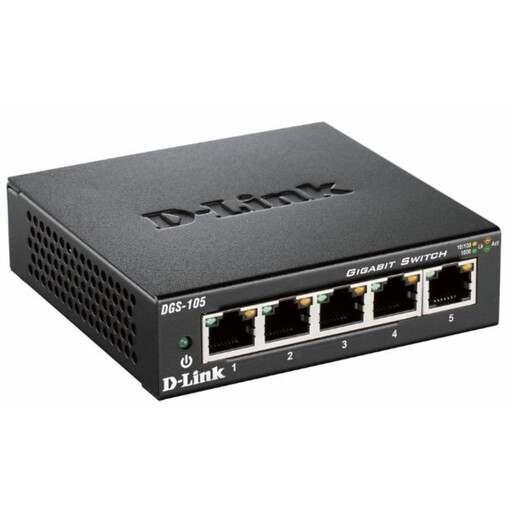
D-Link DGS-105 5-Port Gigabit Unmanaged Desktop Switch
Consider it when a working router is available and you need additional wired connections for fixed devices.
Five Gigabit Ethernet ports, unmanaged operation and fanless design.
A switch expands wired ports; it does not provide a separate internet service or extend Wi-Fi coverage.
View on Joybuy
 No image available
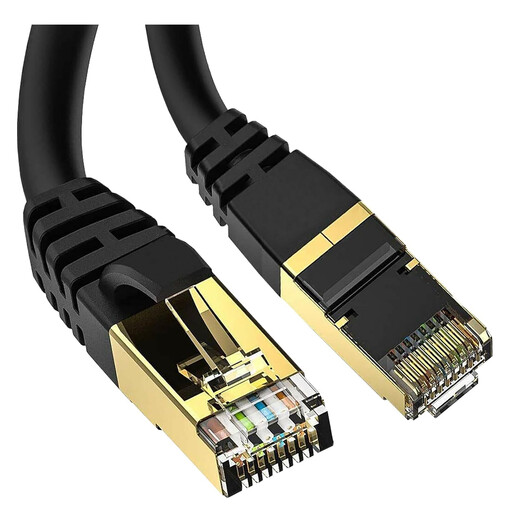
5-metre Cat 8 Ethernet Cable, RJ45
Consider a wired lead if a fixed device can be reached from the router, modem or switch along a suitable cable route.
5 metres; Cat 8; 40Gbps, 2000MHz; shielded S/FTP construction.
Check that the 5-metre length reaches along a practical route without requiring prohibited alterations or creating a trip hazard.
View on Joybuy
Frequently asked questions
Will mesh fix slow broadband at my new address?
Not if the incoming service is the bottleneck. Check the provider’s service status and compare a wired or near-router connection with the problem room; mesh addresses in-home Wi-Fi coverage, not the speed delivered to the property.
Can I replace the provider’s router in a shared rental?
There is no provider-independent answer. Check who manages the connection, the required handoff and settings, and whether the provider’s router needs to be retained for fault diagnosis. Community Fibre, for example, permits a compatible RJ45/DHCP router but may require its standard router during troubleshooting; that policy does not establish another provider’s requirements.
What should I check before arranging new fibre installation in a rented flat?
Ask the provider what access, equipment and work the installation requires, and establish the relevant property permissions before agreeing to work. Ofcom says a new line may require landlord permission. The provider-access route described by the UK Government for an unresponsive landlord concerns certain blocks of flats in England and Wales; it is not blanket permission for tenants to carry out alterations throughout the UK.
Does a mobile coverage-map result guarantee a hotspot will work in my room?
No. Ofcom’s map provides indoor and outdoor predictions for the selected network, while the building and the device’s position can affect reception. Where practicable, check the intended network at the property before committing to mobile hardware.


