Start with the property, not the device: Citizens Advice advises renters to check whether their tenancy restricts a provider switch, while Ofcom provides address-specific broadband and mobile coverage checkers. An existing or newly arranged fixed service may suit a longer stay if the service is available, the necessary work is permitted and its start date meets your needs. A 4G or 5G home router offers a route without a new fixed line when indoor coverage and the data plan suit the household; a portable hotspot or compatible USB adapter is a narrower choice for temporary access.
Who needs which connection?
Renters assessing fixed broadband
If you expect to use a fixed service, establish what is available at the address before buying a separate router. Citizens Advice advises checking the tenancy for switching restrictions; Ofcom says a provider change can involve new equipment or an engineer visit. Ask the provider what it will supply and when the service can start.
Households seeking Wi-Fi without a new fixed line
A SIM-based home router can share a mobile connection across household devices. Check Ofcom’s predicted indoor coverage for your chosen network, then consider whether the plan’s data allowance fits the devices and activities you expect to use.
Renters needing a removable short-term connection
A portable hotspot can share mobile data with several devices and leave with you; a USB adapter may suit access through a compatible host device. Check indoor signal, the data plan and, for battery-powered equipment, how charging fits your use.
What should you check before buying?
The four equipment routes solve different problems: decide whether you need a permitted fixed service, home-wide mobile Wi-Fi or temporary access before comparing devices.
Fixed broadband
Consider it when: A suitable service can be arranged at the address and its start date works for a longer stay.
Allow for: A provider change may need new equipment or an engineer visit, according to Ofcom; check the tenancy before agreeing to any required work.
4G or 5G home router
Consider it when: You need shared home Wi-Fi without arranging a new fixed line and the chosen network has suitable predicted indoor coverage.
Allow for: Coverage predictions cannot guarantee performance inside your home, and the mobile-data plan must fit household use.
USB mobile adapter
Consider it when: Temporary access through one compatible computer or other USB host is the main need.
Allow for: The adapter depends on a compatible host; do not assume it will serve the same role as a standalone home router.
Portable hotspot
Consider it when: Several devices need to share a removable connection for a temporary stay or while fixed service is arranged.
Allow for: Battery runtime and mobile-network conditions matter, particularly if you need a connection throughout the day.
| Concern |
What to check |
Who this matters to |
| Tenancy-compatible setup |
Read the tenancy agreement and ask whether a provider change or proposed installation needs permission. Confirm any engineer visit with the provider. |
I want to avoid ordering a service or equipment I cannot use under my tenancy; around 30% of consumers put a tenancy-compatible setup first. |
| Connection timing |
Ask the fixed provider for the proposed start or engineer date. If you need temporary mobile access, check predicted indoor coverage and the plan’s data terms. |
Internet access matters as soon as I move in, so I need a workable route if fixed service starts later; roughly 30% of consumers prioritise avoiding that gap. |
| Shared household use |
Consider simultaneous devices, the router’s relevant Wi-Fi and wired connections, and whether the data allowance fits expected use. |
Several people or devices will use the connection at home, so one-device access will not meet my main need; around 20% of consumers put shared use first. |
| Removable access |
For a hotspot, check charging and SIM compatibility. For a USB adapter, check the host device, operating system and connector. |
I need to take the connection with me rather than set up permanent home equipment; roughly 20% of consumers make removable access their primary concern. |
Purchase mistakes to avoid
-
Buying 5G equipment on the strength of an outdoor signal
A 5G-capable router cannot create coverage at the property. Ofcom distinguishes outdoor from indoor coverage predictions and cautions that buildings and other local conditions can affect the connection you experience.
Check the exact postcode and intended network’s indoor prediction before choosing a router and plan. If you intend to try the equipment at home, check the retailer’s applicable cancellation and return terms before ordering.
-
Treating a fixed-broadband order as only a router choice
Ofcom says a switch may involve new equipment or an engineer visit, while Citizens Advice advises renters to check whether their tenancy restricts switching. A router purchase alone does not settle either question.
Check the agreement, ask the provider what the order involves and obtain landlord permission where required before arranging installation.
-
Expecting a portable hotspot to run like a home router
Portable equipment can share a temporary connection, but battery operation and the number of connected devices affect how practical it is for sustained household use. TP-Link’s stated runtime and device count for its M7350 are product specifications, not a guarantee for every setting.
Check charging needs, the intended devices and the data allowance. If continuous shared use is essential, compare a mains-powered mobile router or an available fixed service.
-
Assuming any SIM works in any mobile router
Network bands and device compatibility vary by model. Zyxel Networks specifically advises checking operator frequencies, bands and coverage for its portable NR2301 router.
Check the exact device variant against your intended network, SIM format and any network-lock restrictions before buying.
Relevant brands to consider
TP-Link
TP-Link lists both fixed-location 4G/5G routers and portable mobile Wi-Fi devices in its UK ranges. Compare the type of connection you need before comparing individual models.
- TP-Link specifies a SIM-based 5G connection and Wi-Fi 6 for the Archer NX500; it also describes a WAN/LAN connection for use with a compatible fixed-line modem.
- The portable M7350 is specified for up to 10 devices and up to eight hours of operation. Check whether its charging needs and your local mobile coverage suit the intended use.
NETGEAR
NETGEAR’s UK portable-hotspot range is relevant when a cellular connection needs to be shared through Wi-Fi and carried away from the property.
- NETGEAR describes its mobile hotspots as devices that share a cellular data connection over Wi-Fi.
- Check the exact model’s network compatibility, power arrangements and data-plan requirements rather than assuming every portable hotspot suits sustained home use.
Zyxel Networks
Zyxel Networks lists the NR2301 as a portable 5G router for sharing a mobile connection across devices.
- Zyxel specifies Wi-Fi 6, a 4,500 mAh battery and support for up to 32 connected devices for the NR2301.
- Zyxel advises checking the chosen operator’s frequencies, bands and coverage; stated maximum data rates do not describe the connection at a particular property.
Joybuy equipment for mobile connections
These choices cover a portable hotspot, a home 5G router and a USB mobile adapter. Each offers a different way to use mobile data while arranging connectivity in a rented home; choose the format only after checking indoor coverage and the intended SIM or data plan.
 No image available
D-Link DWR-932W 4G LTE AX300 Wi-Fi 6 Mobile Hotspot
Consider this portable 4G LTE hotspot when a removable connection matters more than installing a fixed line.
Confirm that its wireless specification and mobile-network bands match your requirements, and check indoor coverage and the data plan for the intended address.
Joybuy
 No image available
TP-Link Archer NX500 5G AX3000 Router
Consider this 5G router for shared home Wi-Fi through a mobile connection when predicted indoor coverage and the data plan fit the household.
TP-Link lists Wi-Fi 6 and a WAN/LAN connection for the Archer NX500. Confirm the exact port specification and compatibility with your intended mobile network before ordering.
Joybuy
 No image available
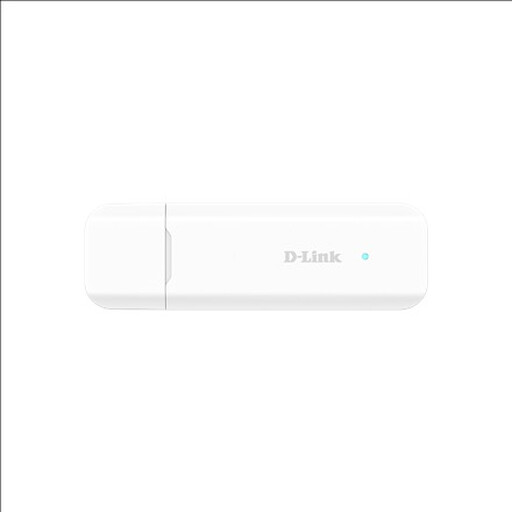
D-Link DWM-222W/R 4G LTE AX300 Wi-Fi 6 USB Adapter
Consider this USB adapter for temporary mobile access when you have a compatible host device rather than need a standalone home router.
Check the intended device’s USB and operating-system compatibility, the adapter’s SIM and network compatibility, and predicted indoor coverage.
Joybuy
Common questions
Can I switch broadband provider in a rented home without asking the landlord?
Check your tenancy agreement before assuming you can switch. Citizens Advice’s guidance for renters in England says an agreement may restrict changing internet provider; if the proposed service also involves work at the property, establish whether landlord permission is required. Renters elsewhere in the UK should check the guidance applicable to their nation and their own agreement.
What should I confirm before ordering fixed broadband for a rented property?
Confirm availability at the exact address, the proposed start date, what equipment the provider supplies and whether an engineer needs access or must carry out work. Ofcom says a provider change can require new equipment or an engineer visit; check the tenancy and obtain permission where required before agreeing to the installation.
Will a 4G or 5G home router work if my phone gets signal outside?
An outdoor phone signal does not establish that a router will have a suitable connection indoors. Ofcom separates indoor and outdoor mobile coverage predictions and cautions that buildings and other local conditions affect real use. Check the exact postcode and intended network’s indoor prediction, then consider the data plan and the router’s network compatibility.


