
24/7 Customer Support

Free returns

Same-day & Next-day Delivery

Quality Guaranteed

Unlock Your Welcome Offers: FREE Delivery | Up to 80% OFF | Free 30-day JoyPlus trial
Download the APP
A privacy screen protector can make it harder for people nearby to read messages, passwords and emails on the train, in a café or at work. However, choosing one based only on phrases such as “360° privacy” or “9H glass” can lead to an expensive mismatch.
The most common buying problems are straightforward:
Before buying an iPhone privacy screen protector, check the exact model shown in your phone settings and compare it with the product listing.
Do not rely on a general description such as “for iPhone 17”. Confirm whether the product is designed for the standard, Pro or Pro Max version. The iPhone 17 privacy screen protector, iPhone 17 Pro privacy screen protector and iPhone 17 Pro Max screen protector are separate shopping searches for a reason.
Some listings may contain inconsistent compatibility wording. For example, a product title can name one model while the specification section refers to another. Check:
If the title and technical details disagree, contact the seller before ordering rather than assuming the protector will fit.
A 9H screen protector generally refers to a pencil-hardness rating used to describe resistance to surface scratching. It can help protect against marks from keys, coins and everyday contact, but it is not a guarantee against every crack or drop.
Tempered glass may provide a firmer protective layer than a thin plastic film, while a case is still important for protecting the phone’s frame and corners. Look for a smooth finish, suitable edge coverage and clear instructions about removal. A screen protector is for external screen protection; it should not be treated as a drop-proof case.
An anti-spy screen protector uses a privacy filter that restricts visibility from side angles. The practical trade-off is that the display may appear darker or less clear when viewed off-centre. Consider whether you frequently share your screen with someone sitting beside you.
Useful additional features include:
Install the protector indoors where possible. Clean the display, use the supplied dust-removal tools, align the protector carefully and press from the centre outwards. Do not repeatedly peel and reapply a contaminated protector, as the adhesive may not bond correctly and the phone’s oleophobic surface can be affected.
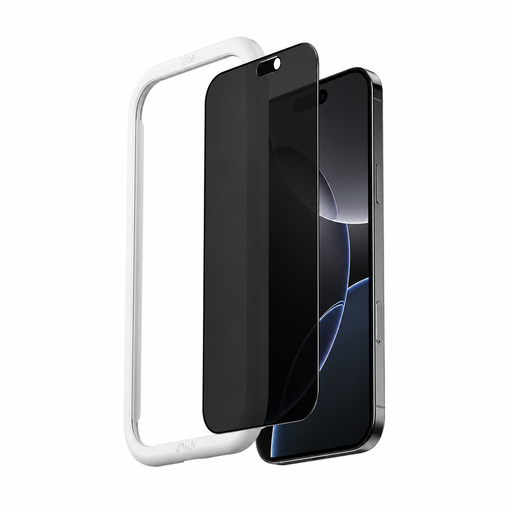
Why This Fits Their Persona: A practical option for iPhone 16 owners who want side-angle privacy for commuting, study areas or shared offices without adding a complicated installation process.
It lists 9H tempered glass, privacy filtering and an installation applicator. Check the exact iPhone 16 variant carefully because the listing’s compatibility wording should be confirmed before purchase.
The listed features include anti-fingerprint, dustproof and scratch-resistant finishes, plus high light transmittance.
Why This Fits Their Persona: Suits iPhone 17 Pro users who prioritise a clean front-facing view, smoother installation and protection from everyday marks in busy workplaces.
The listing describes automatic adsorption, an applicator and centre-outward bubble removal. Its 360° privacy description should still be understood as side-angle dimming rather than complete visual blocking.
It lists 9H high-aluminium alloy glass, anti-fingerprint treatment, AR coating and optical adhesive.
Why This Fits Their Persona: A match for frequent travellers, students and office workers using a larger iPhone 17 Pro Max display around other people.
The product information states a 360-degree peeping angle, automatic adsorption and a supplied applicator. Verify the Pro Max model before opening the packaging.
The listed 9H glass includes anti-fingerprint, dustproof, anti-reflective and scratch-resistant coatings.
Why This Fits Their Persona: Designed around quick application and side-angle privacy, making it suitable for frequent phone use on trains, in libraries and at hot desks.
Automatic outward bubble removal addresses one common installation issue. The product description contains mixed model references, so confirm your exact iPhone version with the seller.
The listing specifies 9H hardness, high light transmittance, anti-fingerprint treatment and an included squeegee.
A privacy protector may need replacement if it develops chips, cracks, lifting edges or persistent bubbles. Avoid applying it over a damaged or dirty display. For users who regularly carry a phone with keys or use it in crowded environments, a protective case and careful storage remain useful additions.
We have compiled a complete, real-time list of products that fully satisfy these strict selection criteria and UK safety regulations.
No. It is designed to reduce visibility from side angles, not to guarantee complete privacy in every lighting condition or viewing position. Adjusting screen brightness and positioning your phone carefully can further limit shoulder-surfing.
A 9H rating indicates resistance to certain surface scratches, but it does not guarantee protection from every impact. Use a case with raised edges and replace the protector if it becomes cracked or its edges lift.
Usually, yes, provided the display is clean and the protector is aligned correctly. Automatic adsorption can help spread the adhesive and reduce bubbles, but dust removal and accurate positioning are still essential.