
24/7 Customer Support

Free returns

Same-day & Next-day Delivery

Quality Guaranteed

Unlock Your Welcome Offers: FREE Delivery | Up to 80% OFF | Free 30-day JoyPlus trial
Download the APP
A j5create USB-C GaN charger can replace several separate adapters, but choosing by wattage alone can lead to an unsuitable purchase. A compact charger may have impressive total output yet provide limited power to an individual port. Similarly, a “multi-device” model may lack the port types or UK plug configuration your setup requires.
Before buying a 65W USB-C charger, 67W GaN charger or higher-output model, check three details: how power is distributed, whether the ports match your cables and whether the charger suits your device’s required USB-C PD profile.
A charger advertised as 130W or 185W does not necessarily supply that amount to every connected device. Output is usually shared when several ports are in use. For example, a 130W charger may provide up to 100W through one USB-C port alone, while its total output is dynamically divided between multiple devices.
Check both the maximum total output and the maximum output per port. This is particularly important when charging a laptop and phone at the same time.
USB-C describes the connector shape, not the charging performance. A charger can include USB-C ports with different power levels, while USB-A remains useful for older cables and accessories.
For laptops, tablets and gaming handhelds, look for USB-C Power Delivery (PD) support and confirm the required wattage in the device documentation. A phone may charge effectively from a lower-power port, while a demanding laptop may need 65W, 100W or more.
Some chargers include interchangeable AC plugs, while others are supplied with a fixed UK plug. A travel charger with international plug options may be convenient abroad, but it is worth checking exactly what is included in the box.
Also consider size and weight. A high-output charger can reduce the number of adapters in your bag, but a heavy desktop-style unit may be less practical for daily commuting.
USB-C PD is the key standard for charging many modern laptops, phones, tablets and consoles. Match the charger’s output with your device’s input requirement rather than selecting the largest number available.
Typical uses include:
GaN, or gallium nitride, allows manufacturers to create smaller power adapters than many conventional silicon designs. It does not remove the need to check output allocation, cable ratings or device compatibility.
Count the ports you genuinely use. Two USB-C ports may be sufficient for a laptop and phone, whereas a home-office setup may benefit from three USB-C ports plus USB-A.
For older accessories, a USB-A port can prevent the need for an additional adapter. For a modern laptop and phone charger arrangement, multiple USB-C PD ports are generally more convenient.
Look for stated protections such as overcurrent, overvoltage, overheating and short-circuit protection. These features help the charger regulate power, although they do not make an incompatible cable or damaged socket safe to use.
For UK buyers, check that the product has an appropriate UK plug and review the product listing for applicable conformity information, warranty terms and included cables. Do not assume a travel adapter is included unless it is listed.
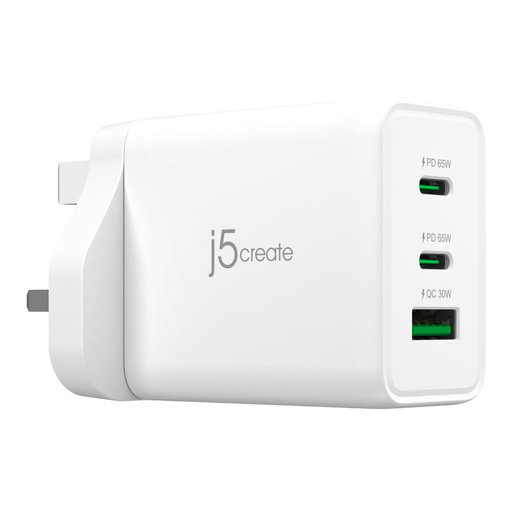
Why This Fits Their Persona: A sensible starting point for students, commuters and home users charging a laptop, tablet and phone from one compact UK-friendly adapter.
Its two USB-C ports and one USB-A port make the port arrangement clear, while intelligent power balancing manages the 65W total output when devices are connected together.
Up to 65W through USB-C, three ports, GaN construction and PD 3.0/QC 3.0 support.
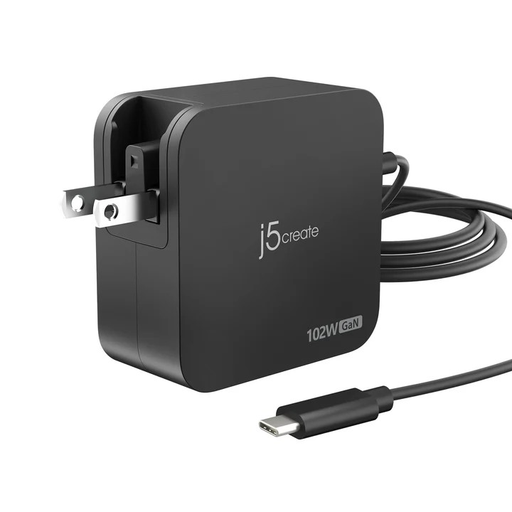
Why This Fits Their Persona: Suitable for professionals and frequent travellers who want higher output, two USB-C ports and changeable AC plugs for international use.
The listing specifies 102W total output and a maximum of 60W per USB-C port, helping set realistic expectations for simultaneous charging.
Two USB-C PD ports, changeable AC plugs, 100–240V input and stated overheat and overvoltage protection.
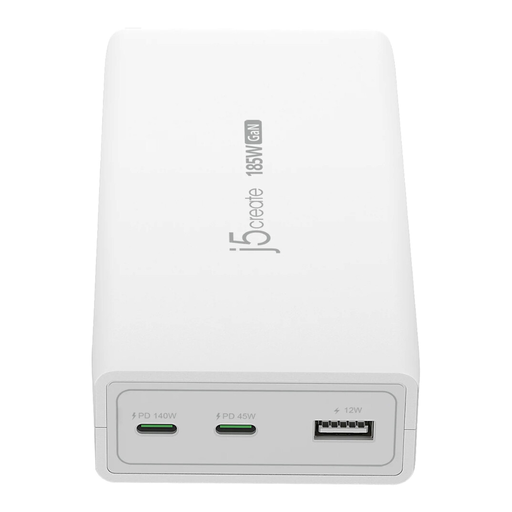
Why This Fits Their Persona: Designed for users powering a demanding laptop, gaming console or workstation alongside phones and tablets.
The port allocation is explicit: up to 140W on USB-C 1, 45W on USB-C 2 and 12W through USB-A, rather than relying only on the headline total.
185W total output, PD 3.1 support, UK plug and protection against short circuits, overheating, overvoltage and overcurrent.
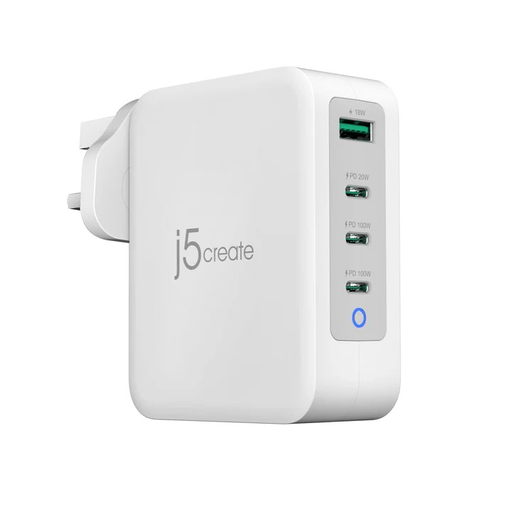
Why This Fits Their Persona: A practical fit for remote workers and shared desks with several laptops, phones, tablets and USB accessories nearby.
It states both the 130W combined limit and the separate port ratings, including 100W USB-C ports and an 18W USB-A port.
Four ports, dynamic power allocation, 295g weight and a UK plug for straightforward desk or travel use.
We have compiled a complete, real-time list of products that fully satisfy these strict selection criteria and UK safety regulations.
It depends on the laptop’s input requirement. Many thin-and-light models can operate with 65W, while larger performance laptops may require more. Check the original adapter or manufacturer specifications, and remember that available power may reduce when other devices share the charger.
GaN technology is designed to improve power-conversion efficiency and reduce charger size, but household electricity use depends on the connected devices, charging time and power drawn. Unplug the adapter when it is not needed and use cables in good condition.
Usually, provided both devices support compatible charging protocols and the charger has sufficient shared output. Review the port allocation before connecting both devices. A multi-port USB-C charger such as the 130W or 185W model may be more suitable for heavier simultaneous charging, while a 65W model is more compact for everyday carry.
For video meetings, a compatible 4K USB webcam or plug-and-play webcam can also simplify a home-office setup. For cable-free bedside charging, consider whether a Qi2 wireless charging station better matches your routine than another wired adapter.