High-volume catalogue editors
If you repeatedly enter prices, quantities and product codes, check for a dedicated number pad, familiar UK key placement and shortcuts that suit your catalogue software.


Choose a full-size keyboard with a number pad if catalogue updates involve frequent prices, quantities or codes; a compact layout makes more sense when desk space matters more than dedicated number keys. For long typing sessions, assess the whole workstation before considering a split keyboard, which takes more room and time to get used to. If you switch devices, check connection methods, device compatibility and the exact UK layout before buying.
If you repeatedly enter prices, quantities and product codes, check for a dedicated number pad, familiar UK key placement and shortcuts that suit your catalogue software.
If descriptions and administration keep you typing for long periods, consider keyboard shape alongside screen, chair and keyboard placement. The Health and Safety Executive advises keeping the keyboard central and just below elbow height.
If your desk is narrow or you move between a laptop, desktop or tablet, weigh keyboard width and mouse reach against the need for dedicated keys. Check how the keyboard connects to each device.
Start with how often you enter numbers, then weigh typing comfort, device switching and desk space against the keys you would give up.
| Concern | What to check when buying | Who this matters to |
|---|---|---|
| Numeric and structured entry | Look for an integrated number pad and check the selected UK key layout. | When prices, quantities and codes fill much of my working day, I want dedicated number keys rather than relying on the top row. Around 33% of consumers put numeric entry first. |
| Comfort during long sessions | Check keyboard position and desk space before deciding whether a split layout suits you. | After a long stretch writing descriptions, I need a typing setup I can position comfortably, not just a differently shaped keyboard. Comfort comes first for around 27% of consumers. |
| Switching work devices | Confirm connection methods, supported devices and operating-system compatibility. | If I update listings on one computer and check products on another device, I want to move between them without repeatedly changing my setup. Around 20% of consumers prioritise device switching. |
| Desk space and shortcuts | Check the physical layout, access to number and arrow keys, and shortcut options. | On a narrow desk, I would rather keep the mouse close and accept fewer dedicated keys for catalogue commands. Compactness and shortcuts are the primary concern for around 20% of consumers. |
A smaller board frees desk space, but doing without an integrated number pad can be awkward when prices, quantities and codes recur throughout a catalogue update.
Review a typical session before choosing the layout. If dedicated number keys matter, compare a full-size board with using a separate number pad.
A separate number pad also needs desk space and another device to connect.
Keyboard shape is only one part of prolonged screen work. The Health and Safety Executive advises positioning the screen and keyboard centrally, with the keyboard just below elbow height.
Check your chair, screen and keyboard placement together. For prolonged laptop work, consider a separate keyboard and mouse with the screen raised to a suitable position.
A keyboard family may include several regional layouts; Keychron, for example, offers UK-ISO alongside other ISO variants. The family name or main image does not establish which one is selected.
Check the precise variant and key legends in the product selection before ordering.
Unfamiliar punctuation placement may mean arranging a replacement or return.
Its MX Keys and ERGO K860 lines offer conventional, compact and split layouts relevant to home-office typing.
Its UK-ISO options include the full-size B6 Pro and the compact, low-profile K3 Max.
The Surface Keyboard (2nd Edition) is a full-size Bluetooth option with a number pad and Windows-oriented shortcut keys.
These keyboards cover full-size, multi-device and space-conscious approaches to home catalogue work. Check the selected layout and number-key arrangement against the fields you enter most often.
 No image available
For recurring numeric fields and work across devices, check the number-pad arrangement and supported connections. This model is labelled full-size and wireless; confirm the selected UK key legends.
 No image available
For catalogue updates split between devices, check pairing and the number-key arrangement you need. This is a Bluetooth wireless model marked UK; confirm its exact key legends.
 No image available
For numeric catalogue work where desk width also matters, check the selected key arrangement and switch variant. The Scope II 96 is listed as wireless with a UK layout; confirm the supplied keycaps.
 No image available
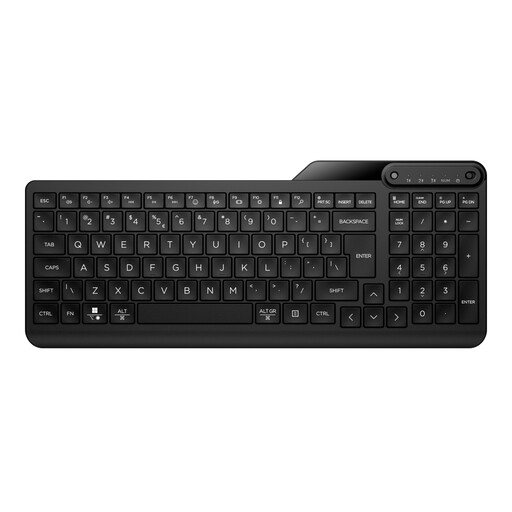
For moving between work devices, check pairing and operating-system compatibility. If you enter numbers frequently, also confirm whether this Bluetooth keyboard has an integrated number pad and the UK layout you expect.
 No image available
For a space-conscious desk used with several devices, check connection compatibility and how you would enter numbers. This wireless Alloy Rise 75 is marked UK; confirm its exact key legends and number-key arrangement.
A dedicated number pad is worth prioritising if you frequently enter prices, quantities, dimensions or codes. If most of your work is writing descriptions, a compact keyboard may be practical, provided you are comfortable using its available number keys.
A split keyboard alone cannot resolve discomfort caused by the wider workstation setup. The Health and Safety Executive advises keeping the screen and keyboard central and the keyboard just below elbow height; consider the whole setup and seek appropriate advice if symptoms persist.
Check that both devices support the selected connection method, that the keyboard can pair with the number of devices you use, and that its operating-system keys suit your workflow. Logitech lists switching across up to three devices for MX Keys S, while Keychron lists 2.4 GHz, Bluetooth and wired connections for B6 Pro.
Choose a UK layout if its key positions and punctuation are what you already use for catalogue entry. Check the exact variant rather than relying on a keyboard-family name or product image, since families such as Keychron's ISO ranges include multiple regional layouts.