Choose around the task that causes the most friction: positioning during long standing sessions, familiar keys for repeated checkout entry, or switching between test devices. The Health and Safety Executive advises placing the keyboard centrally and just below elbow height, but keyboard shape alone cannot resolve problems with the wider workstation. Check the layout, connection method and space needed for the mouse before choosing a model.
Who is this for?
Standing-desk regression testers
If you repeatedly check desktop checkout flows while standing, keyboard placement is part of the decision. The Health and Safety Executive advises keeping the screen and keyboard central, with the keyboard just below elbow height.
Cross-device checkout testers
If you move between a computer, tablet or phone to reproduce checkout behaviour, check whether a keyboard can switch between your particular devices. Logitech and CHERRY describe multi-device features on specific models, but compatibility still needs checking.
Compact-desk technical testers
If desk space is tight but your test steps use particular keys or shortcuts, weigh a smaller layout against the controls it removes. Keychron offers UK-ISO options with different layouts and connection methods.
What matters when choosing?
Start with the keys and devices your checkout checks actually use, then make sure the keyboard and mouse can both sit where you need them at standing height.
| Concern |
What to check |
Who this matters to |
| Standing-workstation comfort |
Check that the keyboard fits centrally just below elbow height without pushing the mouse out of reach. |
During longer standing sessions, I need a position that does not make me twist or reach. Around 33% of consumers put workable posture first. |
| Familiar checkout-entry keys |
Check the physical layout, navigation keys and whether you need a dedicated number pad. |
When I repeatedly enter test details and use shortcuts, I want the keys where I expect them. Familiar layout is the primary need for around 33% of consumers. |
| Switching test devices |
Confirm supported operating systems, connection methods and how many devices the exact model can switch between. |
If I reproduce an issue across devices, I want to change devices without repeatedly setting up the keyboard. Around 20% of consumers make that workflow their first priority. |
| Desk space and connection |
Compare the keys retained by a compact layout; for a wired model, check the cable path throughout the desk’s height range. |
With limited desk space or one fixed computer, I may favour a smaller footprint or a direct cable. Those practicalities come first for around 14% of consumers. |
Mistakes to avoid
-
Expecting an ergonomic keyboard to fix the whole setup
A shaped keyboard can still be awkward to use if it sits too high, off-centre or too far from the mouse. The Health and Safety Executive advises considering keyboard, screen and mouse positions together.
Set the desk so the keyboard sits just below elbow height, keep the screen and keyboard central, and check that the mouse remains in line with your elbow.
-
Choosing a compact layout before checking your test steps
A smaller keyboard may omit a number pad or move keys you use for repeated checkout data entry.
List the numbers, navigation keys and shortcuts used in a typical test pass, then choose a layout that retains the controls you rely on.
-
Assuming wireless means easy device switching
Bluetooth connectivity alone does not establish how many devices a keyboard can switch between or whether it works with your operating systems.
Check the exact model’s switching controls and compatibility. Logitech describes Easy-Switch on Wave Keys, while CHERRY specifies connections to up to three devices for the KW 7100 MINI BT.
-
Overlooking cable movement on an adjustable desk
A cable can restrict where the keyboard sits when the desk changes height.
Check the cable route across the desk’s full height range so it does not pull on the connector; consider a wireless connection if that route does not work for your setup.
Brands to consider
These brands offer different keyboard layouts and connection options; suitability depends on the exact model and your test workflow.
Logitech
Logitech’s Wave Keys and MX Keys S lines address different office-keyboard needs: shaped typing with a palm rest, or a more conventional productivity layout.
- Logitech specifies Bluetooth, a supplied Logi Bolt receiver and Easy-Switch for Wave Keys; it describes backlighting, shortcuts and multi-device features for MX Keys S.
- Check the exact layout and operating-system support. The shape or key design does not establish how comfortable or accurate either model will be for you.
Keychron
Keychron offers UK-ISO mechanical options in compact and full-size formats, including the K3 Max and C2 Pro 8K.
- Keychron describes wired, Bluetooth and 2.4 GHz modes for the K3 Max, while the full-size C2 Pro 8K is wired and supports QMK configuration.
- A compact layout may omit keys needed for repeated entry; check switch feel and noise for a shared workspace.
CHERRY
CHERRY’s KW 7100 MINI BT is a compact Bluetooth option for a space-limited or multi-device setup.
- CHERRY states that the KW 7100 MINI BT can connect to up to three devices without a dongle.
- Check its key arrangement if your checkout checks call for a number pad or a larger set of dedicated keys.
HP
HP’s 720 Multi-Device Ultra-Fast Rechargeable Wireless Keyboard is an office-oriented option for device switching and rechargeable use.
- HP states that the 720 can be recharged through USB-C while in use.
- Check its exact layout and device compatibility, and decide whether charging suits your workflow better than a wired or replaceable-battery option.
Joybuy keyboard options
These keyboards offer different approaches to standing-desk checkout work, from a split layout to full-size or more compact options. Compare each one against your entry tasks, device setup and available desk space.
 No image available
HP 960 Ergonomic Split Layout Wireless Keyboard with padded wrist rest
Consider this split-layout option if your priority is finding a workable typing position during longer standing sessions.
Its name identifies a wireless keyboard with a padded wrist rest. Check the physical key layout and whether the keyboard and mouse can both be positioned comfortably on your desk.
View on Joybuy
 No image available
ASUS ROG Strix Scope II 96 Wireless Gaming Keyboard, black, UK layout
Consider this UK-layout option if desk width matters but your checkout tasks still call for a familiar set of entry keys.
The name specifies a 96-format wireless keyboard. Check the exact key arrangement and switch option against your test steps before choosing it.
View on Joybuy
 No image available
Targus EcoSmart Full Size Wireless Keyboard, UK variant
Consider a full-size layout if your checkout checks use dedicated keys and you have enough room to keep the mouse close.
This is identified as a UK full-size wireless keyboard. Compare its footprint with the usable space at standing height and check its connection requirements for your devices.
View on Joybuy
 No image available
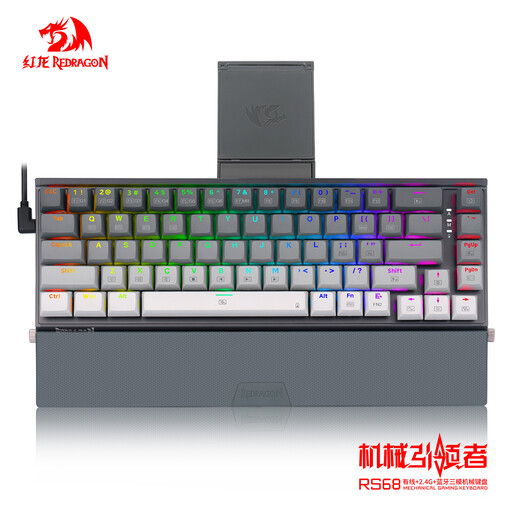
RS68 The Third Mock Examination Wireless Aluminium Alloy Mechanical Keyboard, Deep Space Grey
Consider this compact mechanical option when leaving room for the mouse and other test devices matters more than retaining every dedicated key.
Its name identifies a wireless aluminium-alloy model. Check the physical layout, the keys your checkout steps require and the precise connection and switching behaviour.
View on Joybuy
 No image available
HyperX Alloy Rise 75 Wireless Keyboard, UK variant
Consider this smaller-format option if you want to free desk space while keeping a physical keyboard for desktop checkout checks.
The name identifies the Alloy Rise 75 as a wireless UK variant. Confirm the exact physical key arrangement, particularly if you regularly use a number pad or specific navigation keys.
View on Joybuy
Frequently asked questions
Is an ergonomic keyboard enough for a comfortable standing-desk setup?
No: keyboard shape is only one part of the setup. The Health and Safety Executive advises keeping the screen and keyboard central, placing the keyboard just below elbow height and keeping the mouse in line with the elbow.
Does UK display-screen-equipment guidance require a particular keyboard type?
The Health and Safety Executive’s guidance addresses workstation arrangement and assessment rather than prescribing a keyboard brand or connection method. It says employers must assess workstations for workers who use display screen equipment daily as part of normal work, continuously for an hour or more.
Should I use a wired or wireless keyboard for checkout testing?
A direct wired connection suits a fixed computer if the cable can move safely with the desk; multi-device wireless is worth considering when you regularly reproduce checkout behaviour across devices. Check the exact modes and compatibility: Keychron describes wired, 2.4 GHz and Bluetooth connections for the K3 Max, while Logitech specifies Bluetooth and a supplied Logi Bolt receiver for Wave Keys.
Do checkout tests require a full-size keyboard?
Not necessarily: choose a full-size layout if you regularly rely on its dedicated keys or number pad and can accommodate its width. A compact keyboard may leave more room on the desk, but check your test steps before giving up familiar controls.


