Choose a full-size keyboard if your transport-simulation controls rely on a number pad or dedicated keys; choose a compact layout when mouse and desk space matter more than those keys. For a long session, assess keyboard height, any palm rest and your desk position separately. A keyboard feature does not replace changes of posture and regular breaks.
Who is choosing?
Comfort-focused simulator players
If you spend long periods at the desk, keyboard height, a suitable palm rest and room to position the mouse may matter as much as extra controls. The Health and Safety Executive also advises checking workstation position and taking short, frequent breaks.
Players with many mapped commands
If your controls use a number pad or frequent shortcuts, check whether a full-size layout, dedicated keys or programmable controls fit your existing bindings before choosing a smaller board.
Players sharing a smaller desk
If you switch between simulation play and general PC use, a narrower layout or a choice of connection modes may be useful. Check what you would give up in keys and how you would manage charging.
What matters when buying?
Start with the keys your simulation controls need, then check whether the keyboard and mouse can sit comfortably on your desk for a long session.
| Concern |
What to check |
Who this matters to |
| Comfort and desk setup |
Check the front height, height adjustment and any supplied palm rest against your seated desk position. The Health and Safety Executive advises placing the keyboard just below elbow height. |
During a long session, I want to reach the keys without holding my arms in an awkward position. Roughly 40% of consumers would put comfort and desk setup first. |
| Command access |
Compare your bindings with the exact key layout; check for a number pad and how any dedicated or remappable controls work. |
If I use number-pad bindings for vehicle and camera commands, I need those inputs within easy reach. Around 30% of consumers would prioritise command access. |
| Desk space and connection |
Measure the space available for the keyboard and mouse. Confirm wired, 2.4 GHz and Bluetooth modes individually where they matter. |
On a crowded desk, I would rather free mouse room and manage a wireless connection than keep every key. Approximately 20% of consumers would make space and connectivity their primary concern. |
| Switch feel and tuning |
Confirm the selected switch variant and whether actuation settings can be saved as you need them. |
If accidental presses or key feel distract me, I want to choose the switch behaviour carefully. Roughly 10% of consumers would put switch feel and tuning first. |
What is easy to overlook?
-
Expecting the keyboard alone to fix an uncomfortable setup
A palm rest, low front edge or adjustable feet cannot make up for an unsuitable desk position or staying still for too long.
Check whether the keyboard can sit centrally and just below elbow height. The Health and Safety Executive recommends short, frequent breaks during prolonged display-screen work.
-
Choosing a compact layout before checking bindings
A tenkeyless (TKL) layout removes the number pad, which may conflict with controls you already use in a transport simulation.
List your frequently used bindings before choosing a smaller layout, and compare them with the actual key arrangement.
Keeping those bindings may mean using a separate number pad or changing your control scheme.
-
Assuming every variant includes the same features
Keyboard families can offer different regional layouts, switches and palm-rest configurations. CORSAIR, for example, lists distinct K70 CORE options.
Confirm the model code, UK layout, selected switch and included accessories for the variant you intend to buy.
-
Taking a wireless battery figure as a fixed result
Logitech G states that its quoted G715 battery figure is based on full LED brightness and can vary with use and battery conditions.
Check the stated test conditions and whether you can charge or use a cable during a long session.
Relevant brands to consider
CORSAIR
Relevant when comparing UK-layout full-size and TKL keyboards, including specific K70 variants.
- CORSAIR lists a detachable magnetic palm rest, a multi-function dial and iCUE remapping for the K70 CORE UK configuration with a palm rest.
- Check the exact layout and palm-rest option; those features should not be assumed for every K70 variant.
Logitech G
Relevant when choosing between a low-profile full-size wireless board and a wireless TKL board with a supplied palm rest.
- Logitech G lists a 23 mm height and three connection modes for the G915 X LIGHTSPEED; its G715 is a TKL model with adjustable height and an included palm rest.
- The G715 omits the number pad, and Logitech G says its quoted battery duration varies with conditions.
SteelSeries
Relevant if adjustable key actuation is a priority in a TKL keyboard.
- SteelSeries lists adjustable actuation from 0.1 mm to 4.0 mm and onboard-saved settings for the Apex Pro TKL Gen 3 UK.
- Its TKL layout omits the number pad, and actuation tuning is not a requirement for transport simulations.
Razer
Relevant if you want a full-size layout with dedicated macro controls and a supplied wrist rest.
- Razer describes the BlackWidow V4 Pro as a full-size keyboard with macro keys and a magnetic wrist rest.
- Confirm the selected switch and keyboard layout rather than relying on the model family name.
Keychron
Relevant if a familiar UK/ISO layout and a choice of form factors matter for both typing and play.
- Keychron UK lists ISO-layout options across compact, TKL, 75%, 96% and full-size formats.
- Features vary by model; check the selected keyboard’s switches, connections and software support individually.
Joybuy product choices
These keyboards offer different layout and connection choices for a transport-simulation desk. Compare their exact key arrangements with your bindings, and check long-session setup features on the selected variant.
 Image unavailable
ASUS ROG Strix Scope II 96 Wireless Gaming Keyboard — White, UK layout
Consider this UK-layout wireless model if regional key placement matters alongside simulation controls. Compare its 96-format arrangement with your bindings, and confirm the switch option and any comfort accessories for the selected variant.
View on Joybuy
 Image unavailable
AULA F75 75% Tri-Mode Wireless Gaming Keyboard — QWERTY US layout
The 75% layout is worth considering when desk width matters more than keeping a larger key arrangement. The named variant specifies wired, Bluetooth and 2.4 GHz modes, plus PBT keycaps. Check its QWERTY US layout against your typing and simulation bindings.
View on Joybuy
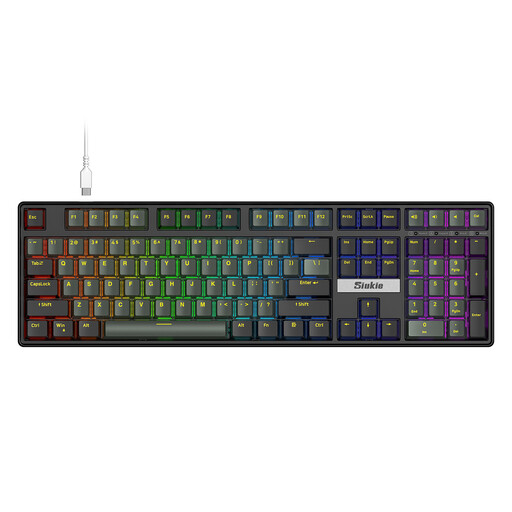 Image unavailable
Siukie CR108 108Keys Detachable Switch Wired Mechanical Keyboard
Consider the stated 108-key arrangement if you need room for many mapped controls, but compare the actual keys with your command scheme. This is a wired mechanical model with detachable switches; confirm its regional layout and selected switch variant before buying.
View on Joybuy
Common questions
Should I choose a UK/ISO keyboard layout?
Choose a UK/ISO variant if familiar regional key placement matters for your typing and mixed PC use. Check the selected variant rather than relying on a product photo: some listings offer separate UK and North American layouts.
Will a palm rest or low-profile keyboard make long sessions comfortable?
Neither feature can establish a comfortable setup on its own. The Health and Safety Executive advises placing the keyboard just below elbow height and taking short, frequent breaks during prolonged display-screen work; assess the keyboard alongside your chair, desk and mouse position.
When is a TKL keyboard a poor fit for transport simulations?
A TKL keyboard is a poor fit if your control scheme depends on a number pad, because TKL layouts omit it. If freeing mouse space matters more, compare your current bindings with the smaller layout before switching.


