What matters when choosing
Start with your standing-desk position and the records you enter most often. Then decide whether switching devices or choosing a particular mechanical feel changes the keyboard you need.
| Concern |
What to check |
Who this matters to |
| Standing comfort |
Check whether the keyboard can sit centrally just below elbow height, with room to place the mouse comfortably. If considering a split model, allow for its size and unfamiliar layout. |
If I type through long renewal sessions while standing, I need a position that does not make me raise my shoulders or twist towards the keys. Around 34% of consumers put standing comfort first. |
| Numeric entry |
Confirm a dedicated number pad for frequent figures and check the exact key layout if familiar UK symbols matter. |
Repeated member references, dates and amounts make a familiar numeric cluster important to my work; roughly 33% of consumers give record entry the highest priority. |
| Device switching |
Count the devices you use and check their connection options. Check operating-system support separately if you need programmable actions. |
When renewal updates move between my club’s devices, I want to change connections without disrupting the task. About 20% of consumers place this workflow need first. |
| Mechanical feel and noise |
Check the exact switch variant, the maker’s noise description and how any remapping works on your devices. |
In a shared room, I want to choose mechanical keys without assuming every switch sounds alike; around 13% of consumers prioritise typing feel or quieter operation. |
Brands to consider
These product lines illustrate different ways to meet renewal-work needs; brand names alone do not establish which layout will suit your desk.
Logitech
Relevant for both a split, full-size keyboard and a conventional low-profile multi-device model.
- Logitech’s ERGO K860 has a curved split layout, integrated number pad and palm-lift settings of 0°, −4° and −7°.
- MX Keys S can switch across up to three devices and offers Smart Actions through Logi Options+.
- MX Keys S is not a split keyboard; check software compatibility if Smart Actions are central to your workflow.
Keychron
Relevant if you want to choose a UK-ISO, full-size mechanical keyboard and its switch variant.
- Keychron lists the Q6 Max with 2.4 GHz wireless, Bluetooth 5.1 and USB-C wired connections.
- Confirm the exact regional layout and switches, as well as whether its full-size footprint fits your desk.
Razer
Relevant for a wireless mechanical keyboard with wrist support and configurable controls.
- Razer describes silent mechanical switches and sound-dampening foam on the Pro Type Ultra, alongside a cushioned wrist rest and control for up to four devices.
- PCMag UK reports that Synapse 3 requires registration and is Windows-only; check this before relying on software-based shortcuts.
CHERRY
Relevant if a wired, full-size mechanical office keyboard suits a single-device desk.
- CHERRY lists the KC 200 MX with MX2A switch variants and additional office keys, including calculator and volume controls.
- Its wired connection does not provide cable-free placement or wireless device switching.
Joybuy keyboard choices
These full-size mechanical keyboards are options for renewal work that involves frequent key and number entry. Check desk fit and the exact key layout before choosing either for a standing workstation.
 No image available
Ticktype DP104 108-key mechanical keyboard, US layout, Gecha Gray
Consider this model if you want a full-size board for renewal records and a choice of wired or wireless connections.
- The product information describes a 108-key layout, Bluetooth, 2.4 GHz and USB-C connection modes, hot-swappable switches and fitted silent tactile switches.
- The stated layout is US, so check its key arrangement and legends against the symbols you use.
- Check that the keyboard and mouse can sit comfortably together, with the keyboard centrally positioned just below elbow height.
Joybuy
 No image available
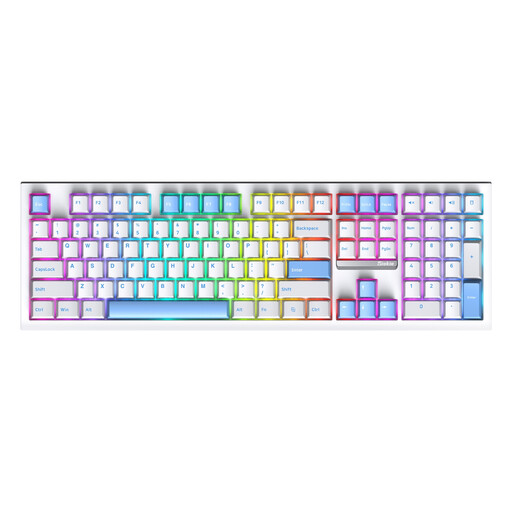
Siukie PL108W 108-key mechanical keyboard, white
Consider this model if a dedicated number pad matters for renewal entry and you want wired and wireless connection options.
- The product information describes a full-size 108-key layout with a numeric keypad, detachable hot-swappable switches, 2.4 GHz wireless, Bluetooth and USB-C wired modes.
- Confirm the exact key layout and legends for your work, and check whether its sound suits a shared room.
- Allow enough desk space to position both keyboard and mouse comfortably at standing height.
Joybuy
Common questions
Where should the keyboard sit when I work standing up?
Place it centrally in front of you and just below elbow height. The Health and Safety Executive also advises avoiding raised shoulders and keeping the mouse in line with your elbow; these checks apply whichever keyboard layout you choose.
Is a number pad useful for club renewals?
A dedicated number pad is worth considering if you frequently enter member references, dates or figures. If most of your work is email and text, you may prefer to weigh that convenience against the desk space taken by a full-size keyboard.
Can one keyboard switch between my club laptop and another device?
Yes, on models that support multi-device connections, but check their limits and your devices before buying. Logitech says MX Keys S switches across up to three devices; Keychron lists Bluetooth pairing with up to three devices for Q6 Max, while Razer states that Pro Type Ultra can control up to four.
Does an employer need to assess a standing computer workstation?
For workers who use display screen equipment daily as part of normal work, continuously for an hour or more, the UK Health and Safety Executive says employers must carry out a workstation assessment. It covers the workstation, the work and the user’s needs; buying a keyboard does not complete that assessment.
Should I check for a UK-ISO keyboard layout?
Yes, if familiar UK key placement matters to your renewal work, check the exact variant and its legends. Keychron distinguishes its UK-ISO Q6 Max from other ISO variants, while the Ticktype DP104 listed above states a US layout.


