Shared-office minute takers
People typing through committee discussions who want keystrokes that do not distract nearby colleagues, visible key-status indicators and a dependable connection.


For a fixed shared-office desk, start with a keyboard whose key feel and sound suit note-taking while colleagues are nearby; a full-size UK/ISO layout is worth considering if minutes regularly include figures and references. A wired model avoids pairing and charging, while multi-device wireless is more useful when the minute taker regularly changes computers. Check the exact layout, connection and workstation fit before choosing.
People typing through committee discussions who want keystrokes that do not distract nearby colleagues, visible key-status indicators and a dependable connection.
Staff entering names, dates, reference numbers and actions at a shared workstation, particularly where a number pad, straightforward wired setup or spill protection matters.
People who move between a work computer, laptop or tablet and need to consider device switching alongside compatibility and charging.
Decide whether the keyboard will stay at one desk or move between devices, then check key sound, layout and connection against the way minutes are recorded.
| Concern | What to check | Who this matters to |
|---|---|---|
| Typing disturbance | Check the exact model's key mechanism and any manufacturer quiet-key claim; try the key feel if sound is especially important. | When discussion continues around me, I want to record decisions without distracting colleagues. Around 42% of consumers put low-distraction typing first. |
| Meeting-detail entry | Confirm the physical UK/ISO layout and printed legends; check for a number pad if figures and references are frequent. | If minutes contain names, votes and reference numbers, I want a familiar layout that helps me keep up. For around 33% of consumers, entering meeting details is the primary concern. |
| Shared-desk upkeep | Check the available USB ports or wireless connection, cable reach where relevant, and the stated cleaning or spill protection. | At a desk used by several staff, I want setup and routine upkeep to interrupt work as little as possible. Dependable shared-desk operation comes first for around 25% of consumers. |
ANSI and ISO layouts differ in key shapes, including Enter and left Shift. An unfamiliar arrangement can mean more corrections while recording a live discussion.
Check the exact variant's layout and printed legends, then match the computer's input-language setting to the keyboard.
A manufacturer's description of quiet or noise-reducing keys does not by itself establish how the keyboard will sound at your desk.
If colleagues are particularly sensitive to typing noise, try a sample before equipping several desks and check the applicable retailer return terms.
Device switching can be useful, but a fixed desk may not benefit from the extra wireless setup.
Choose multi-device wireless when switching or moving the keyboard is part of the work; otherwise, check wired port compatibility and cable reach.
Wireless use also brings charging or battery upkeep and possible pairing effort.
A sealed keyboard design does not replace the manufacturer's cleaning instructions or a suitable shared-workstation arrangement.
Check the protection stated for the exact model, follow its cleaning guidance and include the keyboard in the desk's workstation review.
Kensington has wired office keyboards relevant to fixed and shared desks.
Logitech offers both a basic wired keyboard and a wireless model aimed at work across devices.
The KC 6000 SLIM is a slim, full-size wired scissor-key option.
These keyboards offer different ways to equip a shared-office desk, from full-size wireless models to a keyboard with a wired mode. Check each variant's layout, key feel and connection against your minute-taking routine.
 No image available
Consider this full-size wireless keyboard if you want room for meeting-detail entry without a cable at the desk. Confirm its physical UK/ISO layout, key sound and power requirements before choosing it for a shared room.
 No image available
The split layout and padded wrist rest may be worth assessing if the usual keyboard arrangement feels awkward during long note-taking sessions. Check the physical key layout and whether its wireless setup suits the workstation; the design alone does not establish a comfortable fit for every user.
 No image available
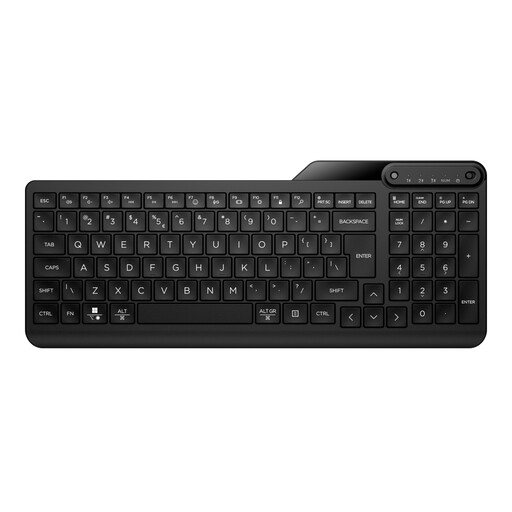
This Bluetooth multi-device keyboard is relevant if the minute taker regularly changes computers. Confirm the physical UK/ISO layout and number-pad arrangement if familiar keys and frequent figure entry are priorities.
 No image available
Consider its tri-mode design if you want a keyboard that can also be used in a wired mode. This 108-key US-layout variant has switches described as silent tactile; try the feel and sound if possible, and check whether its key geometry and operating-system compatibility suit the desk.
 No image available
This Bluetooth wireless model is worth considering where moving between devices matters more than keeping a wired fixed desk. Check the physical UK/ISO layout, key sound and charging routine before using it to record meetings alongside colleagues.
A full-size keyboard is useful when records often contain figures, votes or reference numbers and you use a number pad. If desk space or portability matters more, consider a compact model, but check its exact layout and whether it retains the keys you need.
Wired USB is a straightforward choice for a fixed shared workstation because it avoids charging and wireless pairing. If staff regularly switch between computers or move rooms, a compatible multi-device wireless model may better suit that workflow.
The Health and Safety Executive advises placing the keyboard just below elbow height and keeping the screen and keyboard central to avoid twisting. Consider the whole workstation, not just the keyboard, when arranging a desk for sustained use.
Not necessarily. The Health and Safety Executive advises looking at the whole display-screen workstation, including equipment, furniture and working conditions; keyboard choice is only one part of that assessment.