For drafting and revising a concert programme, start with a keyboard layout that keeps your usual navigation, punctuation and number-entry actions convenient. A compact layout can suit a smaller desk if those actions still work for you; for long typing sessions, consider the keyboard as part of the whole workstation, and check device compatibility before relying on wireless switching or software features.
Who this is for
Long-session programme editors
If you spend extended periods drafting and proofreading at a home desk, key feel matters alongside your chair, display and working position. The Health and Safety Executive advises considering the whole workstation when assessing display screen work at home.
Multi-device organisers
If programme copy, messages and reference material sit on different devices, check the operating systems and switching methods you actually need. Logitech and Keychron describe different connection and switching features across their keyboard models.
Small-desk home-office users
If desk space is limited or shared, a smaller keyboard may be worth considering, provided its key arrangement still suits document editing. Keychron’s 75% K3 Max illustrates why layout needs checking before you choose a compact model.
What matters when choosing
For concert programme work, check the keys and shortcuts you use most, then consider desk comfort, device switching and available space.
| Concern | What to check | Who this matters to |
|---|
| Comfort during long sessions |
Try the keyboard height, angle and palm support at your desk; consider the chair and display position too. |
If I draft and revise for long stretches, I need a typing position I can sustain at my actual workstation. Around 37% of consumers put that comfort need first. |
| Familiar editing layout |
Confirm the physical layout and access to your navigation, punctuation, symbol and number-entry keys. |
When I make repeated corrections and formatting changes, I want the keys I use to be where I expect them. For around 27% of consumers, familiar document editing is the primary concern. |
| Device workflow |
Check each device’s operating system and connection method, plus any software needed for the features you want. |
If I move between programme copy and reference material on different devices, I need the keyboard to work with both. Device workflow comes first for around 18% of consumers. |
| Desk space and disturbance |
Measure the available surface and check whether a smaller layout retains the keys you need; consider the stated key design if noise matters. |
At a shared or narrow desk, I need room to work without giving up essential editing keys. Around 18% of consumers prioritise that workspace fit. |
Buying pitfalls
-
Expecting an ergonomic keyboard to fix the whole workstation
A different keyboard may leave an unsuitable chair, display position or work routine unchanged. The Health and Safety Executive advises assessing the workstation as a whole.
Consider the keyboard in your actual home-office setup, and raise persistent discomfort through your employer’s workstation-assessment process if it applies to you.
-
Choosing compact keys without checking shortcuts
Keychron describes the K3 Max as a 75% keyboard. That arrangement differs from a full-size layout and may change how you access keys used while editing a document.
List your usual navigation, punctuation, formatting and number-entry actions, then check their positions on the specific layout.
-
Assuming wireless features work alike on every device
Operating-system support and feature requirements differ between models. Logitech describes optional software-dependent features for MX Keys S, while Apple specifies Mac hardware and software requirements for its Touch ID keyboard.
Check your devices, connection methods and any companion-software requirements before choosing a keyboard for switching or custom actions.
-
Overlooking old-keyboard take-back
GOV.UK describes a same-type electrical-waste take-back duty for retailers when customers buy electrical goods.
Ask the retailer how to return an old keyboard, or check an appropriate local electrical-waste collection route rather than putting it in general waste.
Keyboard brands to consider
Logitech
Relevant if you are comparing shaped wireless keyboards with productivity models for document work.
- Logitech describes Wave Keys with a cushioned palm rest and Bluetooth or Logi Bolt connection options. Its MX Keys S offers switching among up to three devices.
- Check the particular model and operating system: advanced MX Keys S customisation depends on Logi Options+.
Keychron
Relevant if a compact UK-ISO mechanical layout and remappable keys suit your editing workflow.
- Keychron describes the K3 Max as a 75% low-profile model with wired, 2.4 GHz and Bluetooth connection options and QMK/VIA remapping.
- Check the selected layout’s navigation and number-entry keys before treating it as a substitute for a full-size keyboard.
Apple
Relevant to Mac users considering a compact British English keyboard with Touch ID.
- Apple lists Bluetooth and USB-C charging for its British English Magic Keyboard with Touch ID.
- Apple specifies a Mac with Apple silicon running macOS 15.1 or later for the cited Touch ID model.
Joybuy keyboard choices
These keyboards offer split, full-size and space-conscious layouts for home-office programme work. Compare the stated key layout with your editing habits and check compatibility with your own devices.
 No image available
HP 960 Ergonomic Split Layout Wireless Keyboard with padded wrist rest
Consider this split-layout wireless model if you want a padded wrist rest while drafting for long periods. Confirm the physical key arrangement, operating-system support and editing shortcuts for your setup.
View on Joybuy
 No image available
Targus EcoSmart Full Size Wireless Keyboard (UK)
A full-size UK keyboard is worth considering if familiar key placement matters during document editing. Check that its footprint fits your desk and that your intended device supports the connection you plan to use.
View on Joybuy
 No image available
Ticktype DP104 tri-mode mechanical keyboard, US layout, Powder White, Silent Tactile switches
This 108-key model is an option if you want a full-size mechanical layout and a choice of connection modes. Its stated layout is US rather than UK, so check your punctuation and shortcuts; confirm compatibility with your computer too. The title also specifies hot-swappable switches and an 8000 mAh battery.
View on Joybuy
 No image available
ET Silent wireless keyboard and mouse set, full-size US layout
Consider this set if you want a mouse alongside a full-size keyboard with a wrist rest. The product title specifies a US layout and 2.4 GHz wireless connection; check the key arrangement and receiver fit for your computer. Treat its quiet-typing description as a product claim, not a measured noise level.
View on Joybuy
 No image available
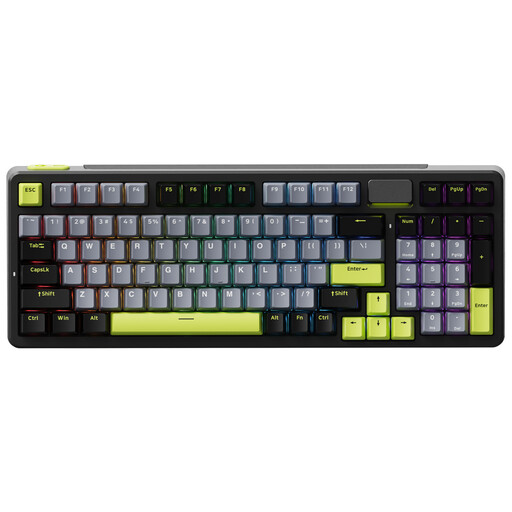
Rapoo V700DIY 96% tri-mode mechanical keyboard, US QWERTY, BG
A 96% layout may suit a desk where you want a smaller arrangement than a conventional full-size keyboard. Check how its US key layout handles your editing shortcuts and number entry. The product name specifies tri-mode connection and a gasket mount.
View on Joybuy
Common questions
Do I need a UK-layout keyboard for a concert programme?
Choose a UK physical layout if that is what you normally use for punctuation, symbols and shortcuts; a different layout is a deliberate choice rather than a requirement for the task. Keychron offers a UK-ISO K3 Max configuration alongside other ISO layouts, so check the selected variant.
Will an ergonomic keyboard solve discomfort at my home desk?
A keyboard alone may not address discomfort if your chair, display position or working routine also needs attention. The Health and Safety Executive advises considering the whole workstation; assess the keyboard in that setting and raise discomfort through an applicable workplace assessment process.
Will Touch ID work with any computer using an Apple Magic Keyboard?
No: Apple specifies a Mac with Apple silicon running macOS 15.1 or later for the cited British English Magic Keyboard with Touch ID. Check both the keyboard version and your Mac before choosing it for that feature.
What should I do with an old keyboard?
Check the retailer’s electrical-waste take-back arrangements when buying a replacement, or use an appropriate local collection route. GOV.UK describes a same-type take-back duty for retailers selling electrical goods; confirm how the retailer handles returns before taking in or sending back the old keyboard.


