Start with a compact keyboard if desk width and room for your mouse are the main constraints, but check whether its UK key layout and editing keys suit your dissertation work. If comfort during long sessions matters more, assess the keyboard alongside screen height, chair position and mouse placement; a larger split keyboard still needs to fit the desk. The Health and Safety Executive advises keeping the screen and keyboard central, with the keyboard just below elbow height where possible.
Who this is for
Writers short on desk space
You need room for a mouse, notes and a laptop while drafting. A compact keyboard may help with mouse placement: Logitech says its MX Keys Mini allows the mouse to sit closer to the keys. The Health and Safety Executive also advises keeping the screen and keyboard central.
Writers planning long sessions
You expect extended drafting and editing sessions and want a workable position at your desk. The Health and Safety Executive advises considering keyboard height, shoulder position, screen placement and mouse reach together.
Writers using UK layouts or several devices
You rely on familiar British key placement or move between devices. Keychron offers a compact K3 Version 3 UK-ISO option with Bluetooth and a wired connection; Apple offers a British English Magic Keyboard for compatible devices.
What to check before buying
Measure the space available for the keyboard and mouse, then check the keys and connections your writing setup requires. Treat comfort as a question about the whole workstation, not the keyboard alone.
| Concern |
What to check |
Who this matters to |
| Desk and mouse space |
Measure usable desk width and depth, allowing room for the mouse and writing materials. Decide whether you need a numpad. |
If I need my mouse and notes beside the keyboard, its footprint could decide whether the setup fits; around 50% of consumers put desk and mouse space first. |
| Long-session comfort |
Check keyboard height and room to position the screen and mouse centrally. Make sure a larger split design would fit. |
When I spend hours drafting, I need a position that does not make me reach awkwardly across the desk; roughly 30% of consumers place long-session setup comfort first. |
| Layout and connection |
Confirm British English or UK-ISO key placement, device compatibility and the connection options you need. |
If I use UK punctuation frequently or switch devices, familiar keys and a workable connection matter most; about 20% of consumers prioritise layout and compatibility. |
Buying pitfalls
-
Assuming every compact keyboard has the same keys
A smaller layout may omit keys you use for editing, citations or tables, while a UK label does not by itself show every key position.
Confirm the British English or UK-ISO variant and inspect its layout diagram for punctuation, navigation keys and a numpad before ordering.
-
Expecting a split keyboard to fix the whole setup
Screen height, chair position and mouse reach still affect how you sit and work. A split model may also occupy more of a narrow desk.
Follow the Health and Safety Executive’s positioning guidance: keep the screen and keyboard central, shoulders relaxed and the keyboard just below elbow height where possible.
-
Choosing a large keyboard before measuring the desk
A full-size model can leave less room for the mouse and notes that need to sit alongside it.
Measure the usable surface, including space for the mouse, before comparing compact and larger ergonomic designs.
-
Assuming wireless means compatible
Bluetooth requirements, supported devices and connection options differ between keyboards.
Check your device’s operating system and Bluetooth capability, how many devices you need to pair, and whether the exact keyboard offers wired use.
Brands to consider for these keyboard formats
Logitech
Its MX Keys Mini and ERGO K860 illustrate two different approaches: a compact keyboard for a crowded desk and a larger split design.
- Logitech says the MX Keys Mini’s compact form allows closer mouse placement; the ERGO K860 has a curved split keyframe, wrist support and adjustable palm-lift positions.
- Check that the full-size ERGO K860 leaves enough room for your mouse and other desk items. Its shape alone does not establish how comfortable your complete setup will be.
Keychron
The K3 Version 3 offers a compact mechanical route for writers considering a UK-ISO layout.
- Keychron lists the K3 Version 3 as a low-profile 75% keyboard with UK-ISO options, Bluetooth and wired connectivity.
- Check the exact switch, backlight and hot-swap variant, as well as the navigation-key placement you would use while editing.
Apple
Its British English Magic Keyboard is a compact option for compatible Apple devices.
- Apple lists the USB-C Magic Keyboard at 27.89 cm wide and 0.239 kg, with Bluetooth connectivity.
- Confirm your device and operating-system compatibility. The standard compact model does not have an integrated numpad.
Microsoft
The Designer Compact Keyboard is a Windows-oriented compact option for writers considering multi-device pairing.
- Microsoft Support says the keyboard can pair with up to three devices.
- Microsoft specifies Windows 10 or Windows 11 and Bluetooth 4.0 or later for setup. Confirm the exact keyboard’s UK layout before choosing it.
Compact keyboards on Joybuy
These compact layouts are options to compare when desk space is the deciding constraint. Check each keyboard’s physical fit, key arrangement and device connection before choosing; a compact format does not replace a well-positioned workstation.
 No image available
ASUS ROG Falchion Ace HFX 65, UK layout
Consider this 65% keyboard if a compact layout is your starting point and you want a model labelled UK layout.
Check the exact key placement for your punctuation and editing shortcuts, and confirm that its connection suits your device.
View on Joybuy
 No image available
HyperX Alloy Rise 75 Wireless Keyboard UK
Consider this wireless 75% model if you want a compact keyboard labelled UK for a desk with limited room.
Check its width against your desk and inspect the exact regional key layout before ordering.
View on Joybuy
 No image available
Razer Huntsman V3 Pro Mini, 60%
Consider this 60% model if keeping the keyboard footprint small matters more than having a larger set of dedicated keys.
Inspect how you would access arrow functions while editing, and confirm the regional key layout and connection you need.
View on Joybuy
 No image available
AULA F75 75%, tri-mode, US layout
Consider this compact 75% model if its wired, Bluetooth and 2.4G connection options suit your devices.
Its title specifies a US layout, so compare the punctuation keys with the UK placement you may use for citations. Check its width and navigation-key arrangement against your desk and workflow.
View on Joybuy
 No image available
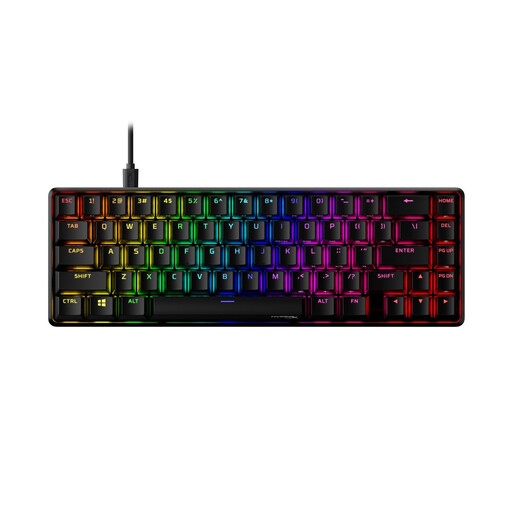
HyperX Alloy Origins 65, HX Red, US layout
Consider this 65% model if you want a compact keyboard and its US key placement works for your writing.
Check its physical width and device connection before ordering, particularly if your desk or available ports are limited.
View on Joybuy
Common questions
Should I use an external keyboard with a laptop for long writing sessions?
An external keyboard and mouse let you raise the laptop screen while keeping the keys at a workable height during prolonged use, as the Health and Safety Executive advises. Keep the screen and keyboard central and position the keyboard just below elbow height where possible.
Does the UK layout matter on a compact keyboard?
Yes, if you rely on familiar British punctuation and key placement. Check that the exact variant says British English or UK-ISO, then inspect its layout; Keychron offers UK-ISO options, while Apple lists a British English Magic Keyboard.
Is a split keyboard worth considering for a small desk?
Consider a split keyboard if it fits alongside your mouse and other work materials and you prefer its shape. A larger design is not a substitute for positioning the screen, keyboard, chair and mouse well; the Health and Safety Executive advises assessing the whole setup.
What should I check before choosing Bluetooth for dissertation work?
Check your device’s Bluetooth compatibility, how many devices the keyboard can pair with and whether you need a wired option. Microsoft Support says the Designer Compact Keyboard pairs with up to three devices, while Keychron lists both Bluetooth and wired connectivity for the K3 Version 3.


