What matters when choosing
For public-dataset work at a standing desk, decide which matters most to your daily tasks: adjustable hand position, direct number entry or room around the keyboard.
Full-size, familiar layout
Consider it when: You frequently enter numbers and want a dedicated number pad without changing your usual key positions.
Trade-off: Allow enough desk width to keep the mouse within comfortable reach.
Compact 75% layout
Consider it when: Space beside the keyboard matters more than a dedicated number pad, and you are willing to use another method for numeric functions.
Trade-off: Check how the exact layout handles the keys and symbols you use most.
Adjustable split layout
Consider it when: Separating and angling the keyboard halves is more important to you than retaining a conventional layout.
Trade-off: Allow time to adapt; Kinesis says most Advantage360 users take 1–2 weeks to regain full typing speed, although individual results vary.
| Concern |
What to check |
Who this matters to |
| Wrist position |
At standing height, check that your wrists can stay straight while typing and that there is space to rest your hands when you pause. |
If I work through datasets for long stretches, I need a keyboard position that fits the rest of my workstation. Around 36% of consumers might make that fit their primary concern. |
| Number entry |
Check whether you need a dedicated number pad and familiar navigation keys for your regular tasks. |
Entering values across many cells makes direct access to number keys important to me; around 29% of consumers might put numeric entry first. |
| Desk space and connections |
Measure the space available for both keyboard and mouse, then check the connection methods required by your devices. |
When my standing desk also holds other work materials, I want room to position the mouse and connect the devices I use. Roughly 21% of consumers might prioritise that flexibility. |
| Programmable keys |
Identify the commands you repeat, and confirm that the keyboard's remapping method works with your software and operating system. |
Repeated filtering and documentation make configurable shortcuts useful to me; around 14% of consumers might choose chiefly for that capability. |
Joybuy keyboard options
These options include full-size, compact and split-layout keyboards for desk-based data work. Compare each physical layout with the keys you use most, then check how the keyboard fits your standing workstation.
 No image available
HP 960 Split Layout Wireless Keyboard with Padded Wrist Rest
Consider its split layout if hand placement is a priority, while checking that the arrangement suits your desk. The product name specifies wireless operation and a padded wrist rest; confirm the physical key layout you need for UK typing and whether a separate numeric keypad is included.
View on Joybuy
 No image available
Targus EcoSmart Full-Size Wireless Keyboard (UK)
The UK full-size layout is worth considering if familiar key placement matters in your data work. Check the exact key arrangement for the numeric entry you do, and confirm shortcut or remapping support separately if you need it.
View on Joybuy
 No image available
Ticktype EVO75, US Layout, Creamy Rye Switches, Spray-coated Nebula
Consider this mechanical keyboard if you want to compare a more compact arrangement with your current desk setup. Its product name specifies tri-mode wireless operation, hot-swappable switches, VIA compatibility and an 8000mAh battery; check whether its US physical layout and numeric-key access suit your work.
View on Joybuy
 No image available
ET Silent Full-Size Wireless Keyboard and Mouse Set, US Layout
This set may suit you if you want a full-size keyboard and mouse together for your desk. The product name specifies a 2.4 GHz wireless connection and US layout; check the physical keys against your typing needs and confirm any programmable-shortcut requirements separately.
View on Joybuy
 No image available
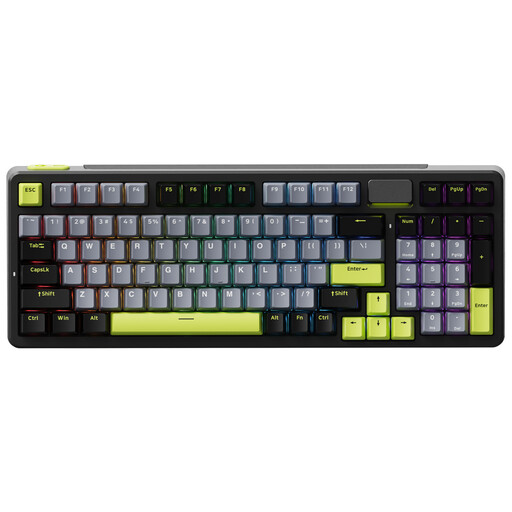
Rapoo V700DIY 96% Mechanical Keyboard, US QWERTY, Gasket Mount-BG
The 96% layout is an option to examine if desk width matters but you do not want to assume every compact keyboard has the same key arrangement. The product name specifies tri-mode operation and a US QWERTY layout; check its numeric-key arrangement and programmable features against your tasks before choosing it.
View on Joybuy
Common questions
Do I need an ergonomic keyboard for a standing desk?
Not necessarily: start by arranging the desk, screen, keyboard and mouse so you can work with straight wrists. A wave-shaped or adjustable split keyboard may be worth considering if you want different hand-positioning options, but it does not replace workstation adjustment or serve as a medical treatment.
Is full-size or 75% better for exploring public datasets?
Choose full-size if you frequently rely on a dedicated number pad; consider 75% if space around the keyboard matters more and you can work without one. Logitech offers a full-size MX Keys S, while Keychron specifies a 75% layout for the K3 Max. Check the exact keys you use for navigation before deciding.
How do I check whether a keyboard has a UK physical layout?
Look for an explicit UK or UK-ISO selection for the exact variant you intend to order; a UK English software setting is not enough. Keychron, for example, identifies a UK-ISO option for the K3 Max, so check that the selected configuration matches it.
Will a split keyboard slow down my typing at first?
It can if the layout changes your familiar hand positions. Kinesis says most Advantage360 users take 1–2 weeks to return to full typing speed, although results vary; allow practice time before relying on a new layout for deadline-sensitive work.
Does a UK employer have to assess a standing-desk workstation?
For UK workers who use display screen equipment daily as part of their normal work, continuously for an hour or more, the Health and Safety Executive says employers must carry out a workstation assessment. That assessment concerns the workstation; it does not require a particular keyboard model.


