Writers sharing a quiet workspace
You draft near colleagues and want a clear reason to expect less keyboard noise, rather than choosing on appearance or switch type alone.


If nearby colleagues can hear your typing, start with a keyboard that makes an explicit claim about keyboard noise rather than assuming a slim or mechanical design will be quiet. Then weigh comfort during long drafting sessions against desk space, physical layout and connection requirements. Logitech’s noise-reduction claim for the MK295 applies to that particular keyboard-and-mouse combo; it does not establish how the other keyboards compare.
You draft near colleagues and want a clear reason to expect less keyboard noise, rather than choosing on appearance or switch type alone.
You spend extended periods outlining, editing and rewriting, so key feel and wrist or palm support matter alongside noise.
You switch between devices, need a particular UK layout or want enough desk space for notes as well as a keyboard and mouse.
For synopsis writing around colleagues, check the typing-noise claim first. Then decide which comfort, layout and connection features your own desk and computer require.
| Concern | What to check | Who this matters to |
|---|---|---|
| Typing noise | Check whether a quiet-typing claim covers the keyboard itself and whether its connection works with your computer. | If colleagues sit close by, I want my drafting to cause less disturbance. Around 46% of consumers put noise control first. |
| Long-session comfort | Consider key height, keyboard shape and whether a palm rest suits your usual desk position. | During repeated drafting and revision, I need a typing position I can work with for longer stretches. Comfort comes first for around 27% of consumers. |
| Layout and device fit | Confirm the exact physical layout, keypad needs, connection method and compatibility with your devices. | When I switch devices or keep printed notes beside the keyboard, the keys and desk footprint need to fit my workflow. Around 27% of consumers prioritise layout and device fit. |
Logitech says increased key stability reduces noise on the MX Keys S, while Keychron describes quieter keystrokes from the K1’s acoustic foam. Neither statement gives a like-for-like noise measurement against the MK295.
If quiet typing is essential, check what the claim covers for the exact keyboard and do not treat an unquantified description as a noise comparison.
Keychron offers K1 layout and switch variants, while Apple identifies its cited Magic Keyboard as British English. The selected variant affects the physical keys and familiar shortcuts.
Confirm the precise layout designation, such as UK-ISO or British English, before ordering rather than relying on a product photo.
A receiver-based keyboard and a Bluetooth keyboard place different demands on an office computer, especially where ports or wireless connections are restricted.
Check permitted connections, available ports and any adapter you would need. If you write on several devices, confirm how switching between them works.
GOV.UK identifies electrical and electronic equipment as subject to waste rules intended to reduce disposal through landfill or incineration.
Check your local electrical-recycling route or ask the seller how its applicable take-back arrangements work.
Its cited keyboards cover a quiet keyboard-and-mouse combo, low-profile multi-device typing and a contoured ergonomic design.
The K1 Version 6 is an option for writers seeking a low-profile mechanical keyboard with a UK-ISO variant and programmable keys.
The cited Magic Keyboard is a compact British-English option for compatible Apple devices.
The cited Surface Keyboard (2nd Edition) is a full-size option for a Windows-oriented desk setup.
These options cover supported approaches to shared-office drafting, including wrist support, full-size typing, multi-device use and compact layouts. Check each model’s physical layout and connection against your workstation; descriptions of quiet keys are not interchangeable noise measurements.
 No image available
Consider this option if wrist-rest support matters during long drafting sessions. Its name specifies a split layout and padded wrist rest; confirm the physical key layout and available desk space before buying.
 No image available
Consider a full-size board if you prefer more space between the main typing area and mouse to be a lower priority than the larger keyboard format. Confirm that the selected UK variant has the physical keys you expect and that its connection suits your computer.
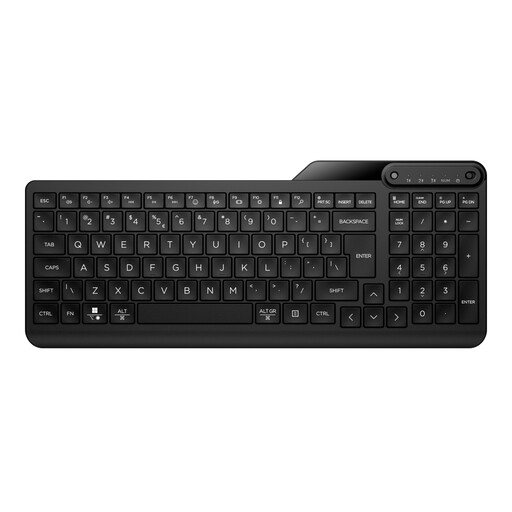 No image available
This is worth considering when drafting moves between devices. Check compatibility with each device, along with the physical key layout and dimensions if desk fit matters.
 No image available
Its compact format may appeal if printed notes share your desk. The product name specifies 78 keys, a US layout, membrane keys, 2.4 GHz and Bluetooth connections, and support for four devices; check whether the US keys suit your writing habits.
 No image available
Consider the bundle if you want a keyboard and mouse at a fixed desk. Its name specifies a US layout and 2.4 GHz wireless connection; check that the layout, bundled mouse and receiver-based setup fit your needs.
Start with an explicit claim about keyboard noise for the exact model. Logitech says its MK295 SilentTouch combo eliminates over 90% of keyboard and mouse noise; that manufacturer claim does not tell you how loud another keyboard will be beside colleagues.
A compact or tenkeyless layout can suit a desk where you need room for notes, provided you do not rely on a numeric keypad. The Keychron K1 cited here has an 80% tenkeyless layout, while Microsoft lists a built-in number pad on its Surface Keyboard (2nd Edition).
Check the selected variant’s physical keys and connection method, not just its product-family name. Keychron offers a UK-ISO K1 variant, Apple identifies its cited Magic Keyboard as British English, and different keyboards require Bluetooth, a receiver or a cable.
Use an appropriate electrical-equipment collection or recycling route rather than assuming ordinary household rubbish is suitable. GOV.UK explains that electrical waste is regulated to reduce disposal through landfill or incineration; check your local collection options or the retailer’s applicable take-back arrangements.