Choose a keyboard setup around the painting shortcuts you use most, the space your drawing device needs and whether the same desk must also support everyday typing. A compact main keyboard can free desk space, a full-size keyboard keeps more dedicated keys, and a separate programmable controller can add reachable commands without replacing your typing keyboard. Check the physical key layout and the software needed to assign your chosen shortcuts before buying.
Who these setups suit
Shortcut-heavy digital painters
If you frequently change brushes, tools, layers or canvas views while holding a stylus, consider whether your most-used commands can sit within easy reach. Adobe documents keyboard shortcuts for common Photoshop actions, while Clip Studio Official Support describes using registered key combinations for commands. A programmable key cluster is useful only if it can send the shortcuts your application accepts.
Pen-tablet users with limited desk space
A keyboard has to share the desk with your drawing device and mouse. A 75% layout such as the Keychron K2 QMK UK-ISO version takes less width than a full-size layout and retains arrow keys, but check whether you can manage without a numpad and some dedicated navigation keys.
People mixing office work and digital art
If the same keyboard handles typing, meetings and painting, weigh ordinary text entry and device switching alongside shortcut access. Logitech describes programmable keys and low-profile options in its MX range; confirm that its configuration software supports the devices you intend to use.
What matters when choosing
For game-character painting at a home-office desk, identify the commands you reach for most, then consider the space needed for your drawing device and the keyboard's role in other work.
| Concern |
What to check |
Who this matters to |
| Painting shortcuts |
List your frequent commands; check remapping software and whether your art application accepts the assigned keys. |
When I repeatedly change tools or layers, I want commands within reach rather than navigating menus. Around 40% of consumers put shortcut access first. |
| Drawing space |
Measure the room for your keyboard, drawing device and mouse; decide whether you need a numpad or dedicated navigation keys. |
With a pen tablet beside my keyboard, I need enough room to move my hand comfortably. Preserving drawing space comes first for around 30% of consumers. |
| Mixed-work setup |
Check the physical layout, device-switching method and configuration requirements; consider the whole workstation arrangement. |
If I type for work and paint at the same desk, the keyboard also has to fit my preferred key feel and devices. Around 30% of consumers prioritise that mixed-use fit. |
Buying pitfalls
-
Expecting a shortcut controller to replace a keyboard
A programmable controller can put painting commands together, but it does not provide a full set of keys for normal text entry.
Keep a typing keyboard in the setup if you choose a separate controller.
The additional device also needs space beside your drawing equipment.
-
Choosing a compact layout before checking your commands
A 75% board saves desk width by moving some functions to key combinations or layers. That trade-off matters if you regularly use a numpad or dedicated navigation keys.
Write down your painting, navigation and number-entry commands, then check whether the smaller layout gives you a workable way to reach each one.
-
Judging comfort by the keyboard alone
The Health and Safety Executive's workstation guidance considers keyboard placement alongside the screen and the rest of the desk arrangement.
Position the keyboard centrally and just below elbow height, and consider where the pen tablet and mouse sit so that you do not have to twist to use them.
-
Assuming every programmable feature works on every computer
Assigning keys can depend on the operating system, connection and configuration tool, as well as the commands recognised by your drawing application.
Check the requirements for the exact variant you want. Keychron says its Launcher configuration for the K2 QMK requires a wired connection and a supported browser.
Brands to consider
Keychron
Relevant if you want a programmable UK-ISO main keyboard and are deciding between a compact layout and a full key set.
- Keychron describes the K2 QMK UK-ISO as a 75% keyboard with Bluetooth and wired operation, QMK firmware and key remapping. Its K5 QMK UK-ISO provides a 100% layout with configurable keys.
- A compact layout omits some dedicated keys; check the configuration requirements and the availability of the exact variant you choose.
Logitech
Relevant if one home-office keyboard needs to handle ordinary typing and occasional painting shortcuts.
- Logitech describes MX Keys S as a low-profile keyboard with programmable keys and switching across up to three devices. Its MX Mechanical line offers Tactile Quiet, Clicky and Linear switch variants.
- Shortcut configuration depends on Logi Options+ and supported operating systems; preferred key feel and sound are individual choices.
Razer
Relevant if you want to add a separate command cluster while keeping your existing typing keyboard.
- Razer describes the Tartarus V2 as a keypad with 32 programmable keys, an eight-way thumbpad and an adjustable, detachable palm rest.
- It is not a full typing keyboard. Check Razer Synapse requirements and whether your intended commands work with your computer and drawing application.
Joybuy product choices
These choices include separate command controllers for use alongside a keyboard and main keyboards for everyday typing. Decide which role you need before comparing their layouts and shortcut options.
 No image available
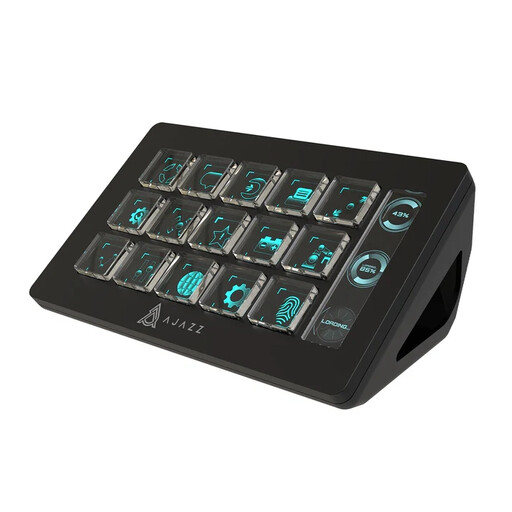
AJAZZ AKP153 Studio Controller (Black)
Consider this separate controller if you want painting commands on dedicated buttons while retaining your typing keyboard.
The product name specifies 15 macro buttons and PC/Mac use. Check that its setup software, your drawing application and the commands you intend to assign work together.
View on Joybuy
 No image available
HP 430 Programmable Wireless Keypad
This supplementary keypad suits someone who wants assigned commands without replacing the main keyboard.
It is a programmable wireless keypad, not a full typing keyboard. Confirm that HP Accessory Centre and your intended shortcuts work on your computer and in your drawing application.
View on Joybuy
 No image available
Targus EcoSmart™ Full Size Wireless Keyboard (UK)
Consider this main keyboard if normal office typing and a full-size key set matter more than saving desk width.
Check the space it leaves for your drawing device and the exact physical positions of keys you use for shortcuts. If you need to assign new commands to keys, confirm its remapping options before buying.
View on Joybuy
 No image available
AULA F75 75% Wireless Keyboard (US QWERTY)
This compact main keyboard is worth considering when a drawing device needs room beside your typing keys.
The named variant has wired, Bluetooth and 2.4G modes, RGB backlighting and PBT keycaps. Its US QWERTY layout may put punctuation keys in unfamiliar positions; check the shortcuts you use and confirm any remapping capability you require.
View on Joybuy
Common questions
Do I need a UK-ISO keyboard for painting shortcuts?
No, but choose a physical layout whose shortcut keys you can locate reliably. UK-ISO and US layouts place some punctuation and symbol keys differently; check the exact variant rather than assuming every version of a keyboard has the same layout.
Should I buy a compact keyboard or add a shortcut keypad?
Choose a compact main keyboard if your priority is making room for drawing equipment while keeping normal typing keys. Add a keypad or controller if you want a separate command cluster and can keep your existing keyboard and an extra device on the desk.
Will a programmable keyboard work with Photoshop or Clip Studio Paint?
It can send useful commands when its assigned keys match shortcuts recognised by your application. Adobe documents Photoshop shortcuts, and Clip Studio Official Support describes registered shortcut combinations; check your application version, intended commands, operating system and keyboard configuration tool together.
Can a different keyboard fix an uncomfortable home-office art setup?
A keyboard change alone may not address the way the whole workstation is arranged. The Health and Safety Executive advises positioning the keyboard centrally and just below elbow height; consider the screen, desk, pen tablet and mouse positions as well.


