A full-size wired USB keyboard is a straightforward choice for help-centre formatting if the computer has a spare compatible port and you want to avoid managing a keyboard battery. Choose compact Bluetooth if desk space and switching between devices matter more than a dedicated number pad; consider a multi-mode keyboard if you need more connection flexibility while retaining the keys you use for formatting. Whichever route you take, check the selected layout and your host device’s connections before buying.
Who needs which layout?
The right keyboard depends on whether formatting happens at one desk, across several devices or alongside colleagues in a shared space.
Desk-bound formatting editors
If you repeatedly edit headings, lists, links, reference numbers or templates at one workstation, a full-size layout and number pad may be worth the desk space. Logitech’s K120 and Dell’s English-UK KB216 are examples of USB keyboards with number pads.
Multi-device editors
If you move between a workstation, tablet or phone, check whether each device supports the keyboard’s connection method. Logitech states that its compact Pebble Keys 2 K380s can switch between three paired devices; compactness still needs to work with your usual formatting keys.
Shared-space support teams
If several people use the same workspace, check the selected keyboard’s regional layout and key arrangement before standardising on it. Where typing noise matters, assess the exact model’s key feel and sound rather than assuming every keyboard from a brand behaves alike.
What should you check first?
With few free wall sockets, start by checking the computer’s available USB ports and Bluetooth support. Then decide whether a full-size key set or a smaller desk footprint matters more to your formatting work.
Full-size wired USB
Choose when: You work mainly at one computer, have a spare compatible USB port and want no keyboard battery routine.
Trade-off: The cable occupies a computer port and adds to the desk connections.
Compact Bluetooth
Choose when: Desk space and moving between compatible devices matter more than a dedicated number pad.
Trade-off: The smaller key arrangement may change your shortcuts, and wireless use still needs battery management.
Full-size multi-mode
Choose when: You want full-size formatting controls but expect to use different connection methods across devices.
Trade-off: You must check which modes your devices support and how the keyboard is powered in each mode.
| Concern |
What to check |
Who this matters to |
| Power and ports |
Check for a spare compatible computer USB port or Bluetooth support, then check the wireless model’s battery or charging method. |
If I cannot spare another wall socket, I need to know whether I would rather use a computer port or manage a battery. Around 42% of consumers put this power-and-port decision first. |
| Formatting keys |
Check the selected layout for a number pad, navigation keys and the shortcuts you regularly use. |
When I enter reference numbers and move through long articles, reaching familiar keys matters more to me than saving desk space. Roughly 33% of consumers prioritise those formatting controls. |
| Flexible workspace |
Check device-switching controls, desk footprint and whether the exact keyboard’s typing sound suits a shared room. |
If I move between work devices or type near colleagues, I need a setup that fits that routine without giving up essential keys. About 25% of consumers place that flexibility first. |
Mistakes to avoid
-
Assuming wireless means no power management
A wireless keyboard avoids a permanent keyboard cable, but it still needs batteries or charging. Keychron’s stated battery life for the B6 Pro is a manufacturer figure tied to its described use pattern, not a reason to assume charging will never interrupt work.
If avoiding a battery routine is your priority, consider wired USB. Otherwise, check the battery type, charging method and conditions attached to any stated runtime.
-
Assuming a UK storefront means a UK key layout
Dell lists an English-UK QWERTY KB216, while a similarly named KB216 listing on Joybuy identifies a US International QWERTY layout. A shared model name therefore does not settle where the punctuation keys will be.
Check the exact selected variant’s layout description and images for English-UK QWERTY or UK-ISO before buying.
-
Choosing a compact keyboard before checking its keys
A smaller board may free desk space but can change key placement or leave out a dedicated number pad used for codes and structured content.
Write down the number, navigation, function and shortcut keys you use during a normal formatting session, then compare that list with the selected layout.
Relevant brands and models
These model examples illustrate different connection and layout choices; their features should not be assumed to apply to every keyboard from the same brand.
Logitech
Logitech has model examples spanning full-size USB and compact wireless layouts.
- Logitech describes the K120 as a full-size USB keyboard with an integrated number pad, and the compact Pebble Keys 2 K380s as a Bluetooth keyboard with three-device switching.
- Check the exact model’s layout and controls: the compact MX Keys Mini’s programmable keys and illumination do not describe the K120 or Pebble Keys 2 K380s.
Dell
Dell’s KB216 is a reference point for a conventional wired office keyboard, provided you select the intended regional variant.
- Dell’s English-UK QWERTY KB216 listing specifies a USB Type-A cable connection and numeric keypad.
- A similarly named Joybuy KB216 listing identifies a US International QWERTY layout; confirm the selected variant rather than relying on KB216 alone.
Keychron
The B6 Pro UK-ISO is a full-size option for consumers considering more than one connection method.
- Keychron lists wired, Bluetooth and 2.4 GHz modes for the B6 Pro UK-ISO.
- Select the UK-ISO variant deliberately. Keychron’s stated battery life of up to 1,200 hours depends on its described use pattern and is not an independently measured result.
Keyboard choices on Joybuy
These choices include wired keyboard-and-mouse sets for a fixed desk and wireless keyboards for consumers considering fewer cables or different connection arrangements. Compare their selected layouts and connection requirements against the devices you actually use.
 No image available
MSI GK-701 Office keyboard and mouse set, UK layout
For a fixed workstation where you want to avoid a keyboard battery routine, this USB keyboard-and-mouse set is worth considering. Its name specifies a UK layout and Copilot key; check that the computer has suitable ports for both wired devices and that the key works as you expect with your operating system.
View on Joybuy
 No image available
Targus EcoSmart full-size wireless keyboard, UK
For desk-based formatting without a permanent keyboard cable, this full-size wireless model offers a layout to consider. Check its connection method against your computer, along with its charging arrangement and the exact keys on the selected UK variant.
View on Joybuy
 No image available
Hyper HyperSpace Next Bluetooth keyboard, UK, white
If you want a keyboard connection without a permanent cable, this UK-named Bluetooth model is an option to examine. Confirm Bluetooth support on each intended device, the selected key layout and how the keyboard is charged.
View on Joybuy
 No image available
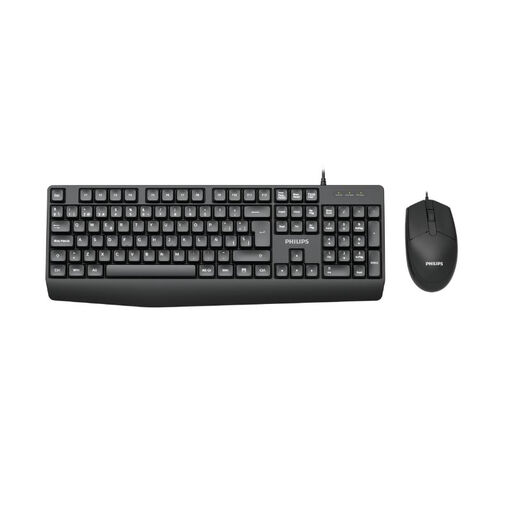
Philips 2000 Series SPT6237B/05 wired keyboard and mouse set, UK English
For a fixed desk where you also need a mouse, this wired UK English set avoids a keyboard battery routine. If frequent number entry matters, check the keyboard’s exact key arrangement before choosing it, and confirm that the computer has ports for both devices.
View on Joybuy
 No image available
ASUS ROG Strix Scope II 96 Wireless gaming keyboard, UK, white
If you want to assess a 96-layout wireless keyboard for formatting work, compare its number and navigation keys with the full-size arrangement you use now. Confirm the selected UK key layout, available connection modes and wireless power requirements before buying.
View on Joybuy
Common questions
Will a wired USB keyboard use one of my wall sockets?
A wired USB keyboard such as Logitech’s K120 connects to the computer rather than taking a separate keyboard wall socket. You still need a spare compatible computer USB port and room for its cable.
How can I avoid buying a US layout for a UK workstation?
Check that the selected variant explicitly says English-UK QWERTY or UK-ISO, then inspect its key images. Dell’s English-UK KB216 and the US International KB216 listed on Joybuy show why the model name alone is not enough.
Is Bluetooth the better choice when sockets and USB ports are scarce?
Bluetooth can avoid a keyboard cable or USB receiver if the computer supports it, but it adds a battery or charging routine. If you have a spare computer USB port and prefer not to manage a keyboard battery, a wired model may be simpler for a fixed desk.


