Choose adjustable or adaptive key lighting if changing daylight makes the legends difficult to locate, but deal with reflections on the screen by changing the display and lighting arrangement. For a long interview-profile draft, consider keyboard shape and wrist position as well; a compact mechanical layout makes more sense when desk space matters and you can work without a dedicated number pad.
Who this choice affects
Writers working in changing daylight
If light at the window changes while you draft, illuminated keys may help you locate their legends. Screen reflections are a separate issue: the Health and Safety Executive advises arranging screens and lighting to avoid glare.
Writers drafting for long stretches
If hand and forearm position matters during sustained typing, consider keyboard shape and palm support alongside the rest of your desk setup. The Health and Safety Executive advises looking at the whole workstation, not just one piece of equipment.
Writers using a small desk or several devices
A compact layout may leave more room for notes beside your screen, provided you can work without a dedicated number pad. If you move between devices, check their compatibility with the keyboard’s connection options.
What to check when buying
Separate key visibility from screen glare, then decide whether typing position or layout will have the greater effect on your drafting workflow.
| Concern |
What to check |
Who this matters to |
| Keys in changing daylight |
Check whether the exact layout has illuminated legends and whether brightness is manual or adaptive. Position the display separately to limit reflections. |
When daylight shifts during a draft, I want to find keys without struggling to read their legends. Around 50% of consumers put that need first. |
| Comfort during a long draft |
Consider key height, keyboard shape and the space a palm rest needs on your desk. Assess the wider workstation if discomfort persists. |
For sustained writing and editing, I care most about how my hands and forearms sit at the desk. That is the main concern for around 30% of consumers. |
| Layout and device workflow |
Confirm the exact UK key layout, whether you need a dedicated number pad, and which connection modes work with your devices. |
With limited desk space or several devices in use, I need the keys and connections to fit my routine. Around 20% of consumers prioritise this fit. |
Buying pitfalls
-
Expecting keyboard lighting to remove screen glare
Illuminated keys address key visibility, not reflections on the display. The Health and Safety Executive advises arranging screens and lighting to avoid glare.
Choose lighting for the keys if you need it, then adjust the screen position or surrounding light if the display remains difficult to view.
-
Choosing a compact layout before checking your keys
A 75% layout, such as the Keychron K3 Max configuration described by Keychron, does not have a dedicated number pad.
Check the shortcuts and number-entry keys you use while drafting before deciding between a compact and full-size layout.
-
Expecting keyboard shape to fix the whole workstation
A wave-shaped board or palm rest changes one part of the setup. Health and Safety Executive guidance considers equipment, furniture and working conditions together.
Check keyboard fit alongside desk height, chair position, screen placement and lighting.
-
Assuming a UK listing has a UK-ISO layout
Key placement depends on the exact variant. Keychron, for example, identifies UK-ISO as a configuration of its K3 Max line.
Confirm the listed layout and symbol placement for the variant you are ordering rather than relying on the product family name.
Relevant brands to consider
Logitech
Its MX Keys S and Wave Keys illustrate different routes for this decision: illuminated low-profile typing and a wave-shaped keyboard with palm support.
- Logitech lists adaptive illumination and switching across up to three devices for MX Keys S.
- Wave Keys’ shape and cushioned palm rest should not be taken as features of MX Keys S, or its lighting assumed for Wave Keys. Check the exact model and layout.
Keychron
The K3 Max UK-ISO line is relevant if you want a compact, low-profile mechanical keyboard.
- Keychron lists 2.4 GHz, Bluetooth and wired connection options for the K3 Max.
- Its 75% layout omits a dedicated number pad. Confirm the exact layout and switch variant before choosing it for daily drafting.
CHERRY
The STREAM DESKTOP offers a keyboard-and-mouse-set route for a shared workspace.
- CHERRY describes the set’s SX scissor keys as quiet when typing.
- It is a set rather than a keyboard-only choice; check whether the mouse and connection method suit your desk.
Joybuy keyboard options
These keyboards offer different ways to approach the same drafting setup, from illuminated keys and compact layouts to split keys and wrist-rest options. Check each model’s exact layout and lighting controls against the issue you most want to solve.
 No image available
Hyper HyperSpace Next Bluetooth wireless keyboard, UK, white
Consider this model if changing daylight makes illuminated keys useful while you draft across devices. Check whether its lighting controls suit you; key lighting will not remove reflections from your screen.
Bluetooth wireless keyboard; UK variant; white.
View on Joybuy
 No image available
HyperX Alloy Rise 75 wireless keyboard, UK
Consider this keyboard if you want illuminated keys and a smaller working area beside your notes. Confirm the exact key layout and the keys you rely on before ordering; adjust the display separately if window glare is the problem.
Wireless keyboard.
View on Joybuy
 No image available
HP 960 ergonomic split-layout wireless keyboard with padded wrist rest
This is a route to consider if hand position during a long draft matters more to you than key illumination. Check that the split layout and wrist rest fit your desk and typing position; assess the wider workstation too.
Wireless design; split layout; padded wrist rest.
View on Joybuy
 No image available
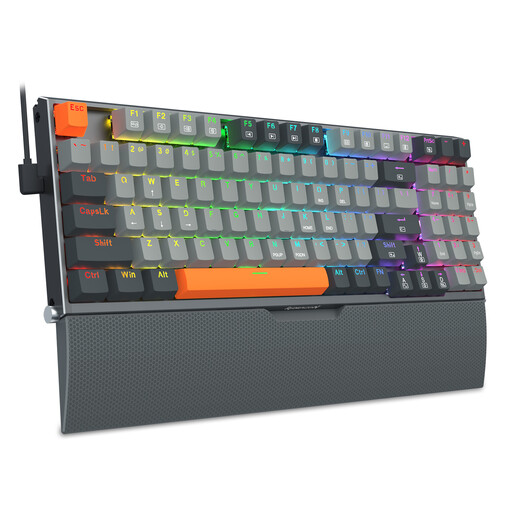
REDRAGON 94-key full-metal wired mechanical keyboard with phone stand and wrist rest
Consider this wired option if you want mechanical keys and a wrist rest at a fixed writing desk. Check its exact key layout and whether its lighting controls meet your needs as daylight changes.
94-key, full-metal wired mechanical design; phone stand and wrist rest.
View on Joybuy
 No image available
ASUS ROG Strix Scope II 96 wireless keyboard, UK layout, black
Consider this model if your drafting workflow calls for a UK layout and you want to check whether its key arrangement suits number entry. Confirm the included switch variant and lighting controls if typing feel or changing daylight is central to your choice.
Wireless keyboard; UK layout; black.
View on Joybuy
Common questions
Will a backlit keyboard solve glare from a bright window?
No. Backlighting helps you locate keys, while reflections on the display call for a change to the screen or lighting arrangement. The Health and Safety Executive advises arranging both to avoid glare.
Should I choose a full-size or compact keyboard for interview drafting?
Choose a layout with a dedicated number pad if you use one routinely; consider a compact 75% board if desk space matters more and you can work without it. Check your usual shortcuts and the exact key layout before ordering.
Can one keyboard work with my laptop, tablet and desktop?
It can if the exact keyboard and each device have compatible connection options. Logitech says MX Keys S can switch across up to three devices, while Keychron lists 2.4 GHz, Bluetooth and wired options for K3 Max; check device compatibility and layout for the variant you choose.


