Shortcut-heavy city builders
If you manage complex settlements or production chains, you may want ready access to function keys, number keys, a numpad or remapped controls rather than a minimal layout.


Choose the layout around the commands you actually use: a 96% or full-size keyboard keeps more keys within reach, while a tenkeyless (TKL) board frees desk space but omits the numpad. Then decide whether you need separate macro keys or remapping, and check the exact switch, UK layout and connection options before buying.
If you manage complex settlements or production chains, you may want ready access to function keys, number keys, a numpad or remapped controls rather than a minimal layout.
For extended play and typing, switch feel and sound, keyboard height, tilt and wrist support may matter as much as gaming controls.
If your large-screen PC shares a desk with other devices, connection choices and keyboard footprint matter—but they should not come at the expense of keys you regularly use.
List your regular game commands before choosing a keyboard size. Once the layout works for you, compare control customisation, long-session feel and connection options.
| Concern | What to check | Who this matters to |
|---|---|---|
| Key layout | Check the exact UK or US layout, numpad, function row and placement of arrow and navigation keys. | When I use numbers and shortcuts throughout a game, I want those keys where I expect them rather than behind a layer. Around 36% of consumers put familiar key access first. |
| Macros and remapping | Distinguish separate macro keys from remapping; check required software and whether your game permits the intended commands. | I want repeatable controls close at hand, but I may prefer remapping to an extra column of keys. For roughly 29% of consumers, custom control access is the primary need. |
| Feel and noise | Check the fitted switch type and available tilt or wrist support, particularly if others share the room. | During longer sessions, I care about how the keys feel and sound, not just their gaming specifications. About 21% of consumers prioritise long-session feel and noise. |
| Connections | Check wired, 2.4 GHz and Bluetooth modes on the exact variant, plus any receiver or cable you need. | If I move between devices or want fewer cables on the desk, I need connection choices that fit that setup. Connection flexibility comes first for around 14% of consumers. |
A compact board may replace familiar controls with key combinations, which can interrupt command-heavy play.
Note which numpad, function, arrow and navigation keys you use. Choose TKL only if its missing numpad works for you; compare the exact key arrangement of any 96% model.
Separate macro keys and software remapping involve different key positions and setup steps.
If you want distinct physical controls, check their number and location. For remapping, check software compatibility, profile storage and your game’s rules.
Switch options and keyboard construction can change the typing experience; a response-rate claim does not tell you whether a board will feel comfortable over a long session.
Confirm the switch fitted to the exact variant and consider the sound in a shared room. If you cannot try it, read the seller’s applicable return terms before ordering.
The ROG Strix Scope II 96 Wireless is a model-specific option for players who want number-key access in a compact layout.
The K70 CORE TKL suits a desk-space-first approach when a function row matters more than a numpad.
The BlackWidow V4 is worth considering if separate macro inputs matter more than a small footprint.
The G915 X LIGHTSPEED TKL is a low-profile option for players interested in remapping and multiple connection modes.
The Apex Pro TKL Gen 3 offers switch adjustment for buyers who want to configure key actuation.
These keyboards offer different approaches to desk space, key access and connection flexibility for a large-screen city-building setup. Compare each exact layout and variant against the controls you use.
 No image available
Consider its compact arrangement if desk space matters, but check the keys you use for game commands. The title specifies wired, Bluetooth and 2.4G modes and US QWERTY; confirm the fitted switch before choosing it for a particular feel.
 No image available
Consider this model if you want function and number keys in a compact layout. ASUS ROG specifies three connection modes and a detachable wrist rest for the ROG Strix Scope II 96 Wireless; confirm the switch fitted to this White UK-layout variant.
 No image available
Consider its compact 75 layout if saving desk space is your priority. Check the exact key arrangement against your city-building shortcuts, and confirm the available control configuration if macros matter to you.
 No image available
Consider this full-size option if broad key access and a specified Silent Tactile switch appeal to you. Its title identifies a 108-key, tri-mode design; check the precise numpad arrangement and whether US key legends suit your setup.
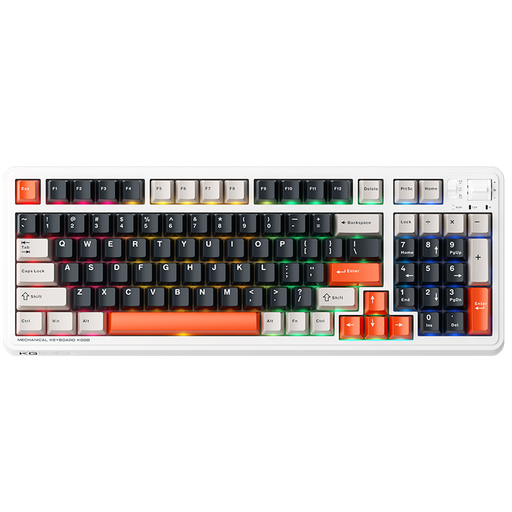 No image available
Consider its 96% format if you want to compare compact key arrangements. The title specifies tri-mode connectivity and US QWERTY; check the exact numpad, switch and programmable-control details against your needs.
No: start with the key layout and controls you use, then choose a switch feel and sound you can live with during longer sessions. For example, Razer offers the BlackWidow V4 with clicky Green or smoother, quieter linear Yellow switches.
Choose by the keys you need and the space available: full-size or a suitable 96% layout makes sense when numpad access matters, while TKL frees desk space by omitting it. Check the exact key arrangement rather than assuming every compact model places navigation keys alike.
No: they suit players who want physically separate controls, while remapping may suit those who prefer fewer extra keys. Check the model’s software and profile options, as well as the game’s rules for your intended commands.
Keep your order record and contact the seller about the fault. Citizens Advice guidance for England says a faulty, unfit-for-purpose or misdescribed item may qualify for a refund, repair or replacement; use the applicable Citizens Advice route for Northern Ireland, Scotland or Wales rather than assuming identical guidance applies throughout the UK.