What should you check before buying?
List your most-used editor commands before choosing a keyboard size. Then check the physical layout and how the keyboard will connect to your devices.
| Concern |
What to check |
Who this matters to |
| Shortcuts and number entry |
Check access to navigation, function and numeric keys. Confirm software compatibility before relying on programmable commands. |
If I keep changing coordinates and moving between editor panels, I want frequent commands within easy reach rather than hidden in key layers. Around 40% of consumers may put key access first. |
| Desk space and UK layout |
Compare the keyboard width with your mouse space; inspect the selected variant’s physical legends and key arrangement. |
When precise mouse placement takes up my desk, a narrower keyboard is appealing, but unfamiliar punctuation keys could interrupt editing. Roughly 30% of consumers may prioritise desk space and layout fit. |
| Long sessions and device switching |
Check connection modes, charging requirements and whether the switches suit a shared space; assess the whole workstation for prolonged use. |
If I edit for long stretches or move between a design computer and another device, noise, setup and switching affect my choice. For about 30% of consumers, these may be the primary concern. |
Keyboards for different editing setups
These keyboards cover full-size, 96% and 75% layouts for different balances of key access and desk space. Check each selected variant’s physical layout before buying, particularly if you normally use UK-ISO keys.
 No image available
Ticktype DP104, Gecha Gray, Silent Tactile switches
Consider this full-size option if your editor work calls for a broad set of dedicated keys and you have room for the keyboard.
The product name specifies 108 keys, hot-swappable switches, tri-mode wireless operation and an 8000mAh battery. It specifies a US layout, so check the physical keys before choosing it for a UK-layout setup.
Joybuy
 No image available
Targus EcoSmart full-size wireless keyboard (UK)
A full-size layout is worth considering if direct access to keys matters more to your editing workflow than saving desk width.
The product name identifies a UK version. Inspect the selected keyboard’s physical legends if you specifically need UK-ISO, and confirm any command-programming features you intend to use.
Joybuy
 No image available
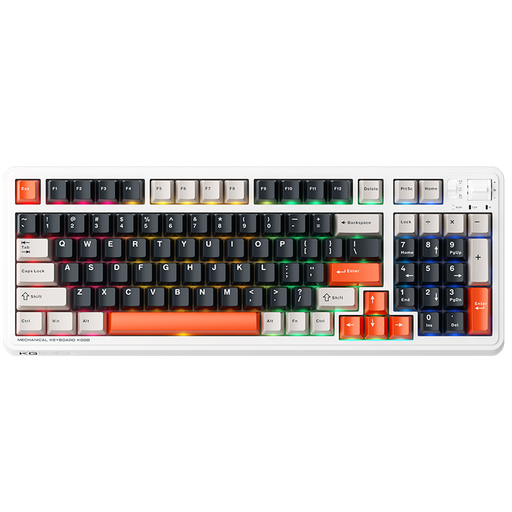
MACHENIKE KG98 96%, Black White Orange
Consider the 96% layout if you want a more compact arrangement without moving to a 75% keyboard; check where your editor’s frequent keys sit on it.
The product name specifies tri-mode connection, hot-swappable switches and a US QWERTY layout. Confirm the physical key arrangement and compatibility with your computer before ordering.
Joybuy
 No image available
Hyper HyperSpace Next Bluetooth keyboard (UK), White
This is a full-size Bluetooth option for an editing desk where key access takes priority over a narrow footprint.
The product name identifies a UK version. Check its physical key layout and confirm compatibility with the devices you plan to use.
Joybuy
 No image available
AULA F75 75%, US QWERTY
A 75% layout may suit mouse-first level editing when desk width is tight, provided its key layers work for your frequent commands.
The product name specifies wired USB, Bluetooth and 2.4G modes, PBT keycaps and a US QWERTY layout. Check key positions before choosing it if you rely on dedicated navigation or UK-layout symbols.
Joybuy
Common questions
Should I choose a UK-ISO keyboard for designing puzzle levels?
Choose UK-ISO if it is the physical layout you normally use, especially when punctuation and symbol keys matter to your editor shortcuts. Microsoft distinguishes the United Kingdom input layout in Windows, but changing a software setting cannot change a keyboard’s physical legends or key arrangement.
Is full-size more useful than tenkeyless or 75% for level editing?
Full-size is a sensible choice when you regularly need a numeric keypad and dedicated navigation keys; a smaller layout is worth considering when mouse room matters more. Compare your actual editor commands with the smaller board’s direct keys and key layers before deciding.
Will a wrist rest solve discomfort during long editing sessions?
A wrist rest alone cannot address every workstation issue. The Health and Safety Executive’s display-screen guidance calls for assessing workstation risks and reducing them, so consider keyboard and screen position, your chair and breaks as part of the setup.
Does UK workplace guidance require a particular keyboard model?
The Health and Safety Executive’s display-screen guidance calls for workstation assessment and risk reduction, not a named keyboard model. Its guidance applies to workers who use display-screen equipment daily for continuous periods of an hour or more; if that describes your work, follow your employer’s assessment and setup process.


