Support players with little desk space
Your keyboard and mouse compete for room, but shrinking the keyboard should not put frequently used controls out of practical reach.


At a small desk, start with a 65% keyboard if support-role practice calls for frequent arrow or navigation-key access, or consider 75% if you want more utility controls within reach. A 60% board gives mouse movement more room, but check that layers or remapped keys work for your essential commands before choosing the smaller layout.
Your keyboard and mouse compete for room, but shrinking the keyboard should not put frequently used controls out of practical reach.
You need to weigh direct-access keys against programmable layers or remapping. If you intend to use macros, check the rules for your game or event.
Keyboard sound, desk cables and switching between supported devices may influence your choice alongside layout.
Map the commands you reach for most often, then decide how much desk width you can give the keyboard. A tenkeyless board is another option if you have room for a wider layout without a number pad.
Choose when: Your desk is especially narrow and you can practise comfortably with a compact binding plan.
Trade-off: Fewer physical keys are directly available; layers and remaps do not add dedicated keys.
Choose when: You want arrow and navigation keys close at hand without moving to a wider layout. ASUS describes this arrangement on its ROG Falchion RX Low Profile.
Trade-off: Check the exact model if you also rely on dedicated utility controls.
Choose when: Utility keys matter enough to give the keyboard more space; Corsair lists arrows, utility keys and a programmable dial on its K65 PLUS Wireless.
Trade-off: Allow for the wider footprint rather than assuming every compact board leaves the same mouse room.
| Concern | What to check | Who this matters to |
|---|---|---|
| Desk footprint | Measure the available width and compare the actual keyboard dimensions, not just its layout percentage. | If mouse movement feels cramped during practice, I would give up some dedicated keys to reclaim space. Around 36% of consumers put desk footprint first. |
| Keybind access | List essential commands and check direct keys, remapping and layers; confirm game rules before planning macros. | When I need to reach abilities, targets or chat quickly, I want a binding plan I can use without awkward combinations. Direct keybind access is the priority for around 29% of consumers. |
| Feel and sound | Check the exact switch variant and construction; do not treat dampening material as a measured noise rating. | In a shared room, I would pay attention to key feel and how the keyboard might sound near my microphone. Around 21% of consumers place feel and sound first. |
| Cables and devices | Check the available connection modes, supported devices and lighting conditions attached to battery claims. | If I move between devices or want fewer cables on the desk, connection options could decide the purchase. That flexibility comes first for around 14% of consumers. |
A smaller board leaves more room beside the mouse, but commands that lack dedicated keys may require layers or remaps.
Write down your must-reach support-role binds. If several need direct access, compare the key arrangements on 65% and 75% models before deciding.
A keyboard's ability to record a macro does not establish whether an automated command is permitted in your game, mode or event.
Check the applicable rules before using macros, and plan ordinary remaps only where those rules permit them.
Corsair states a 266-hour figure for the K65 PLUS Wireless with backlighting off. It should not be treated as the runtime for every lighting setting.
Compare wireless claims under the same lighting, connection and usage conditions.
If you use backlighting, allow for the possibility of more frequent charging or playing with a cable attached.
ASUS and Corsair describe dampening features on particular models, but switch choice, desk surface and microphone placement can affect what you hear.
Check the exact switch variant and the seller's return terms if sound and feel are important to your decision.
The ROG Falchion RX Low Profile is a reference point for a compact layout that retains arrows and navigation keys.
Its PRO X 60 and PRO X TKL illustrate different ways to balance mouse space and directly available controls.
The Huntsman Mini is a 60% option for players willing to plan around fewer direct-access keys.
The K65 PLUS Wireless is a 75% reference point when arrows, utility keys and a dial matter more than the narrowest footprint.
These keyboards cover 65% models with compact layouts, 75% models with additional controls, and a 60% option for tighter desk space. Check each model's actual key arrangement against your support-role binds: the layout percentage alone does not confirm which keys are dedicated.
 Image unavailable
Consider this 65% model if you want a compact keyboard and prefer a UK layout. Check that its individual keys suit your binding plan; if you need wireless operation, choose a different connection option, as this model is wired.
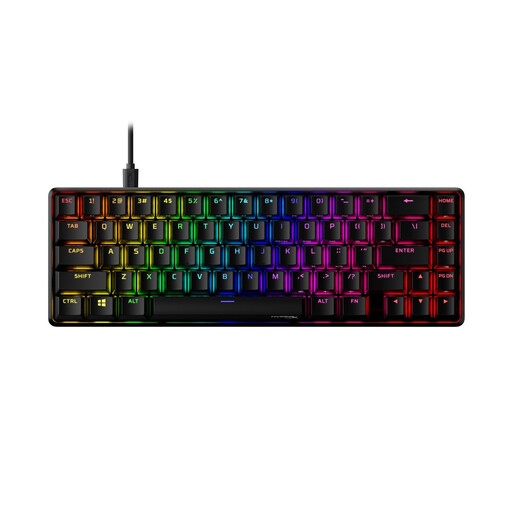 Image unavailable
Consider this 65% mechanical keyboard if compactness matters but you want to check a layout with arrow and navigation keys. It has HX Red switches and a US layout; confirm the key legends and physical width suit your desk and preferences.
 Image unavailable
Consider this 75% model if a multimedia knob and a choice of wired, Bluetooth or 2.4 GHz connection suit your desk setup. Check its exact arrow and utility-key arrangement, physical width and US QWERTY layout before relying on it for your bindings.
 Image unavailable
Consider this 75% model if you want wireless connection options alongside a knob and TFT display. The named variant has hot-swappable Star Vektor switches; check its physical width and exact key layout before assigning support-role controls.
 Image unavailable
Consider this 60% model when mouse room takes priority over dedicated arrow keys. Its arrow functions use a modifier, so check that arrangement against your practice binds; check the applicable game rules before using macros.
Choose 60% if mouse room matters most and your bindings work with layers or remaps; consider 65% for compactness with direct arrow and navigation access, or 75% when additional utility controls justify a wider board. Check the exact model's keys rather than relying on its layout percentage alone.
Some can: Logitech G lists multiple customisable layers for the PRO X 60, while Razer lists programmable keys for the Huntsman Mini. Check the software for the model you intend to buy and map your essential commands before deciding whether its smaller layout works for you.
Only if the exact keyboard supports switch replacement. Corsair states that the K65 PLUS Wireless has hot-swappable sockets compatible with 3-pin or 5-pin switches; do not assume the same compatibility for another compact model.
Compare claims made under similar lighting and connection conditions. Corsair specifies its 266-hour figure for the K65 PLUS Wireless with backlighting off, so check the conditions attached to any figure before using it to choose between keyboards.