What matters when choosing
Start with the keys your editor and prototype actually use. Then decide whether remapping, a smaller desk footprint or adjustable actuation would serve the part of the workflow you do most.
| Concern | What to check | Who this matters to |
|---|
| Editor shortcuts |
Compare dedicated keys and remapping options with your recurring commands. |
If editor commands fill most of my session, I want them within easy reach rather than buried in key layers; around 36% of consumers put shortcut access and remapping first. |
| Keyboard playtests |
Check your movement-key layout and whether adjustable actuation suits your preferred input feel. |
When I repeatedly test movement and jumps, I need a control-key arrangement I can use consistently; around 29% of consumers chiefly prioritise keyboard playtesting. |
| Desk and devices |
Check the physical key map and the connection modes needed for your devices. |
If desk space is tight or I switch between development and test devices, the board needs to fit that setup; around 21% of consumers place compactness and device flexibility first. |
| Workstation and UK layout |
Confirm the physical UK legends you need, then assess keyboard position within your desk setup. |
For long sessions, I want familiar symbol keys and a workstation arrangement that suits my work; around 14% of consumers chiefly prioritise comfort and UK-layout fit. |
Joybuy keyboards for editing and playtesting
These keyboards offer different physical layouts for balancing editor commands with keyboard playtests. Compare each exact key map with your shortcuts and control bindings, particularly when choosing a compact board.
 No image available
HyperX Alloy Rise 75 Wireless Keyboard UK
Consider this 75% wireless keyboard if you want a smaller board for alternating between editor work and keyboard tests. Compare the exact physical key map and symbol legends with the UK layout and shortcuts you need.
View on Joybuy
 No image available
ASUS ROG Strix Scope II 96 Wireless Keyboard, black, UK layout
Consider the 96% UK-layout variant if familiar physical keys matter more to your editor workflow than the smallest possible footprint. Check the included switch variant and its feel before buying.
View on Joybuy
 No image available
AULA S75 Pro 75% Wireless Mechanical Keyboard with Star Vektor switches
This 75% keyboard may suit a compact desk where configurable keys are useful for repeated editor commands. Its stated US QWERTY layout needs particular care if you rely on UK symbol positions; compare the full key map with your shortcuts.
The product title specifies tri-mode connectivity, hot-swappable switches, a display and a knob.
View on Joybuy
 No image available
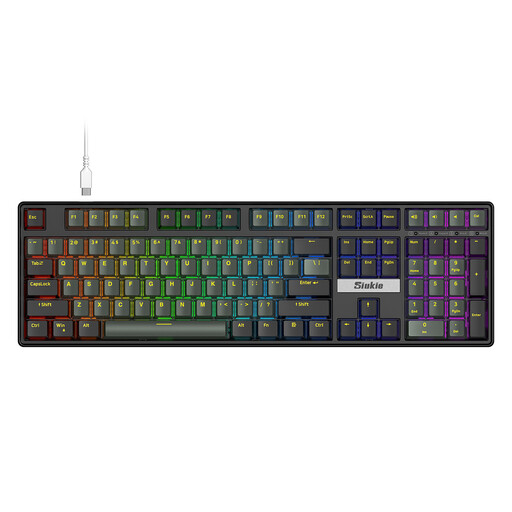
Siukie CR108 108-key wired mechanical keyboard
A 108-key wired board is worth considering if broad physical key access matters more to you than a compact footprint. Confirm its exact physical layout and UK symbol legends against your editor commands before ordering.
The product name specifies detachable switches.
View on Joybuy
 No image available
ASUS ROG Falchion Ace HFX 65 Analog Gaming Keyboard, UK layout
Consider this 65% analog keyboard if compact keyboard playtests are a priority. Its UK-layout designation is relevant, but compare the full physical key map with your editor shortcuts and playtest bindings before choosing such a small format.
View on Joybuy
Frequently asked questions
Do I need an analog or 8,000 Hz keyboard to prototype a platform level?
No. Consider those gaming-input features if repeated keyboard movement tests are central to your work and you want to tune actuation or reset behaviour. The Logitech G and Razer model specifications do not establish that these features make editor tasks faster.
Should I choose a physical UK keyboard layout?
Choose a physical English UK layout if you want the printed symbols to match your usual UK typing setup. Check the exact variant: Logitech G lists an English UK QWERTY option for the G515 RAPID TKL, while the referenced Keychron Q3 Max listing specifies ANSI.
Which keys should I check for platformer playtests?
Check the keys assigned to movement, jump, pause and restart, including simultaneous presses you expect to use. MDN Web Docs illustrates desktop controls that track arrow-key states independently, but your keyboard choice should follow your prototype's actual bindings.
Can I remap keys for repeated editor commands?
Some keyboards support remapping, but the method depends on the model. Keychron lists QMK-based remapping and macros for the Q3 Max, while Logitech G lists KEYCONTROL for the wired G915 X; confirm that the exact keyboard and its configuration tools can handle the commands you intend to use.


