Small-desk record keepers
If names and notes make up most of your entries, a narrower keyboard can leave room for a mouse and paper forms. Check the available width with everything you use on the desk in place.


Choose a compact keyboard if space for the mouse and membership forms matters more than a dedicated number pad. If entering IDs, dates and figures takes up much of your working day, consider a keyboard with a number pad and check that its extra width fits. For longer typing sessions, consider the keyboard shape alongside the position of the screen, keyboard and mouse.
If names and notes make up most of your entries, a narrower keyboard can leave room for a mouse and paper forms. Check the available width with everything you use on the desk in place.
If member IDs, dates or spreadsheet figures are a regular part of the job, dedicated number keys may matter more to you than the narrowest keyboard. The Microsoft and Apple models discussed below illustrate number-pad layouts.
If you spend extended periods updating records, consider keyboard shape and the whole desk arrangement together. The UK Health and Safety Executive advises placing the keyboard just below elbow height and the mouse in line with the elbow.
Start with the space available for the keyboard, mouse and paperwork, then decide how often you need dedicated number keys. Check comfort and computer compatibility before settling on a layout.
| Concern | What to check | Who this matters to |
|---|---|---|
| Desk and mouse space | Measure the clear desk area and the keyboard’s width and depth; leave room for the mouse and forms. | If I work from paper forms beside the computer, I need enough room to move the mouse without shifting the paperwork. Around 33% of consumers put usable desk space first. |
| Numeric entry | Review a typical week of IDs, dates and figures, then compare an integrated number pad with a compact keyboard and separate keypad. | When I enter long runs of membership numbers, dedicated number keys take priority over a narrow layout. Around 27% of consumers prioritise numeric entry. |
| Long-session comfort | Check keyboard height and mouse position as well as shape. The UK Health and Safety Executive advises keeping the keyboard just below elbow height and the mouse in line with the elbow. | If record updates keep me typing for extended periods, I want a desk arrangement I can use comfortably, not just a differently shaped keyboard. For around 20% of consumers, comfort is the primary concern. |
| Computer compatibility | Confirm the key layout, Bluetooth or receiver requirements, and operating-system support for any special functions. | When I move between computers, I need the keyboard to connect to each one and the keys to match how I type. Compatibility comes first for around 20% of consumers. |
A compact keyboard can free desk space but may omit the number pad you would use for repeated IDs and figures.
Look at a typical week of entries before choosing between a compact board, an integrated number pad or a separate keypad.
A palm rest or shaped keyboard does not address the position of the screen and mouse. The UK Health and Safety Executive advises keeping the keyboard just below elbow height and the mouse in line with the elbow.
Arrange the screen, keyboard and mouse together; for prolonged laptop use, consider a separate keyboard and mouse so the screen can be raised.
Apple states that the cited Magic Keyboard with Touch ID requires a Mac with Apple silicon running macOS 15.1 or later.
Check the Mac’s hardware and operating-system version if Touch ID is part of your reason for choosing that keyboard.
A keyboard may use Bluetooth, a USB receiver or both, while shortcut customisation can depend on the operating system.
Check the computer’s connections, available USB ports and support for any shortcuts you intend to use.
Logitech offers distinct compact and shaped-keyboard options in the models considered here.
The Surface Keyboard (2nd Edition) represents a number-pad option for a Windows-oriented setup.
Apple offers British English Magic Keyboard with Touch ID variants both with and without a numeric keypad.
These keyboards offer compact layouts, a shaped layout with a separate keypad, or an integrated number pad. Compare their stated key layouts and desk dimensions with the way you enter records.
 No image available
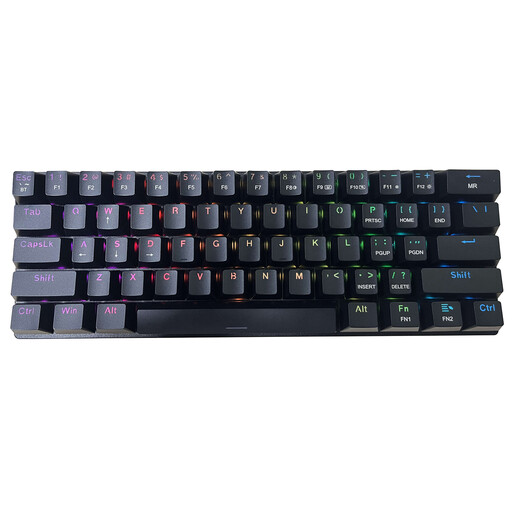
Consider this 60% layout when space for the mouse matters more than a number pad; it omits the number pad, function-key row and navigation cluster.
It lists Bluetooth, 2.4GHz USB-receiver and wired USB connections, plus clicky Blue switches. Confirm that the US QWERTY layout suits your typing needs.
 No image available
Consider the split layout for longer typing sessions if its cushioned wrist rest fits your desk; keyboard shape does not replace suitable screen and mouse positioning.
The wireless numeric keypad can be repositioned or stored when it is not needed. Check the space required for the keyboard and keypad together, and confirm the key layout you need.
 No image available
The 75% layout is worth considering when the mouse and paperwork must share a small desk with the keyboard.
It lists membrane keys, Bluetooth and 2.4GHz connections, and switching between up to four devices. Check its physical dimensions, number-pad arrangement and US QWERTY layout against your requirements.
 No image available
Its stated 12.05 × 5.67 × 1.69-inch dimensions let you check whether the keyboard will leave room for a mouse and forms.
It lists Bluetooth 5.1 and wired USB-C connection. Confirm that its US QWERTY layout and number-key arrangement suit your record-entry work.
 No image available
Its integrated number pad is a consideration if member IDs and figures are frequent entries and you can accommodate a wider keyboard.
The stated dimensions are 380 × 150 mm, and it lists Bluetooth switching between three paired devices. Check that this size leaves room for the mouse and confirm the exact key layout.
Choose a compact layout when mouse and paperwork space are the main constraints and most entries are text or occasional figures. If long sequences of IDs, dates or spreadsheet values are routine, consider a number pad and allow for the additional desk width.
Yes, if the desk has room for a separate keyboard and mouse. For prolonged laptop use, the UK Health and Safety Executive advises using them separately so the screen can be raised; it also advises keeping the keyboard just below elbow height and the mouse in line with the elbow.
Check the key layout, the computer’s Bluetooth or USB-receiver capability, and support for any functions you intend to use. Logitech lists Bluetooth Low Energy and Logi Bolt options for MX Keys Mini for Business; Apple states that the cited Magic Keyboard with Touch ID requires a Mac with Apple silicon running macOS 15.1 or later.