Choose a compact multi-device keyboard if you want to type on both your development computer and a phone or tablet without repeatedly pairing a different keyboard. A programmable mechanical model makes more sense if desktop shortcuts and connection options matter more to you; an iPad keyboard case suits a compatible iPad-centred setup, not a general computer-and-phone workflow. Whichever format you choose, the keyboard does not replace the connection needed to inspect a real mobile device.
Who needs which setup?
Developers working at a cramped desk
You need room for a development computer, a real phone or tablet, and a pointing device. A compact keyboard may help you arrange them within reach, but check that its reduced key layout still works for your daily editing tasks.
Computer-and-phone switchers
You type on the development computer and also enter URLs, notes or test data on a mobile device. Check that the exact keyboard supports your devices and lets you switch between them in a way that suits your workflow.
Shortcut-heavy layout debuggers
You regularly use editor and browser-tool shortcuts. Remappable keys or a wired connection may be useful if you will use those features, though neither establishes the connection for inspecting a mobile device.
What matters when choosing?
Start with the space available beside your test device, then decide whether typing across devices or controlling desktop shortcuts is your main reason for changing keyboards.
| Concern |
Buying checks |
Who this matters to |
| Desk space and key layout |
Check the keyboard’s dimensions and UK layout, then decide whether you need dedicated navigation keys or a number pad. |
If my phone and pointing device must sit beside the computer, I need a keyboard that fits without losing keys I use often. Around 42% of consumers put usable desk space and typing position first. |
| Switching between devices |
Confirm compatibility with your computer and mobile operating systems, plus the number of paired-device slots and how you switch between them. |
When I enter test data on both a computer and a phone, I want to change the active typing device without repeated pairing. For around 33% of consumers, that cross-device workflow is the primary need. |
| Shortcuts and connections |
Check whether the exact model offers the keys, remapping and keyboard connection options you will use. Plan the mobile-device inspection connection separately. |
I spend much of my time navigating an editor and desktop developer tools, so accessible shortcuts matter more than another small reduction in footprint. Shortcut and configuration control comes first for around 25% of consumers. |
Mistakes to avoid
-
Treating the keyboard as the whole debugging setup
A keyboard helps with typing, but it does not connect the test device to inspection tools. Chrome for Developers documents a direct USB connection and USB debugging for its Android remote-debugging workflow; Apple documents inspecting iPhone and iPad web content from a connected Mac with Web Inspector enabled.
Confirm your device, host computer and inspection method before choosing keyboard features.
That workflow may also require a suitable data-capable USB cable or access to a compatible host computer.
-
Choosing an iPad keyboard case by screen size alone
An iPad-specific case is not interchangeable with every iPad. Apple lists device and operating-system requirements for its Magic Keyboard for iPad Pro 11-inch (M5).
Match the exact iPad model and generation, keyboard variant, language layout and minimum iPadOS version before ordering.
-
Assuming compact keyboards share the same switching features
Connection options and key customisation differ. Logitech lists three-device switching for Pebble Keys 2 K380s, while Keychron lists Bluetooth, 2.4 GHz and wired connections alongside QMK/VIA remapping for K3 Max.
List the devices and functions you need, then check each one against the exact keyboard variant rather than relying on the word “wireless”.
-
Choosing the smallest layout without checking shortcuts
A reduced layout can leave more desk area, but it may change how you reach navigation keys and shortcuts used in your editor or browser tools.
Identify the keys you use repeatedly, then choose a layout you can work with. Consider remapping only if you are willing to configure it.
Brands to consider
Logitech
Its MX Keys Mini and Pebble Keys 2 K380s illustrate two compact approaches: configurable desktop typing and portable multi-device typing.
- Logitech describes MX Keys Mini as compact, backlit and configurable through software. It lists switching between three devices and compatibility with major desktop and mobile operating systems for Pebble Keys 2 K380s.
- Check the exact keyboard layout and whether the software functions you want are available on your operating system.
Keychron
Its UK-ISO K3 Max is relevant if a compact mechanical layout, several connection methods and key remapping matter to your desktop workflow.
- Keychron lists a 75% low-profile layout, Bluetooth, 2.4 GHz and wired connections, and QMK/VIA remapping for K3 Max.
- Select the intended UK-ISO version and switch configuration, and allow for any key configuration you plan to use.
Apple
Its Magic Keyboard for iPad Pro 11-inch (M5) is an iPad-specific case option, rather than a standalone keyboard for switching between a development computer and mobile devices.
- Apple lists an adjustable stand, trackpad, function row and USB-C pass-through charging for this keyboard.
- Check the listed compatible iPad models and iPadOS requirement. Apple’s web-inspection workflow still calls for a connected Mac and Web Inspector setup.
Joybuy keyboard options
These compact standalone keyboards cover different small-desk typing needs, including UK-layout options and models with wireless or wired connection choices. Check the exact layout and mobile-device compatibility before treating any of them as a computer-to-phone switching solution.
 No image available
HyperX Alloy Rise 75 Wireless Keyboard UK
Consider this model if you want a compact keyboard for a development computer and may also need to type on another device. Check compatibility with your particular phone or tablet operating system before planning around that use.
View on Joybuy
 No image available
Lofree OE907 65% Mechanical Keyboard, US QWERTY, Jellyfish Switches
The compact format may suit a desk shared with a test device. Its title specifies a 68-key US QWERTY layout, Bluetooth 5.1, a wired mode and white backlighting. Check that the US legends suit your typing and that its device-switching behaviour meets your needs.
View on Joybuy
 No image available
AULA F75 75% Mechanical Keyboard, US QWERTY
This 75% keyboard is a compact option if you want a choice of connection methods. Its title lists wired, Bluetooth and 2.4 GHz modes, RGB backlighting and PBT keycaps. Check the US QWERTY layout, supported mobile systems and Bluetooth switching behaviour if you plan to type on a test device.
View on Joybuy
 No image available
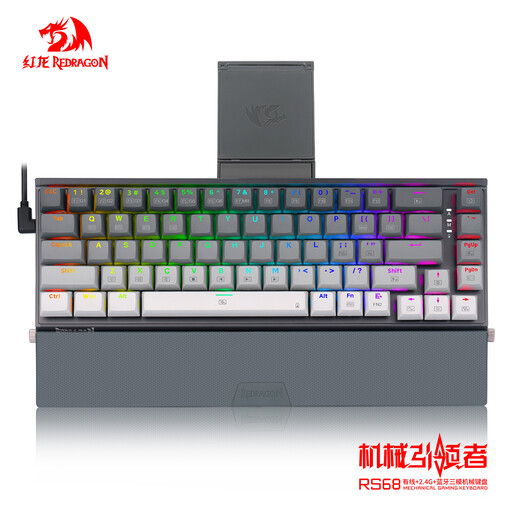
RS68 Wireless Mechanical Keyboard, Deep Space Gray
Consider this compact keyboard if you want wireless typing with a wired option. Its title names Bluetooth and a detachable wrist rest; allow desk space for the rest if you use it. Confirm the exact key layout and compatibility with any phone or tablet you intend to pair.
View on Joybuy
 No image available
ASUS ROG Falchion Ace HFX 65 Analog Gaming Keyboard, UK Layout
The stated UK layout makes this a model to consider for a compact development-computer setup. If typing directly on a phone or tablet matters, confirm its connection method and compatibility with that device before choosing it.
View on Joybuy
Common questions
Can a Bluetooth keyboard alone let me debug a layout on a real Android phone?
No. For the remote-debugging workflow documented by Chrome for Developers, enable USB debugging and connect the Android device directly to the development computer by USB. Check that you have a data-capable cable as well as the keyboard you want to type on.
What do I need to inspect web content on an iPhone or iPad?
Apple documents inspection from a connected Mac with Web Inspector enabled on the iPhone or iPad. Set up the device connection and approve trust if prompted; choosing an iPad keyboard case does not replace that inspection setup.
How do I pair a multi-device Bluetooth keyboard with a phone or tablet?
Put the keyboard in pairing mode, then select it in the phone’s or tablet’s Bluetooth settings and confirm a code if prompted. For a Logitech Easy-Switch model, Logitech instructs users to hold the relevant device key until its light blinks when assigning a slot; check your exact keyboard’s instructions for its switching method.
Will an iPad keyboard case work with any iPad?
No; match the case to the exact iPad model and keyboard variant. Apple lists compatible devices and an iPadOS 17.4-or-later requirement for its Magic Keyboard for iPad Pro 11-inch (M5), so check both before ordering.


