Deal with reflections on the display before choosing a keyboard: illuminated keys may be easier to see as the light changes, but backlighting will not clear screen glare. For testing across devices, consider a compact keyboard with compatible switching or connection options; choose a programmable mechanical layout if remapping matters, or a split keyboard if most work happens at a desk with room for it. Check the exact key layout and host-device compatibility before buying.
Who this setup affects
Cross-device mobile-layout debuggers
If you move between a development computer and a phone or tablet, check whether the keyboard can connect to the devices you actually type on. A compact footprint and familiar key layout may also matter when desk space is limited.
Bright-window workstation users
If daylight makes the display difficult to inspect, keyboard visibility and screen glare are separate decisions. The Health and Safety Executive advises arranging screens and lighting to avoid reflections and glare.
Long-session desktop debuggers
If you spend extended periods typing and using a pointer at one desk, allow room to position the keyboard and mouse comfortably. A wider split layout may be worth considering, but it still needs to fit the workstation.
What to prioritise
Start with the display and lighting, then choose the keyboard layout and connections around the devices you use and the space available on your desk.
Compact illuminated keyboard
Consider it when: A smaller keyboard suits your desk and you want visible key legends as ambient light changes.
Allow for: Compact layouts can change access to dedicated keys; confirm the layout and device-switching features of the exact model.
Low-profile mechanical keyboard
Consider it when: Remappable keys and a choice of connection methods matter to your debugging workflow. Keychron specifies these options for the K3 Max.
Allow for: A 75% layout and your chosen switch variant may take adjustment; select the UK-ISO version if that is the layout you need.
Split keyboard
Consider it when: Most debugging happens at a fixed desk and you prefer a wider, divided typing position.
Allow for: Check the space left for your mouse and screen; keyboard shape does not replace a suitable workstation arrangement.
Apple Magic Keyboard with Touch ID
Consider it when: Your main computer is an Apple-silicon Mac and you want this model’s Apple layout and Touch ID.
Allow for: Apple requires an Apple-silicon Mac running macOS 15.1 or later for this Touch ID model.
| Concern |
What to check |
Who this matters to |
| Screen glare and key visibility |
Arrange the display and lighting to reduce reflections; then consider adjustable key illumination if you need it. |
If daylight obscures the mobile layout on my screen, I need to see the display clearly before worrying about backlit keys. Around 42% of consumers put glare control first. |
| Cross-device workflow |
Check the exact host devices, operating systems and connection methods, including whether the model switches between paired devices. |
When I type on both my development computer and test hardware, changing devices needs to fit my workflow. For around 33% of consumers, cross-device use is the primary concern. |
| Long-session desk comfort |
Check keyboard width, mouse placement, preferred key layout and how the board fits your desk setup. |
If I spend long debugging sessions at one workstation, I want enough room to type and use the mouse without an awkward reach. Desk comfort comes first for around 25% of consumers. |
Buying pitfalls
-
Expecting backlit keys to fix screen glare
Illuminated legends may help you find keys, but reflections can still make a mobile layout difficult to inspect on the display.
Follow the Health and Safety Executive’s advice to adjust screen position and lighting to avoid glare. Choose keyboard illumination separately, according to whether you need it to see the keys.
-
Assuming a compact board has your usual UK keys
A smaller layout can move navigation keys or put shortcuts on a function layer. A US layout can also place symbols differently from a UK layout.
Check the selected variant’s key legends, Enter key, navigation keys and function layer against the shortcuts you use.
-
Treating Bluetooth as universal compatibility
Connection and operating-system requirements differ by model. Microsoft, for example, specifies Windows and Bluetooth requirements for its Designer Compact and Surface keyboards.
Match the stated requirements to your computer and any mobile device you intend to use. Check for a wired option if you want one at a fixed desk.
-
Choosing a split board without measuring the desk
A wider keyboard can leave less room for the mouse or make the overall workstation harder to arrange.
Measure the usable space with the mouse beside the keyboard, and consider screen and lighting position as part of the same setup.
Brands to consider
Logitech
Relevant lines include illuminated productivity keyboards and a split keyboard for a fixed desk.
- Logitech specifies adaptive backlighting for MX Keys Mini and switching across up to three devices for MX Keys S.
- The ERGO K860 has a split form, but its fit depends on your desk arrangement; none of these keyboard features removes display glare.
Keychron
The K3 Max is a route to a compact, low-profile mechanical keyboard with UK-ISO variants.
- Keychron specifies a 75% layout, QMK/VIA remapping and Bluetooth, 2.4 GHz and wired connections for the K3 Max.
- Check the selected layout and switch variant rather than assuming every configuration will suit your shortcuts or typing preference.
Apple
Apple keyboards warrant a closer look when the main host is a compatible Mac or the keyboard must fit a particular iPad.
- Apple specifies Bluetooth and USB-C for its Magic Keyboard with Touch ID for Mac models with Apple silicon.
- That Touch ID model requires an Apple-silicon Mac running macOS 15.1 or later. Apple’s iPad keyboard cases have model-specific compatibility lists.
Microsoft
Microsoft offers compact and full-size Bluetooth keyboard options with stated Windows requirements.
- Microsoft says Designer Compact Keyboard can pair with up to three devices and requires a Windows 10 or 11 PC with Bluetooth 4.0 or later.
- Microsoft specifies Windows 11 and Bluetooth 4.0 or later for Surface Keyboard; check requirements before planning to use either model with other hosts.
Joybuy keyboard choices
These keyboards offer different starting points for the same workstation decision: a split layout for desk-based typing, or compact and full-size layouts with different keys and connection options. Check each model against your host devices, preferred layout and available desk space.
 No image available
HP 960 ergonomic split wireless keyboard with padded wrist rest
Consider this split layout for a fixed debugging desk where you can position the keyboard and mouse comfortably.
The product title identifies a wireless keyboard and padded wrist rest. Check the exact key layout, host-device compatibility and desk space before buying.
Joybuy
 No image available
AULA F75 75% mechanical keyboard, US QWERTY layout
Consider this compact mechanical layout if you want several connection options and can work with US-positioned keys.
Its title lists wired, Bluetooth and 2.4 GHz modes, RGB backlighting, PBT keycaps and hot-swappable switches. Check the US key legends against your debugging shortcuts and confirm the connection mode you intend to use with each host.
Joybuy
 No image available
Lofree OE907 65% 68-key mechanical keyboard, US QWERTY layout
Consider this smaller layout if desk space and illuminated keys matter more to you than dedicated keys.
The title specifies Jellyfish switches, Bluetooth 5.1, a wired connection and white backlighting. Check the US key positions and whether its pairing behaviour suits switching between your computer and test devices.
Joybuy
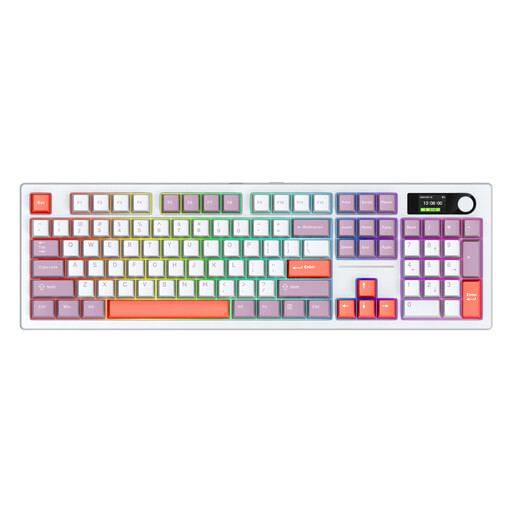 No image available
Siukie ACH105 104-key mechanical keyboard, pastel purple and white
Consider the 104-key layout if you want a broader key set and have room for it beside your mouse.
The title identifies a colour display, detachable switches, three-mode connectivity and RGB backlighting. Confirm the exact key layout, supported hosts and connection modes before buying.
Joybuy
Common questions
Will a backlit keyboard solve glare from a bright window?
No. Backlighting affects how easily you see the keys, not reflections on the display. The Health and Safety Executive advises adjusting screens and lighting to avoid reflections and glare, so tackle the screen position before deciding whether you also need illuminated keys.
Do I need a multi-device keyboard for mobile-layout debugging?
A multi-device keyboard is useful if you actually type on more than one paired device or want to switch input between your computer and test hardware. If all typing happens on the computer, a single-device or wired keyboard may meet that need; check the chosen model’s connections and host compatibility.
Can I use Apple’s Magic Keyboard with Touch ID with any computer?
No. Apple specifies that this Touch ID model requires a Mac with Apple silicon running macOS 15.1 or later. Check your Mac before choosing it for your main debugging workstation.
Will an iPad Magic Keyboard fit every iPad?
No. Apple lists compatibility by iPad model for its keyboard cases. Match the case to your iPad’s exact family, size and generation before buying.


