
24/7 Customer Support

Free returns

Same-day & Next-day Delivery

Quality Guaranteed

Unlock Your Welcome Offers: FREE Delivery | Up to 80% OFF | Free 30-day JoyPlus trial
Download the APP
Buying a keyboard and mouse combo can seem straightforward: choose a familiar-looking set, check the price and add it to your basket. However, small differences in layout, connection type and comfort can have a noticeable effect on everyday use.
For UK shoppers, the main risks are not always obvious from a product photograph. A compact keyboard may lack essential navigation keys, a wireless set may use batteries rather than rechargeable power and an attractive specification may not match the way you work. This guide explains what to check before buying and highlights suitable options for different users.
A keyboard labelled “QWERTY” is not necessarily a UK keyboard. UK and US layouts differ in the position and shape of several keys, including Enter, Shift, quotation marks and the symbols used for currency. If you regularly type documents, emails or spreadsheets in Britain, confirm that the product states UK English QWERTY or UK layout.
Some compact mechanical keyboards listed for gaming use a US layout. That can be perfectly suitable if you already know the arrangement, but it may be inconvenient for office work or shared family use.
A wireless keyboard and mouse combo may use replaceable AA or AAA batteries, a built-in rechargeable battery or a mixture of both. These options have different running costs and maintenance requirements.
A rechargeable wireless keyboard and mouse reduces disposable battery purchases, but it will need charging. A battery-powered office keyboard and mouse set may run for a long time without a cable, but you should check whether replacement batteries are included and how easy they are to access.
Backlighting, programmable keys and high mouse DPI can be useful, but they do not compensate for an unsuitable layout or uncomfortable shape. For everyday typing, a full-size keyboard with number pad may be more practical than a small gaming model. Similarly, a high DPI rating does not automatically make a mouse more comfortable or more accurate for your particular desk surface.
A full-size keyboard with number pad is useful for finance work, data entry, spreadsheets and administration. It normally includes a dedicated numeric keypad, function row and navigation keys, but it takes up more desk space.
Tenkeyless and 60% or 65% keyboards leave more room for mouse movement. The Lofree OE907, for example, uses a 68-key layout, while the ET model uses 61 keys. These are easier to carry and can suit gaming or compact desks, but some functions may require key combinations.
A wired keyboard and mouse combo connects directly through USB and does not require pairing or charging. It can be a sensible choice for a fixed desktop, school computer or office workstation. Check that your device has sufficient USB-A ports, particularly if you use a laptop with only USB-C connections.
A wireless keyboard and mouse combo can reduce cable clutter and make it easier to switch between devices. Bluetooth keyboard and mouse sets connect without a USB receiver, while 2.4GHz wireless models generally use a small USB dongle. Dual-mode products can provide both options, but check operating-system compatibility before purchase.
Look for features that relate directly to your usage:
For UK workplaces and education settings, also check the product’s safety instructions, cable placement and compatibility information. Route wired cables away from walkways and keep small receivers out of reach of young children.
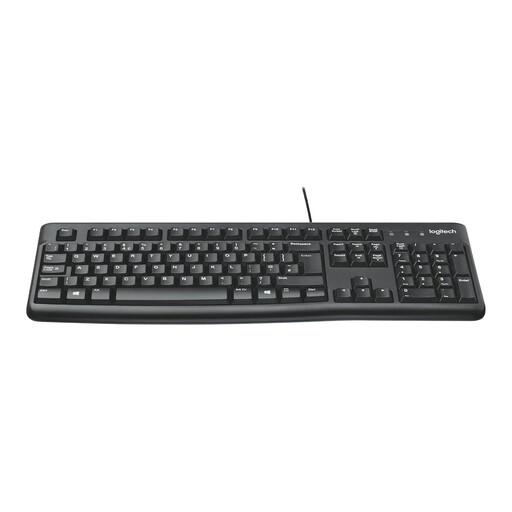
Why This Fits Their Persona: This straightforward set suits a first desktop, student workstation or home-office computer where reliable USB connection matters more than wireless convenience.
It specifies a UK English full-size layout, so buyers can avoid accidentally ordering a US keyboard. The wired USB design also avoids pairing and battery concerns.
Full-size keyboard with number pad, adjustable tilt legs, spill-resistant design up to 60 ml and an ambidextrous optical mouse.
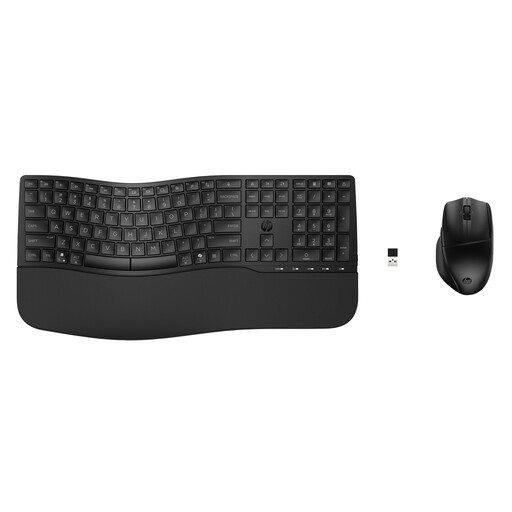
Why This Fits Their Persona: A practical match for professionals and hybrid workers who want custom controls, quiet typing and the flexibility to connect with more than one device.
The connection options are clearly specified as Bluetooth and a wireless USB receiver, while the spill-resistant keyboard and battery indicators address common daily-use concerns.
Supports up to three devices, includes 23 programmable keyboard keys, a wrist rest and a mouse with up to 4000 DPI sensitivity.
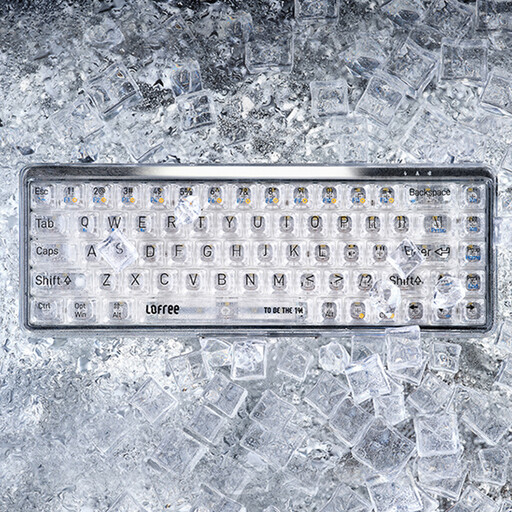
Why This Fits Their Persona: This compact mechanical gaming keyboard is aimed at users who prioritise typing feel, desk space and multi-device connectivity over an integrated mouse.
Its 68-key size is stated clearly, helping buyers assess the missing number pad and navigation cluster before ordering. Bluetooth 5.1 and USB-C modes are also specified.
MX Jellyfish linear switches, white LED effects, a 2000mAh battery and compatibility with Windows, macOS, iPadOS, iOS and Android.
If none of these profiles matches your setup, consider the wider selection of USB keyboard and mouse bundles, wireless desktop sets and UK layout options. The Targus full-size wired combo is designed for office, education and shared-device use, with optical tracking and built-in DefenseGuard antimicrobial protection. The MSI GK-701 provides a UK full-size layout, low-profile keys and a dedicated Copilot key for compatible Windows use.
For multi-device work, the RAPOO 9760 offers wireless connectivity and an adjustable mouse sensor, while Philips 2000 and 3000 Series bundles provide additional wired and wireless alternatives. Always check the detailed listing for layout, power source and operating-system support before ordering.
We have compiled a complete, real-time list of products that fully satisfy these strict selection criteria and UK safety regulations.
A wired set is generally simpler for a fixed desk because it requires no pairing or battery management. A wireless model can make a shared workspace tidier and is more convenient when connecting to laptops or multiple devices. Your choice should depend on desk layout, available ports and whether you value cable-free movement.
Lifespan depends on usage, cleaning, cable handling, switches and battery care. Keep liquids away, avoid pulling cables and clean optical sensors with a soft, dry cloth. If buying a rechargeable model, follow its charging instructions and avoid leaving it in damp or excessively hot conditions.
Not necessarily. DPI changes cursor sensitivity, but comfort, sensor performance, grip shape and software support also matter. For office tasks, adjustable DPI can help users find a comfortable setting; gaming users should additionally check the keyboard switch type, rollover features and layout.