What to check before choosing
For multitrack alignment, compare keyboard formats against your shortcut list before weighing their footprint and positioning options. The three formats address different constraints; none removes the need to set up the standing workstation around the person using it.
Conventional ergonomic
Consider it when: You want a one-piece layout with familiar key placement while reconsidering your hand position.
Allow for: Its shape does not provide the separate positioning of a split board; check any remapping you need on the exact model.
Compact programmable
Consider it when: Desk space matters and you want to arrange recurring DAW commands around your workflow.
Allow for: Some commands may require a function layer or modifier rather than a directly accessible key.
Split and tented
Consider it when: Separating and rotating the keyboard halves would help you position them around your hands and pointing device.
Allow for: Contoured keys or thumb clusters can take time to learn, particularly for established shortcuts.
| Concern |
What to check |
Who this matters to |
| Shortcut access |
Check your frequent DAW commands against the exact key layout, then confirm how any remapping works with your DAW and operating system. |
When I align takes repeatedly, I want my trim, nudge and edit-mode commands within easy reach rather than hidden behind an awkward sequence. Around 36% of consumers put shortcut access and customisation first. |
| Wrist position |
At standing height, check whether you can key with straight wrists and keep the pointing device close. Assess a split board's available positioning if you need it. |
I need to arrange my keyboard and mouse without bending my wrists or repeatedly reaching across the desk. Wrist position is the primary concern for around 36% of consumers. |
| Desk footprint |
Measure the usable keyboard-and-mouse area; compare connection options and the keys retained on a smaller layout. |
With audio equipment beside the keyboard, I need enough clear space to move the pointing device while keeping the commands I rely on. Around 28% of consumers prioritise footprint and connection flexibility. |
Joybuy keyboard options
These options include full-size keyboards, a compact model and a split-layout model. Compare each one with your alignment shortcuts and the space available at your standing desk; a split layout is not the same as independently positionable keyboard halves.
 No image available
HP 960 Ergonomic Split Layout Wireless Keyboard with padded wrist rest
Consider this if you want a split-zone key arrangement while retaining a single keyboard for DAW editing.
- Wireless keyboard with a padded wrist rest.
- Check the exact key layout and whether the commands you want to map work with your DAW and operating system.
- Assess wrist position at your standing desk; an ergonomic shape does not establish personal comfort.
View on Joybuy
 No image available
Targus EcoSmart™ Full Size Wireless Keyboard, UK layout
Consider this if you prefer a familiar full-size UK layout for reaching your established editing commands.
- Full-size wireless keyboard with a UK layout.
- Check whether your DAW supports the shortcut assignments you need; do not assume the keyboard provides programmable macros.
- Allow room for the keyboard and pointing device together at standing height.
View on Joybuy
 No image available
ET Silent Wireless Keyboard and Mouse Combo, US layout
Consider this keyboard-and-mouse set if you want a conventional full-size keyboard and have checked that its US layout suits your editing shortcuts.
- Full-size US-layout keyboard with a mouse and 2.4 GHz wireless connection.
- Check the positions of punctuation and other keys used in your DAW before choosing a US layout.
- Confirm any remapping you require and assess the keyboard-and-mouse arrangement on your desk.
View on Joybuy
 No image available
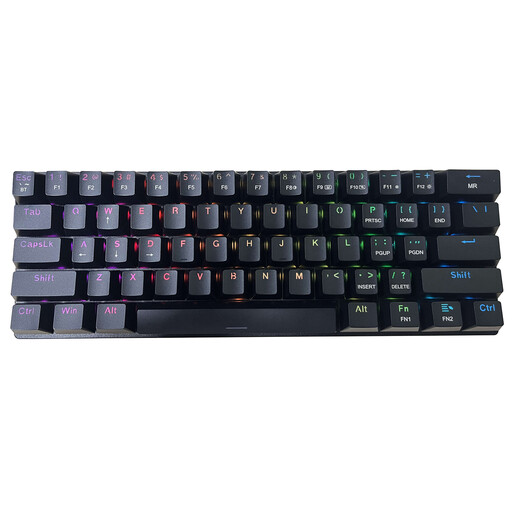
ET 60% Tri-Mode Mechanical Keyboard, 61-key US layout
Consider this compact keyboard if desk space is tight and your alignment shortcuts remain practical on a reduced key set.
- 60% mechanical keyboard with 61 keys, a US layout and clicky blue switches.
- Check how you would reach commands that normally use a function row or navigation cluster.
- Confirm connection and shortcut-mapping compatibility with your setup, and consider whether clicky switches suit your workspace.
View on Joybuy
Common questions
Do I need a full-size keyboard for multitrack editing?
No: choose the layout that gives you workable access to your most-used commands. Check transport, trim, nudge, navigation and any numeric-keypad shortcuts against the exact keyboard; Avid documents extensive Pro Tools commands, while Apple supports custom shortcuts in Logic Pro.
Does using a standing desk mean I need an ergonomic keyboard?
No particular keyboard format follows from standing to edit. The Health and Safety Executive advises keeping wrists straight when keying, so assess desk height, mouse and screen placement, and your work routine rather than treating a keyboard purchase as the whole adjustment.
What should I check if this standing setup is used for work?
For UK employees who are display screen equipment users, the Health and Safety Executive says employers must analyse workstations to assess and reduce risks. Review the workstation assessment when considering how the keyboard, pointing device and standing desk are arranged together.
Can a programmable keyboard replace setting up shortcuts in my DAW?
No: keyboard remapping still has to work with the commands and assignments available in your DAW and operating system. Check the DAW's shortcut settings first, then decide whether a keyboard's mapping options make your recurring alignment commands easier to reach.


