Repeatable keyboard-test operators
People running the same Tab, Shift+Tab, Enter, Space, Escape and arrow-key checks across websites or applications need a layout they can use consistently from one test to the next.


For repeatable keyboard-navigation tests at a shared desk, start with a wired keyboard whose physical layout gives everyone familiar access to the keys in the test script. A quiet full-size office model suits straightforward handovers; a programmable UK ISO model is worth considering when remapped shortcuts are part of the work, provided its layout still exposes the required keys. W3C guidance concerns whether the website or application can be operated through a keyboard interface: the keyboard is a test tool, not proof of accessibility.
People running the same Tab, Shift+Tab, Enter, Space, Escape and arrow-key checks across websites or applications need a layout they can use consistently from one test to the next.
When different people use the same workstation, a simple connection, manageable cable or pairing routine, typing noise and cleaning instructions all affect the handover.
Teams testing across macOS, Windows or Linux may need to check shortcut behaviour and key remapping, as well as whether a UK ISO physical layout matches their test procedure.
At a shared test desk, choose the layout and connection routine around the work people actually perform, then check how the keyboard fits the wider workstation.
Choose it when: different users need a familiar layout and a quick connection at a fixed desk.
Allow for: a cable and the desk space taken by the number pad; confirm the exact UK layout before ordering.
Choose it when: remapped keys or cross-platform shortcuts are part of the test workflow. Keychron describes these options for its C3 Pro UK ISO model.
Allow for: a different layout and key feel; check that the keys in your script remain accessible on a tenkeyless board.
| Concern | What to check | Who this matters to |
|---|---|---|
| Test-key access | Check the physical positions of Tab, Shift, Enter, Space, Escape, arrow keys and any function keys in the test script. | I need to repeat navigation checks without changing my procedure to work around a keyboard layer. Around 31% of consumers put direct access to their test keys first. |
| Shared-desk connection | Check the workstation’s USB port or, for wireless use, how pairing, the receiver and batteries will be managed. | When another person takes over the desk, I want to begin testing without sorting out the connection. For around 31% of consumers, a straightforward handover is the primary need. |
| Noise and cleaning | Check the exact model’s typing-noise claims and cleaning instructions; do not treat spill resistance as permission to wash it. | I work near colleagues and need a cleaning routine that suits a frequently used keyboard. Around 23% of consumers place low-disruption shared use first. |
| Workstation fit | Check keyboard footprint and pointing-device space alongside the chair, display and individual workstation needs. | During sustained desk work, I need the keyboard to fit a comfortable overall setup. Workstation fit comes first for around 15% of consumers. |
A physical keyboard supplies input, but it cannot establish whether a website or application lets users reach and operate its controls. W3C guidance addresses keyboard operation of the content itself.
Use a repeatable script to check focus order, visible focus, activation, menus, dialogs and ways to leave controls without a mouse.
Keys placed behind layers can change how a tester carries out a navigation check, even when the smaller keyboard fits the desk.
Compare every required key with the physical layout before purchase. If direct number-pad or function-key access matters, confirm it rather than relying on the layout name.
Working around relocated keys can take time during repeated tests.
A spill-resistant feature does not mean water can be poured onto the keyboard.
Disconnect or switch off the exact model before cleaning, follow its manufacturer’s instructions and never wash it or pour water directly onto it.
For sustained display-screen work, the chair, desk, display, work pattern and individual needs also affect workstation fit.
Use the workplace workstation-assessment process where applicable, particularly if someone reports discomfort, before assuming a different keyboard alone will resolve it.
The K120 is a reference point for a conventional corded keyboard at a fixed shared desk.
The KC 1000 offers a conventional full-size, corded office-keyboard format, including a United Kingdom variant.
The C3 Pro UK ISO is a tenkeyless wired option for teams whose tests involve configurable keys.
These options include keyboard-and-mouse sets, wireless keyboards and compact layouts. For each one, check the test-script keys and plan how the connection will work when the desk changes hands.
 No image available
Consider this set if the shared workstation needs both a keyboard and mouse with a UK keyboard layout.
Check that the USB connection fits the workstation and that every key in the test script is positioned as the team expects.
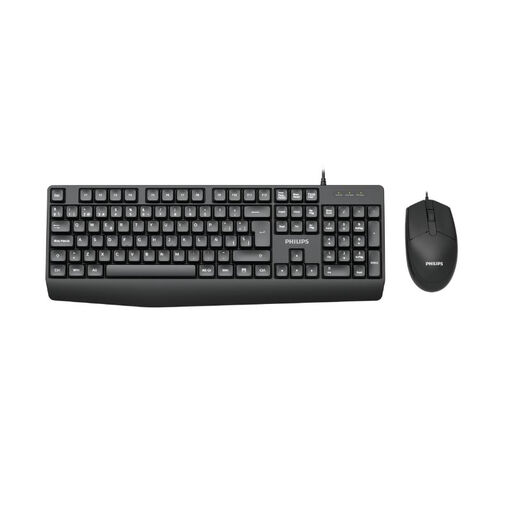 No image available
This wired set suits a desk where users want a UK English keyboard and mouse together.
Confirm the connection fits the workstation and inspect the physical positions of the keys used in navigation tests. Follow the exact model’s cleaning instructions.
 No image available
The 96 layout is worth examining when desk space matters but the test procedure also calls for broad key access.
Check the position of each required key and confirm the intended connection mode and cable arrangement before using it for shared-desk handovers.
 No image available
This full-size option suits a shared desk where wireless placement matters more than avoiding a pairing or battery routine.
Agree how users will manage the connection and batteries, and check that the physical layout matches the test script.
 No image available
Consider this compact option only if its physical key arrangement works for the team’s navigation tests.
Check whether each required key is directly accessible or needs a layer, and confirm compatibility with the operating systems used at the desk.
Usually not for ordinary website and application checks: choose a keyboard that gives you the keys your procedure uses. W3C guidance concerns whether the content can be operated through a keyboard interface, so test the content’s navigation and controls rather than treating the keyboard itself as an accessibility result.
A wired USB keyboard suits a fixed desk when quick handovers without pairing or battery management take priority. Wireless placement may suit a different desk arrangement, provided users have a clear routine for the receiver or pairing and batteries; check the workstation’s connections either way.
There is no universal keyboard type specified in the Health and Safety Executive guidance cited here. For workers who use display screen equipment daily as part of normal work for continuous periods of an hour or more, the employer must assess the workstation; the keyboard choice should be considered alongside the rest of that setup and individual needs.
Follow the instructions for the exact model and disconnect or switch it off first. Logitech advises using a lightly damp lint-free cloth or fragrance-free disinfecting wipe on the exterior of its keyboards, without washing them or pouring water directly onto them; do not assume another manufacturer gives identical instructions.