Shared-office accessibility testers
Testers who repeatedly use Tab, Shift+Tab, arrow keys, Enter and Escape to check interfaces while keeping typing noise considerate of nearby colleagues.


For a fixed shared-office test desk, start with a quiet keyboard whose physical layout matches the operating-system setting and gives direct access to the navigation keys in your test scripts; a wired connection removes pairing from the setup. Consider wireless switching, programmable mappings or a split design when the work calls for them, but check whether the changed layout or connection could make tests less repeatable.
Testers who repeatedly use Tab, Shift+Tab, arrow keys, Enter and Escape to check interfaces while keeping typing noise considerate of nearby colleagues.
People moving between test devices who need to know which physical layout, operating-system setting and connection are active before interpreting a keyboard result.
Testers whose keyboard needs to fit their desk arrangement and wider display screen equipment workstation assessment, rather than being treated as the only comfort consideration.
For a shared-office test desk, check the keys your scripts use before weighing noise, movement between devices and sustained use.
| Concern | What to check | Who this matters to |
|---|---|---|
| Navigation keys and layout | Check direct access to the keys in your test scripts, including any Fn-layer behaviour. Match the physical layout to the operating-system input setting. | When I repeat navigation scripts, I need the expected keys in familiar places so I can tell a layout mistake from an interface fault; around 31% of consumers put navigation-key coverage first. |
| Noise around colleagues | Check the switch variant and its description; terms such as quiet do not establish a comparable sound level. | Repeated keystrokes beside colleagues should not disrupt their work. Roughly 31% of consumers prioritise keeping keyboard noise down. |
| Device and keymap consistency | Confirm compatibility with each test device and whether the active connection and any remapping can be documented. | Moving between devices means I need to know which device and keymap are active before recording a fault; around 19% of consumers place cross-device consistency first. |
| Comfort during long sessions | Consider keyboard height and desk arrangement alongside the wider workstation assessment. | Long testing sessions make a workable desk position important to me; roughly 19% of consumers put sustained-use comfort first. |
A compact layout can move keys to an Fn layer or remove dedicated keys, complicating a manual test script.
List the keys and shortcuts in your tests, including Home, End, Page Up, Page Down and function keys where relevant, then check the exact physical layout.
Quiet is often a manufacturer description rather than a sound measurement made on a comparable basis. Switch variants within a range may differ.
Check the exact switch option and, where possible, assess its noise in the room where it will be used. CHERRY and Kensington describe specific scissor-switch office models as quiet; that does not establish how every variant compares.
Device switching, pairing and remapped layers can change what happens at a shared station without a change to the application under test.
Use a wired connection where appropriate, or document the active device, connection mode, operating-system layout and keymap for each test setup.
The Health and Safety Executive considers the workstation and work arrangement in display screen equipment assessments, not just the keyboard.
For sustained use, review the desk, chair, display, mouse reach and work pattern alongside any keyboard change.
The KB515 EQ is a full-size ISO wired keyboard to consider for a fixed test desk.
The wired STREAM keyboard is an office-oriented scissor-switch option.
Different Logitech models address device switching, switch choice and split-keyboard preferences.
The K3 Max is a compact, programmable mechanical option for testers who deliberately use alternate keymaps.
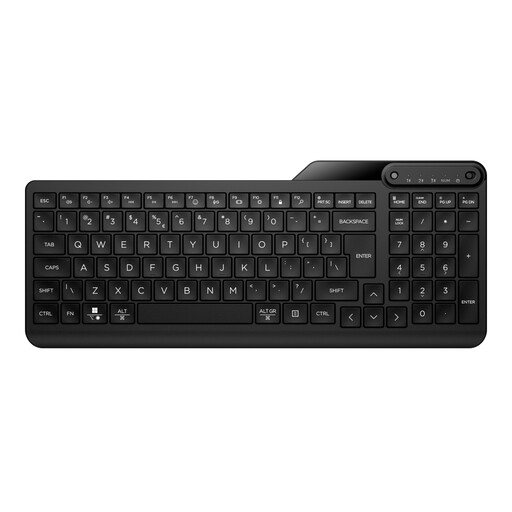
The HP 460 is a multi-device keyboard to consider when testers move between devices. Check its physical navigation-key layout and connection options before using it as the standard keyboard at a shared test desk.
 No image available
Consider this model if moving between test devices is part of the work. Before assigning it to a shared desk, check where its dedicated navigation keys sit and whether its available connection modes fit a repeatable test setup.
Usually not: start with a keyboard that gives reliable access to the keys your tests require. The W3C Web Accessibility Initiative says functionality should be usable with a keyboard; the test is whether people can operate the interface, not whether the keyboard carries an accessibility label.
A wired keyboard suits a fixed desk when you want to keep pairing and device switching out of the test setup. Wireless can suit testers moving between devices, provided they record the active device, connection and keyboard layout before investigating a defect.
Choose UK-ISO when it matches the tester’s expected physical keys and operating-system setting, or when the test specifically covers UK keyboard input. Check the exact regional variant; a model name alone may not identify the layout being sold.
No. The Health and Safety Executive says employers must assess display screen equipment workstations and reduce identified risks. A split keyboard is only one part of the arrangement, so consider the desk, chair, display and work pattern as well.
No. Tab and Shift+Tab help check focus movement, but other interactions depend on the control being tested. The W3C Web Accessibility Initiative also highlights logical tab order and keyboard operation of controls such as menus and pop-ups, so include the relevant arrow, Enter and Escape interactions in the test plan.