For routine website keyboard-navigation checks, start with a keyboard whose layout gives you easy access to Tab, Shift, Enter, Space and the arrow keys; a wired UK-layout model keeps the setup straightforward if it fits your desk and computer. Choose a smaller layout when desk space matters more than a dedicated number pad, or consider quieter keys for a shared room. Remapping is useful only if your tests include custom shortcuts: the website’s keyboard operation, focus order and visible focus are what you need to assess.
Who this is for
Students starting accessibility checks
If you are checking whether links, forms and menus work without a mouse, begin with a physical keyboard whose standard keys you can use comfortably. The W3C Web Accessibility Initiative’s keyboard guidance concerns the website’s operation, not a particular keyboard model.
Students working in shared rooms
If coursework and repeated navigation checks take place near a housemate, key noise may influence your choice alongside layout. Quiet or low-profile descriptions can help you make a shortlist, but they cannot tell you exactly how a keyboard will sound on your desk.
Students balancing desk space and shortcuts
A smaller keyboard may leave more room for notes or other equipment, while a programmable one may suit experiments with remapped keys. These are separate needs: a compact layout does not automatically provide remapping, and basic Tab-order checks do not require it.
What matters when choosing
Start with the keys and connection your tests require, then decide whether room noise, desk width or custom shortcuts are your main reason to choose a different layout.
| Concern |
What to check |
Who this matters to |
| Standard-key testing |
Check the physical layout for Tab, Shift, Enter, Space and arrow keys, and confirm a connection that works with your computer. |
If I am learning to test links and forms without a mouse, I want familiar keys so I can concentrate on what the page does. Around 36% of consumers choosing for this task would put standard-key testing first. |
| Shared-room noise |
Look at the stated key mechanism or low-profile design, then check the exact variant and return terms if sound matters to you. |
When I work near someone who is studying or sleeping, I want typing that will not be too disruptive. Roughly 29% of consumers would make lower key noise their primary concern. |
| Desk space |
Compare dimensions and whether a tenkeyless or other compact layout retains the keys you use; check whether you need a number pad. |
If books and a laptop already fill my desk, I need room to move while testing, but I may still need numeric entry for coursework. About 21% of consumers would prioritise keyboard footprint. |
| Custom shortcuts |
Confirm remapping support and compatibility with the computer and configuration tools you intend to use. |
When my work includes remapped keys or shortcut experiments, I need more than ordinary navigation keys. Around 14% of consumers would put programmability first. |
Buying pitfalls
-
Assuming accessibility testing requires a programmable keyboard
The W3C Web Accessibility Initiative says website functionality must be usable from a keyboard. Switch type and macros do not establish whether a page meets that aim.
Begin by checking whether you can reach and operate controls with Tab, Shift+Tab, Enter, Space and relevant arrow keys. Check the order of focus and whether you can see where focus has moved; choose remapping only if your workflow calls for it.
-
Choosing a smaller board without checking numeric entry
A tenkeyless keyboard removes the dedicated number pad. CHERRY says its STREAM TKL retains the main keypad, but its layout may be inconvenient if your coursework or shortcuts rely on a number pad.
Compare the keys shown for the exact variant with the work you do beyond navigation testing. Keep a full-size layout in consideration if dedicated numeric entry matters more than the space saved.
-
Reading “quiet” as a promise about your room
Manufacturers describe characteristics such as low-profile or quiet keys, but perceived sound and key feel depend on the keyboard variant and where it is used.
Use those descriptions to narrow your choices, then check the key mechanism, dimensions and applicable return terms rather than assuming every model from the same brand will feel or sound alike.
-
Overlooking accommodation rules
Rules for your room and questions about equipment supplied with the accommodation are different from choosing a keyboard you own.
Check your accommodation agreement before use. If a keyboard supplied with the room appears unsafe, tell the accommodation provider rather than trying to repair it yourself.
Brands to consider
These brands have relevant keyboard lines to compare; the features below apply to the named models, not to every keyboard each brand makes.
Logitech
The K120 is a full-size wired UK-layout option for students who want standard keys and a number pad.
- The K120 is described as a USB keyboard with low-profile keys, full-size function keys and a number pad.
- Its listed 45 cm width is worth comparing with the clear space on a small desk; the listing’s quiet-key description is not a promise about sound in your room.
CHERRY
The wired STREAM range offers a choice between a full-size board and the smaller STREAM TKL.
- CHERRY describes quiet keystrokes and an SX scissor mechanism on the STREAM line.
- The STREAM TKL omits the dedicated number pad, so compare it with your numeric-entry needs before choosing the smaller layout.
Keychron
The UK ISO C3 Pro is relevant when your testing includes remapping or cross-platform shortcuts.
- Keychron says the C3 Pro supports per-key programming through QMK and Launcher, with Mac, Windows and Linux compatibility.
- Configuration adds a step that ordinary keyboard-navigation checks do not require; confirm availability and the exact UK ISO variant before choosing it.
HP
The wired 320K provides a familiar layout for navigation checks and numeric entry.
- HP describes the UK 320K as a three-zone USB keyboard with arrow keys, a number pad and a 6° adjustable slope.
- HP also describes its keys as quiet and low-profile; assess that claim against your own shared-room needs rather than treating it as a measured sound level.
Joybuy keyboard choices
These choices include UK-labelled keyboards, compact layouts and keyboard-and-mouse bundles. Compare each exact layout and connection with your computer, desk and navigation-testing routine.
 No image available
ASUS ROG Strix Scope II 96 Wireless Keyboard, White, UK Layout
Consider this UK-layout 96% model if you want a keyboard to use for navigation checks without choosing a tenkeyless layout. Confirm its connection options for your computer and check the exact key variant if sound in a shared room matters.
View on Joybuy
 No image available
MSI GK-701 Office Keyboard and Mouse Set, USB, UK Layout, Black
This UK-layout USB set suits a student who wants a keyboard and bundled mouse for the same desk. Check that you want both items and that the keyboard’s size and keys suit your navigation tests and other coursework; the product name also identifies a CoPilot key.
View on Joybuy
 No image available
AJAZZ AK820 V2 Starry Sparkle Wired Magnetic-Switch Keyboard, 75%
The wired 75% layout is worth considering if desk space is your priority while you test navigation. Check the exact physical layout before buying if you need UK key positions; also check whether its configuration options match any shortcut experiments you plan to do. Do not assume its key sound will suit a shared room.
View on Joybuy
 No image available
HyperX Alloy Rise 75 Wireless Keyboard, UK
This UK-labelled 75% wireless keyboard is a compact option for a student-room desk. Confirm that its connection options work for your testing setup, especially if you want to use a cable, and consider how its keys may sound in a shared room.
View on Joybuy
 No image available
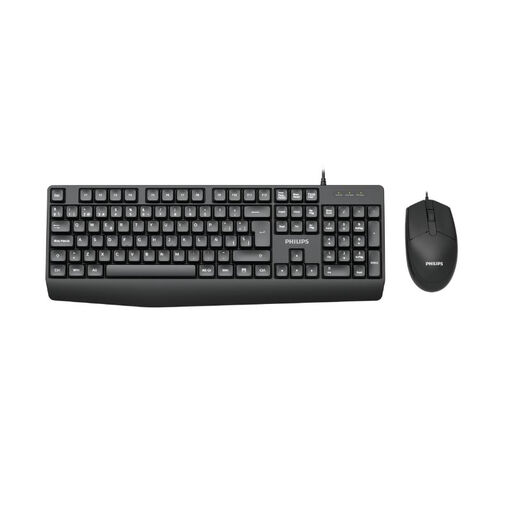
Philips 2000 Series SPT6237B/05 Wired Keyboard and Mouse Combo, UK English
This wired UK English bundle is an option if you need both a keyboard for navigation checks and a mouse for other work. Check the keyboard’s dimensions and number-pad arrangement if desk width or numeric entry affects your choice, and assess its key sound against your room’s needs.
View on Joybuy
Common questions
Do I need a specialist keyboard to test website navigation?
No specialist model is necessary for routine keyboard-navigation checks. The W3C Web Accessibility Initiative’s guidance focuses on whether website functionality can be used from a keyboard; use normal keystrokes to check that you can reach and operate controls, move through them in a sensible order and see where focus is.
Should I buy a UK ISO keyboard?
Choose a UK-labelled physical layout if it matches the keys and symbols you normally use for study. Check the exact variant before buying: a UK label makes layout selection easier, but the layout itself does not establish whether a website is keyboard-accessible.
Will a tenkeyless keyboard work for navigation testing?
Yes, provided its exact layout retains the keys your tests use and you do not need a dedicated number pad for other work. CHERRY says its STREAM TKL keeps the main keypad while omitting the number pad; check the key arrangement of whichever model you choose rather than assuming all compact layouts are identical.
What should I check before using a keyboard in student accommodation?
Check your accommodation agreement for rules that apply to equipment used in your room. If the keyboard came with the accommodation and appears unsafe, report it to the provider; guidance from Bath and North East Somerset Council addresses the safety of goods supplied with rented accommodation, rather than the suitability of a keyboard you choose for your own testing.


