A conventional keyboard is enough to build and maintain a photo gallery if its layout and keys suit the shortcuts you actually use. Choose a full-size or compact format according to your need for navigation keys, number entry and desk space; consider programmable controls or a separate shortcut device only if you will configure and reuse them. Check the exact physical layout and computer compatibility before choosing a model.
Who this is for
Shortcut-heavy photo organisers
If you regularly select images, add captions and move through a catalogue, accessible navigation and modifier keys may matter more to you than decorative features. Adobe documents keyboard shortcuts for both Lightroom Classic and Photoshop.
Multi-device gallery builders
If you move between computers or other devices while editing images and managing a gallery, check how a keyboard connects and whether its layout and features work with each device you intend to use.
Long-session cataloguers
If captioning, keywording or other extended keyboard work makes fit your main concern, a split layout is one option to try. Allow for an adjustment period and check the retailer’s return terms before relying on a new shape for comfort.
What matters when choosing
Start with the physical layout and compatibility of the keyboard you will use. Then decide whether repeated shortcuts, typing comfort or a flexible workspace is your leading reason to choose a different design.
| Concern |
What to check |
Who this matters to |
| Repeated shortcuts |
Check access to the modifier and navigation keys your software uses, and whether any configurable keys work with your operating system. |
If I repeat the same editing or catalogue commands, I want those actions within easy reach rather than configuring controls I will rarely use. Around 29% of consumers put repeatable shortcut access first. |
| Layout and compatibility |
Confirm the exact UK or British English physical layout and the requirements for the connection and features you plan to use. |
When I name files and enter captions, unfamiliar symbol positions or an incompatible feature would disrupt my work. For around 29% of consumers, layout and computer compatibility are the primary need. |
| Long-session comfort |
Assess keyboard shape, key position and fit at your desk; check return terms if you want to try a split design. |
If I spend long sessions entering metadata, I need a keyboard shape I can use comfortably, while recognising that fit is personal. Around 24% of consumers place that need ahead of the other factors. |
| Space and device changes |
Decide whether you need a number pad and dedicated navigation keys, then check desk space and the connection methods you can use. |
On a small desk or when changing devices, I need a format and connection that fit the way I work. That flexibility comes first for around 18% of consumers. |
Buying pitfalls
-
Assuming every keyboard has the familiar UK layout
A different physical layout can put symbols and keys in unfamiliar positions when you name files, write captions or enter metadata.
Check the exact variant for UK ISO or British English layout rather than relying on a keyboard family name or product photograph.
-
Buying programmable controls without a shortcut plan
Assignable keys help only when their commands match actions you repeat in your photo software, browser or gallery-management tools. Adobe documents shortcuts for Lightroom Classic and Photoshop; Elgato documents assignable hotkeys for Stream Deck +.
Identify the commands you use regularly before deciding whether a programmable keyboard or separate controller is worth setting up.
Allow time to configure, test and maintain your assignments.
-
Expecting an ergonomic label to settle the comfort question
A split keyboard changes the typing layout, but individual fit depends on the wider desk setup too. A new shape may take time to get used to.
Consider keyboard position and desk height, and check return terms if you need to assess the fit at home.
-
Overlooking feature-specific compatibility
A keyboard may type on a device without every advertised feature working there. For example, Apple specifies an Apple-silicon Mac running macOS 15.1 or later for its cited Magic Keyboard with Touch ID and Numeric Keypad.
Match the exact model and the features you want to your computer, operating system and available connection method.
Brands to consider for this work
Logitech
Its MX Keys S and ERGO K860 illustrate two different desk-keyboard approaches: configurable everyday controls and a curved split layout.
- Logitech lists backlighting, custom shortcut keys and multi-device use for MX Keys S, and a split frame with palm-lift positions for ERGO K860.
- Confirm the exact regional layout and operating-system features. A split design’s comfort is individual, not a guaranteed outcome.
Keychron
The Q6 Max UK-ISO line is an option for buyers who want a full-size mechanical keyboard with configurable controls.
- Keychron lists QMK/VIA configuration and 2.4 GHz, Bluetooth 5.1 and USB-C wired connection options for the cited Q6 Max model.
- Check the selected layout, switches and assembled or barebones configuration; customisation also takes setup time.
Apple
Its cited British English Magic Keyboard with Touch ID and Numeric Keypad is a Mac-focused extended-keyboard option.
- Apple describes this model as wireless and rechargeable, with a numeric keypad and Touch ID.
- Apple specifies a Mac with Apple silicon running macOS 15.1 or later for this model; do not assume its Touch ID feature works with other computers.
Elgato
Stream Deck + is a separate shortcut-control option to use alongside a typing keyboard.
- Elgato documents hotkeys that can be assigned to application or operating-system commands, including dial actions.
- It does not replace a normal keyboard, and its usefulness depends on configuring commands you will actually reuse.
Keyboard choices on Joybuy
These keyboards offer different ways to approach gallery work: a split shape, full-size typing layouts or a more compact format. Choose by the keys and desk space you need, then confirm the selected variant’s layout and computer compatibility.
 No image available
HP 960 Ergonomic Split Layout Wireless Keyboard with padded wrist rest
Consider the split layout if your gallery work involves long typing sessions and you want to assess a different keyboard shape.
Wireless design and padded wrist rest. Confirm the physical layout and whether the programmable-key features you want work with your operating system; a split layout may take time to get used to.
View on Joybuy
 No image available
Targus EcoSmart™ Full Size Wireless Keyboard (UK)
The full-size format is worth considering if you prefer a larger keyboard for file naming, metadata entry and navigation at a fixed desk.
UK variant and wireless design. Check the available desk width and whether you need application-specific shortcut remapping before choosing it for that purpose.
View on Joybuy
 No image available
HyperX Alloy Rise 75 Wireless Keyboard (UK)
Consider this 75-format keyboard when you want a smaller desk footprint and plan to check whether its controls suit your repeated gallery commands.
Wireless UK variant. Confirm the exact physical layout, including whether it matches the UK ISO arrangement you expect, and check key-assignment compatibility with your operating system.
View on Joybuy
 No image available
ASUS ROG Strix Scope II 96 Wireless Keyboard, Black (UK layout)
The 96-format UK-layout option may suit a desk where you want to compare keyboard footprint with access to keys used for gallery work.
Wireless gaming-keyboard variant in black. Check its exact key arrangement and whether it supports the application-specific shortcut assignments you intend to use; its gaming label does not establish an advantage in photo software.
View on Joybuy
 No image available
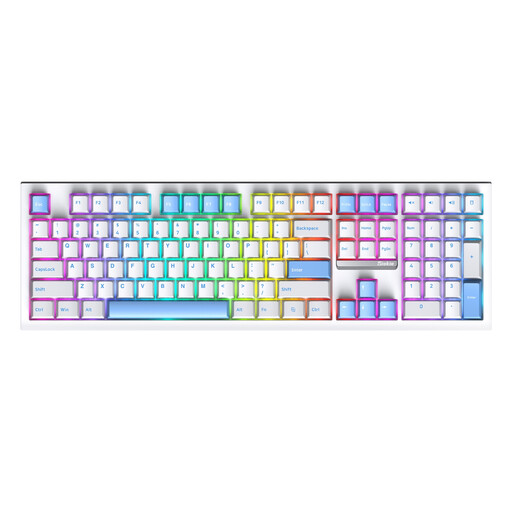
Siukie PL108W 108-Key Three-Mode Mechanical Keyboard, White
Consider the 108-key format if you want a larger keyboard for typing and numeric entry while managing a gallery.
Detachable switches, three-mode design and RGB lighting are identified in the product name. Confirm the physical layout and any application-shortcut support you need, and allow space for the full-size format.
View on Joybuy
Common questions
Do I need a dedicated photo-editing keyboard to build a gallery?
No: a conventional keyboard can use the shortcuts Adobe documents for Lightroom Classic and Photoshop. Consider programmable keys or a separate controller when you repeat particular commands often enough to justify configuring them.
Should I choose a full-size keyboard for photo-gallery work?
Choose a full-size layout if you want dedicated navigation keys or a number pad and have room for it on your desk. A compact layout can make more sense where space matters, provided you are comfortable with how it gives access to the keys you use.
Does a UK ISO layout matter?
It matters if you rely on familiar UK key positions and symbols when naming files or writing captions. Check the exact variant for a UK ISO or British English physical layout rather than assuming every keyboard offered by a UK retailer uses one.
Will Apple Touch ID work with any computer?
No. Apple specifies a Mac with Apple silicon running macOS 15.1 or later for the cited Magic Keyboard with Touch ID and Numeric Keypad. Check that requirement against your Mac and the exact keyboard model before buying.


