Choose a keyboard whose physical layout and typing feel suit your work, then check its connection and shortcut options against the devices you use. Adjustable backlighting may help as room light changes, but it does not establish that keys will be readable in direct sun. For a desk beside a bright window, address screen reflections and glare through workstation placement as well as keyboard choice, as the Health and Safety Executive advises.
Who this is for
Bright-desk portfolio builders
If you write, code and revise a portfolio homepage while daylight changes around your desk, consider both the keyboard and the position of your screen. The Health and Safety Executive advises arranging lighting and screens to avoid reflections and glare.
Shortcut-heavy, multi-device creators
If you move between work devices or repeatedly use design and editing commands, check device switching and key customisation on the exact model. Logitech describes device switching and programmable shortcuts on MX Keys S; Keychron describes remapping on K3 Version 3.
Apple-silicon Mac desk users
If your desk centres on a compatible Mac, a British English keyboard with Touch ID may suit your setup. Apple specifies a Mac with Apple silicon running macOS 15.1 or later for its Magic Keyboard with Touch ID.
What to check when buying
Start with the physical layout and the devices you need to connect; then weigh typing feel, shortcuts and lighting against the way you use the desk.
| Concern | What to check | Who this matters to |
|---|
| Changing light and glare |
Check brightness controls on the exact keyboard, then position the screen to limit window reflections. |
If daylight changes across my desk, I want to see the keys without letting screen glare disrupt my work; around 36% of consumers put changing light and glare first. |
| Shortcuts and device switching |
Confirm supported devices and whether remapping needs software or a wired connection. |
When I move between devices or repeat design commands, I want those actions within easy reach; around 29% of consumers prioritise shortcuts and switching. |
| Typing feel and noise |
Consider the selected switch type, keyboard height and desk space for your hands. |
For long sessions of editing copy and code, I need a feel I can live with and a sound that suits the room; around 21% of consumers put typing feel and noise first. |
| UK layout and device fit |
Verify the physical layout and any operating-system or hardware requirement for special features. |
I do not want unfamiliar key placement or a feature my computer cannot use; around 14% of consumers chiefly prioritise layout and device fit. |
Buying pitfalls
-
Assuming backlighting fixes bright-window visibility
Logitech describes adaptive illumination on MX Keys S and MX Mechanical, but that does not establish key readability in direct sun. A keyboard also cannot remove reflections from a monitor.
Check whether the lighting is adjustable, and try positioning the screen and desk to reduce glare, in line with Health and Safety Executive workstation guidance.
-
Assuming every variant has a UK layout
Keychron offers a UK-ISO K3 Version 3 option, while Apple identifies its Touch ID model as British English. Those labels need to match the variant you select, not just the product family.
Confirm the physical layout in the selected listing before ordering, particularly if an unfamiliar key position would slow down your work.
An unsuitable layout can also mean time spent changing your setup or arranging a return.
-
Choosing Touch ID without checking the Mac
Apple specifies a Mac with Apple silicon running macOS 15.1 or later for its Magic Keyboard with Touch ID.
Check your Mac processor and macOS version before choosing that model. If several types of device are central to your work, assess their compatibility separately.
-
Treating all mechanical switches as equally quiet
Logitech offers tactile quiet, clicky and linear MX Mechanical switches with different feel and sound. A clicky variant may not suit a shared quiet room.
Check which switch variant you are selecting, and consider both the feel you prefer and the noise acceptable at your desk.
Relevant keyboard brands to consider
Logitech
Relevant to low-profile productivity typing or a choice of low-profile mechanical switches.
- Logitech describes adaptive illumination, programmable shortcuts and switching across up to three devices on MX Keys S.
- MX Mechanical is offered with tactile quiet, clicky or linear switches.
- Adaptive illumination is not a claim of direct-sunlight key readability; check the selected model and switch variant.
Keychron
Relevant to a compact mechanical keyboard with a UK-ISO option and remappable keys.
- Keychron lists wired and Bluetooth operation, QMK support and Launcher remapping for K3 Version 3.
- Launcher configuration requires wired mode, and hot-swapping applies to the RGB Backlight Hot-Swappable version rather than every configuration.
Apple
Relevant to a British English, Mac-focused desk where Touch ID matters.
- Apple lists its Magic Keyboard with Touch ID as wireless and rechargeable, with USB-C charging.
- Apple specifies a Mac with Apple silicon running macOS 15.1 or later for this Touch ID model.
Joybuy product choices for this desk
These keyboards offer different compact layouts, connection options and typing styles for a portfolio-design desk. Check the physical layout carefully: several listed variants use US QWERTY rather than a UK layout, and lighting alone does not establish readability in direct sun.
 No image available
HyperX Alloy Rise 75 Wireless Keyboard UK
Consider this UK-labelled wireless model if a compact keyboard suits your desk. Check the selected layout and your screen position rather than relying on keyboard lighting to resolve window glare.
View on Joybuy
 No image available
Rapoo E9050L 75% wireless membrane keyboard, US layout, White
Consider this compact membrane keyboard if its US physical layout suits your typing. Its title specifies 78 keys, 2.4GHz and Bluetooth 5.0/4.0 connections, and support for four devices; check the exact connection requirements for your setup.
View on Joybuy
 No image available
Lofree OE907 65% mechanical keyboard, US layout, mouse gift listing
Consider its compact 68-key layout if you can work with US key placement. The title specifies Bluetooth 5.1, a wired connection and white backlighting; check whether the selected listing includes the advertised mouse gift.
View on Joybuy
 No image available
AULA F75 75% mechanical keyboard, US layout
Consider this compact mechanical option if US key placement is acceptable. Its title specifies wired, Bluetooth and 2.4GHz connections, RGB backlighting and PBT keycaps. Its supplied safety information advises against prolonged direct sunlight, so consider where it will sit beside the window.
View on Joybuy
 No image available
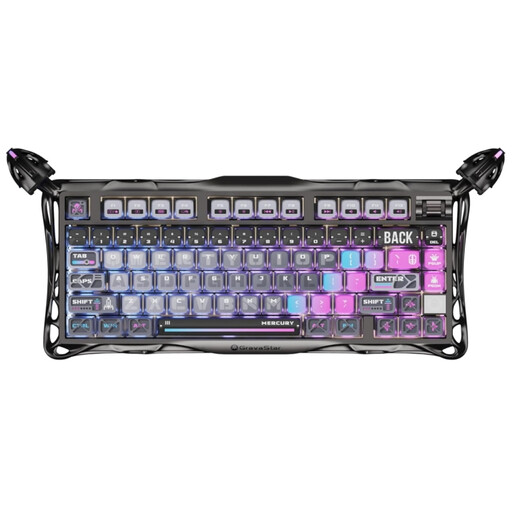
GravaStar Mercury K1 Pro 75% Cyberpunk Edition, Black, Chinese retail version
Consider its compact mechanical layout if you are comfortable with the stated US QWERTY keys. The title specifies wired, Bluetooth and 2.4GHz modes, hot-swappable switches and RGB backlighting. Confirm compatibility with your intended computer before choosing this version.
View on Joybuy
Questions and answers
How should I position a keyboard for longer portfolio-design sessions?
Leave space in front of the keyboard where possible and keep your wrists straight while typing. The Health and Safety Executive says that front-of-keyboard space can help you rest your hands and wrists; assess the desk and screen position alongside the keyboard.
Can I change my mind about an online keyboard purchase in the UK?
For a qualifying online purchase, GOV.UK says a customer can cancel up to 14 days after delivery without giving a reason. Check the retailer's cancellation process and any applicable conditions before ordering; a keyboard that is faulty or misdescribed raises a separate issue from a change-of-mind return.


