What matters when choosing?
Compact scissor-style keyboard
Consider it when: You want a compact board for document work and shortcuts without selecting mechanical switches. Logitech lists illuminated, programmable keys and English UK variants in the MX Keys Mini range.
Trade-off: Logitech specifies 79 keys and no tilt legs for MX Keys Mini Business, so check its navigation keys and fixed typing angle.
Low-profile mechanical keyboard
Consider it when: Switch choice and remapping matter to you. Keychron offers the K3 Max in a 75% UK-ISO configuration with QMK/VIA support.
Trade-off: Choose the exact switch option and check which dedicated editing keys its compact layout retains; a mechanical label alone does not establish how it will sound or feel to you.
Apple Magic Keyboard
Consider it when: Your main device meets Apple’s stated requirements and you want its compact British English keyboard. Apple lists the USB-C Magic Keyboard at 27.89 cm wide.
Trade-off: The compact version has no numeric keypad. Check Apple’s requirements for your particular device rather than assuming Windows compatibility.
For consumers choosing a keyboard to write a project proposal on a small desk, settle the space and key-layout question before weighing typing feel and connections.
| Concern | What to check | Who this matters to |
|---|
| Desk space and editing keys |
Compare keyboard width and the exact positions of arrows, navigation keys and any number pad. |
If papers and a mouse already crowd my desk, I need to save width without losing the keys I use to edit; around 50% of consumers put workable desk space first. |
| Typing feel and sound |
Choose a specific switch or key mechanism, and consider whether its angle and sound suit where you write. |
During a long drafting session near other people, I want typing that does not distract me or them. Roughly 30% of consumers prioritise typing feel and sound. |
| Layout and device fit |
Check the printed UK or US layout and confirm that the connection works with your computer or tablet. |
If I change devices or rely on familiar UK punctuation, an unexpected layout or incompatible connection could interrupt my work; around 20% of consumers place layout and device fit first. |
Joybuy keyboard options
These Joybuy options cover several compact-layout approaches, from a board for writers considering a number pad to smaller 75% and 65% models. Check each listing’s exact layout and connections against your desk and computer; these products are not the Logitech, Keychron or Apple models discussed above.
 No image available
ASUS ROG Strix Scope II 96 Wireless, White, UK Layout
Consider this model if you want a compact arrangement but still use a number pad for proposal budgets; compare its full key diagram and dimensions with your available space.
The product name identifies a wireless keyboard in a white UK-layout variant. Confirm the fitted switch option before buying, and do not assume that sound-dampening descriptions mean quiet typing.
View on Joybuy
 No image available
HyperX Alloy Rise 75 Wireless Keyboard UK
The 75% format is worth considering when desk width matters but you want to check whether familiar editing keys remain easy to reach.
The title identifies a wireless UK variant. Check its exact printed legends and physical dimensions before deciding whether it fits your typing habits and desk.
View on Joybuy
 No image available
ASUS ROG Falchion Ace HFX 65 Analog, UK Layout
Consider this smaller-format keyboard if saving desk width takes priority over having a larger set of dedicated editing keys. Check the exact navigation-key arrangement before buying.
The product name specifies a UK-layout variant. Confirm that its wired connection and stated Windows 10/11 compatibility suit your setup.
View on Joybuy
 No image available
Rapoo E9050L 75% Wireless Membrane Keyboard, White, US QWERTY
This compact membrane model is an option if you can work with US QWERTY legends; check the punctuation keys before choosing it for UK-formatted documents.
The product name specifies 78 keys and 2.4 GHz and Bluetooth wireless modes. Check its physical dimensions against the space on your desk.
View on Joybuy
 No image available
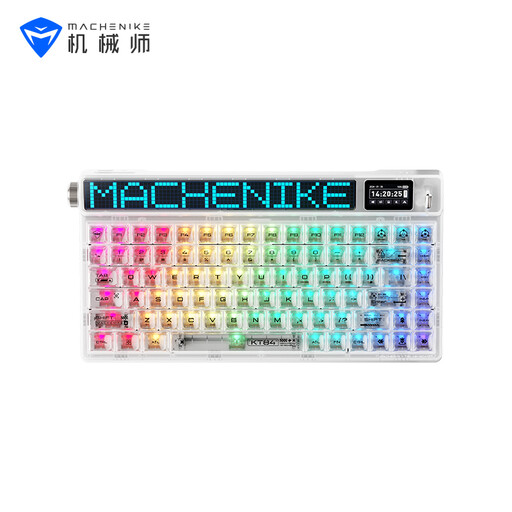
MACHENIKE KT84-B84W 75% Mechanical Keyboard, White, Gateron Yellow, US QWERTY
This is a compact mechanical option if you want the stated switch variant and can use a US keyboard layout for proposal work.
The product name specifies tri-mode operation. Check its exact navigation keys, operating-system compatibility and physical dimensions against your setup.
View on Joybuy
Common questions
Do I need a UK keyboard layout for writing proposals?
Choose a UK-layout variant if you rely on its printed punctuation and symbols. Check the exact product variant: Logitech lists separate English UK and English International MX Keys Mini Business versions, and Keychron offers a UK-ISO K3 Max.
Can a compact keyboard replace a full-size one?
A compact keyboard can work for prose-heavy proposals if its editing keys meet your needs, but a missing number pad may matter when you enter budgets or tables. Compare the exact arrangement rather than judging by size alone: Logitech specifies 79 keys for MX Keys Mini Business, and Keychron describes K3 Max as a 75% layout.
Should I connect by Bluetooth, receiver or cable?
Choose a connection your computer supports and that fits how often you switch devices. Logitech lists Bluetooth and Logi Bolt options for MX Keys Mini Business, while Keychron lists Bluetooth, 2.4 GHz wireless and wired operation for K3 Max; check the requirements of the exact model and your computer.
Will Apple Magic Keyboard work with my Windows laptop?
Do not assume Windows compatibility for Apple’s British English Magic Keyboard. Apple specifies requirements for its supported Apple devices, so check independently for compatibility with your particular Windows laptop before choosing it.


