What matters when choosing?
Start with the record-entry task and available desk space, then weigh noise, individual workstation fit and how the keyboard will connect at a shared desk.
| Concern |
What to check |
Who this matters to |
| Numeric entry and layout |
Check for a dedicated numeric keypad and the exact UK key layout; allow room to position the mouse comfortably. |
I enter member IDs, dates and amounts throughout the day, so familiar number keys are my priority. Around 33% of consumers would put numeric record entry first. |
| Typing noise |
Check the exact model’s key action rather than treating a quiet-key claim as a promise of silence. |
Colleagues work or take calls close to my desk, and I want typing to be less disruptive. For around 27% of consumers, quietness would be the primary concern. |
| Workstation fit |
Check keyboard position alongside the chair, screen and mouse. For qualifying daily display-screen work, arrange a workstation assessment. |
I type for long stretches and need a setup that suits my position at the desk, rather than relying on a keyboard’s shape alone. Around 27% of consumers would prioritise workstation fit. |
| Connection and sharing |
For wired use, check USB access and cable routing; for wireless use, check pairing, receiver handling and battery responsibility. |
People use different devices at our shared desk, so straightforward handovers matter most to me. Around 13% of consumers would make connection and sharing their first priority. |
Joybuy keyboard choices
These wired and wireless keyboards offer different ways to approach shared-office record work. Match the exact layout, key action and connection requirements to the desk where each will be used.
 Image unavailable
Targus EcoSmart™ Full Size Wireless Keyboard (UK)
Consider this full-size option when record entry is central to the shared desk, but check the exact keys and typing sound before choosing it for the team.
Wireless operation also calls for a clear plan for connections and batteries when staff share the workstation.
View on Joybuy
 Image unavailable
HP 960 Ergonomic Split Layout Wireless Keyboard with Padded Wrist Rest
Consider the split layout where an individual workstation review points towards a different keyboard shape; the padded wrist rest does not replace that review.
Confirm the UK key layout and how the wireless connection will be managed at the intended desk.
View on Joybuy
 Image unavailable
Hyper® HyperSpace Next Bluetooth Wireless Keyboard (UK), White
This Bluetooth model may suit a desk where wireless connection matters, provided staff can manage pairing and charging.
Check the exact UK key arrangement, whether it meets your numeric-entry needs and how its keys sound in a shared room.
View on Joybuy
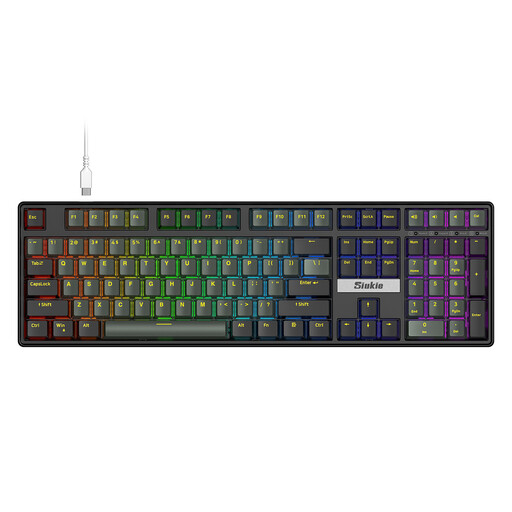 Image unavailable
Siukie CR108 108Keys Detachable Switch Wired Mechanical Keyboard
For a fixed desk with USB access, this wired mechanical model avoids wireless pairing and battery handovers.
Its title specifies 108 keys and detachable switches. Confirm the keyboard layout, the fitted switch and its sound before using it in a quiet shared office.
View on Joybuy
Frequently asked questions
Do we need a full-size keyboard for membership records?
Choose a full-size keyboard when staff regularly enter member numbers, dates or spreadsheet values and want an integrated numeric keypad. RTINGS notes that a full-size keypad is useful for data entry; a smaller layout may suit a desk where mouse space matters more.
Should a UK shared office choose a UK-ISO layout?
A UK-ISO variant is a sensible choice when staff expect familiar UK key positions and symbols. Logitech explains that ANSI and ISO layouts differ, so confirm the exact English UK variant rather than relying on a product photo.
Does a workplace need a particular ergonomic keyboard?
The Health and Safety Executive’s UK guidance does not prescribe a particular keyboard model. It says employers must assess the workstation when workers use display screen equipment daily as part of normal work, continuously for an hour or more; that assessment considers the task, whole setup and individual needs.
When is wireless worth considering for a shared desk?
Consider wireless when staff need flexibility between devices or want fewer cables, provided the office can manage pairing, receivers or batteries. For a fixed PC, a wired USB keyboard avoids those handover tasks.
How should a shared keyboard be cleaned?
Follow the instructions for the exact keyboard model. Logitech advises switching off or disconnecting its keyboards before cleaning and says not to use bleach on its products; other models may have different instructions.


