For painting a game character, choose a conventional keyboard if you also type regularly, or a separate shortcut controller if reaching brush, zoom and layer commands while holding a stylus is the bigger problem. A programmable mechanical keyboard offers another way to keep normal typing while changing key assignments. Beside a bright window, check whether you can recognise the controls at your actual desk position: adjustable lighting and display labels do not establish direct-sun readability.
Who each setup suits
Shortcut-heavy character painters
If you repeatedly change brushes, zoom, resize, undo and manage layers with a stylus in hand, organised controls close to your drawing device may matter more than another typing layout. Xencelabs documents assignable drawing controls, while Huion describes using tablet express keys for frequently used commands.
Painters who also type extensively
If you name files and layers, write notes or communicate while painting, a conventional keyboard retains ordinary text entry alongside shortcuts. Logitech and Keychron both describe customisable keyboard controls, although the available configuration depends on the model and software.
People working beside changing daylight
If the light across your desk shifts during a painting session, assess control labels from your normal seated position. Logitech describes adjustable keyboard illumination, while Xencelabs and Elgato offer display-based labels; those features alone do not tell you how readable a device will be in direct sun.
What to check before choosing
Decide whether you need regular typing or quicker access to painting commands first. Then check the exact layout, software and connections against the drawing setup you already use.
| Concern |
What to check |
Who this matters to |
| Pen-side shortcuts |
Check that your painting application accepts the commands you want to assign and that the controller fits beside your tablet. |
When my stylus hand is busy, I want brush, zoom and undo commands within easy reach. Around 37% of consumers would make pen-side shortcut access their primary need. |
| Typing and custom keys |
Confirm the physical layout and whether your operating system supports the key-customisation software you intend to use. |
I still name layers, write notes and type messages during a painting session, so a full keyboard matters to me. For around 27% of consumers, regular typing alongside custom shortcuts would come first. |
| Control visibility |
Check labels at your usual viewing angle beside the window and whether the device’s lighting can be adjusted. |
As daylight moves across my desk, I need to recognise assigned controls without relying on lighting alone. Clear control identification would be the main priority for around 18% of consumers. |
| Desk and software fit |
Measure the space beside your drawing device, identify available ports and check driver and application compatibility. |
My tablet and monitor already occupy the useful desk space, so another device has to fit and work with my setup. Around 18% of consumers would put space and compatibility first. |
Mistakes to avoid
-
Assuming backlighting solves window glare
Logitech’s adaptive keyboard lighting and the display labels on Xencelabs and Elgato controllers serve different purposes, but none establishes how clearly you will see the controls in direct sunlight.
Check the device at your normal painting angle, where daylight falls on the desk, and whether you can adjust its lighting or position.
-
Choosing a controller before checking its software
Xencelabs says Quick Keys requires a driver and does not support iOS or Android. Elgato uses the Stream Deck desktop app to configure its controls; its Stream Deck XL guidance calls for a direct USB-A connection rather than a USB hub.
Confirm your computer, painting application, available port and any existing pen-tablet driver will accommodate the controller you want.
-
Assuming every variant has a UK layout
A keyboard family can include different physical layouts. Keychron lists a UK-ISO option for the V5 Max, so the family name alone is not enough to identify the selected variant.
Check the exact layout shown for the variant before ordering, especially if familiar UK key positions matter to your typing.
-
Replacing a typing keyboard with action keys
Xencelabs Quick Keys and Elgato Stream Deck XL organise application actions; neither serves as a conventional full typing keyboard.
Keep a normal keyboard in the setup if you enter substantial text, and consider a controller when reaching painting commands is the separate problem to solve.
Relevant brands for reference
Logitech
A conventional keyboard route for painting setups that also involve regular typing.
- Logitech describes MX Keys S as an illuminated wireless keyboard with programmable keys and multi-device support.
- Its adjustable illumination should not be treated as proof that the key legends will be readable in direct sun.
Keychron
A mechanical keyboard route for people who want to choose a physical layout and remap keys.
- Keychron lists a UK-ISO V5 Max variant with VIA key and macro customisation and hot-swappable MX-compatible switches.
- The cited V5 Max variant has non-shine-through PBT keycaps, so do not choose it on the assumption that its legends light up.
Xencelabs
A compact shortcut-controller route for drawing commands used alongside a typing keyboard.
- Xencelabs describes Quick Keys with an OLED assignment display, a dial and up to 40 shortcuts per application.
- Quick Keys requires a driver and does not support iOS or Android. Xencelabs also says it does not support macro commands, script automation or third-party plugin integration.
Elgato
A desk-based control-surface route for visually labelled, application-specific actions.
- Elgato describes Stream Deck XL with 32 customisable LCD keys, folders and application profiles.
- It is not a normal typing keyboard. Elgato’s setup guidance specifies a direct USB-A connection rather than a USB hub.
Joybuy product choices
These keyboards and a separate programmable keypad offer different ways to arrange typing and commands beside a drawing device. Compare their stated layouts and controls with your painting software and the light at your desk.
 No image available
HyperX Alloy Rise 75 Wireless Keyboard UK
Consider this wireless typing keyboard if you want to keep keyboard input while setting up painting commands. Check that NGENUITY and the assignments you need work with your computer and painting application; assess key visibility beside your window rather than relying on lighting alone.
View on Joybuy
 No image available
HP 430 Programmable Wireless Keypad
This programmable wireless keypad is a companion option when you want commands beside your drawing device but still need a separate keyboard for typing. Before relying on assigned painting shortcuts, check HP Accessory Centre compatibility with your computer and application, and inspect label visibility at your desk.
View on Joybuy
 No image available
Lofree OE907 65% keyboard with mouse gift, US layout
Consider this compact typing keyboard if space beside your drawing device is limited and a US physical layout suits you. Its stated configuration includes 68 keys, Jellyfish switches, Bluetooth 5.1 or a wired connection, and white backlighting. Check whether the keys can be assigned to your painting commands and whether you can read them at your usual viewing angle.
View on Joybuy
 No image available
ASUS ROG Falchion Ace HFX 65, UK layout
This 65% typing keyboard is worth considering if a stated UK layout matters and you want to limit the keyboard’s desk footprint. Check whether its controls can be mapped to the commands in your painting application before choosing it for shortcut work.
View on Joybuy
 No image available
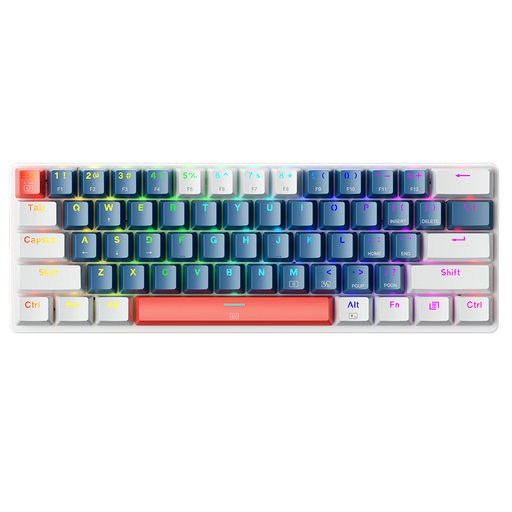
MACHENIKE K500-B61 60% wired keyboard, Brown Switch RGB
This compact mechanical keyboard offers ordinary typing where desk space is tight. The stated variant has a US QWERTY layout, Brown switches, a wired connection and RGB lighting. Confirm operating-system compatibility and painting-command remapping if either is essential to your setup; check the keys’ visibility beside the window.
View on Joybuy
Common questions
Is keyboard backlighting enough beside a bright window?
No: adjustable backlighting alone cannot establish that you will see the key legends clearly in direct sun. Logitech says MX Keys S adjusts its lighting as ambient conditions change; check visibility from your own painting position before depending on that feature.
Can a shortcut controller replace my normal keyboard?
Use a shortcut controller alongside a keyboard if you still type regularly. Xencelabs Quick Keys centres on assigned controls and a dial, while Elgato Stream Deck XL uses LCD action keys and profiles; neither is a conventional full typing keyboard.
Will a drawing shortcut controller need software?
Check the requirements for the particular controller: Xencelabs says Quick Keys requires a driver, and Elgato uses the Stream Deck app to configure Stream Deck XL actions. Confirm that your operating system and painting application support the workflow you intend to set up.
How do I check that a mechanical keyboard has a UK layout?
Confirm that the exact variant you select specifies a UK physical layout, rather than relying on the keyboard family name or a photograph. Keychron lists a UK-ISO V5 Max option, but layout selection is variant-specific.


