Choose a conventional programmable keyboard if you need to type as well as use painting shortcuts; consider a compact keyboard when a drawing tablet or pen display needs more desk room. A dedicated shortcut pad can put labelled commands within reach, but it works alongside, rather than replacing, a typing keyboard. Before buying, check the physical layout, software compatibility and where each device will sit.
Who this setup suits
Shortcut-heavy character painters
If one hand stays on a stylus or mouse, frequently used brush, tool and layer commands need to be reachable with the other. Adobe supports customised Photoshop shortcuts, while Elgato documents dedicated Photoshop controls for its Stream Deck.
Pen-display users short on desk space
A keyboard must fit beside the drawing device without making either hand reach awkwardly. A compact layout may help, but check which keys it removes before giving up a larger keyboard.
Creators working across devices
If you move between compatible computers or other devices, connection switching and shortcut software matter alongside ordinary typing. Logitech says its MX Keys S can switch across up to three devices, subject to its compatibility requirements.
What matters when choosing
Start with the task that interrupts your painting most: reaching commands, fitting the drawing device, positioning your hands or switching devices. Then check whether the keyboard or companion pad can serve that need in your actual application and workspace.
| Concern |
What to check |
Who this matters to |
| Command access |
List your frequent painting commands and check whether your application, keyboard or control-pad software can assign them to reachable controls. |
When I repeatedly change tools or layers with one hand on a stylus, reaching those commands is my main interruption. Around 37% of consumers put command access first. |
| Desk footprint |
Measure the space with the tablet in its working position; check whether you need a numpad or dedicated navigation keys. |
If my pen display and keyboard compete for space, I want both within comfortable reach. Desk fit comes first for around 27% of consumers. |
| Workstation position |
Check keyboard height and your reach to the drawing device and pointing device, rather than judging a keyboard’s profile alone. |
For a long painting session, I need a layout that does not make me twist or stretch to use it. Around 27% of consumers prioritise workable positioning. |
| Device compatibility |
Confirm the physical key layout, connection method, operating system and software needed for your shortcuts. |
If I change between devices, I need my connections and assigned commands to work where I paint. Compatibility is the primary concern for around 9% of consumers. |
Buying pitfalls
-
Assuming every programmable keyboard stores shortcuts the same way
Shortcut behaviour can depend on desktop software or on the painting application. Microsoft says PowerToys keyboard remaps apply only while PowerToys is enabled and running; Logitech describes MX Keys S automation through Logi Options+.
Write down the commands and operating system you use, then check how the exact model assigns and retains them.
-
Expecting a shortcut pad to replace a keyboard
A pad can provide dedicated controls for tools and layers, but it does not offer a normal layout for writing notes, naming files or chatting.
Choose a control pad as a companion if labelled commands are the priority; keep a typing keyboard in the setup.
-
Choosing a compact layout without checking the missing keys
A tenkeyless layout removes the numpad. A smaller board may also change how you reach commands you currently use while painting.
Compare the exact layout with your current shortcuts and check whether its UK or US key arrangement suits your typing.
-
Relying on a new keyboard to fix an awkward workstation
Keyboard height and the placement of the tablet, mouse, chair and screen all affect how far you reach. A different keyboard alone may not resolve an awkward arrangement.
Use Health and Safety Executive guidance to position the keyboard just below elbow height, then check your reach to the drawing device and mouse.
Brands to consider
Keychron
A reference point for a compact, configurable primary keyboard. Keychron describes the Q3 Max as an 80% tenkeyless model offered in UK-ISO with QMK/VIA and several connection methods.
- The Q3 Max offers 2.4 GHz, Bluetooth and wired connections, according to Keychron.
- Its tenkeyless layout omits a numpad; check the selected layout and switches rather than assuming every variant is alike.
Logitech
A reference point for conventional typing with programmable controls and device switching. Logitech describes these features for its MX Keys S.
- Logitech says MX Keys S can switch across up to three devices and offers programmable keys and Smart Actions.
- Check Logi Options+ support on your operating system for the customisation you intend to use.
Elgato
A reference point for a companion control surface, not a primary typing keyboard. Elgato describes its standard Stream Deck as having 15 customisable LCD keys.
- Elgato documents Photoshop plugin controls for tools, layers and Actions.
- It takes additional desk space and depends on suitable software or plugins; retain a keyboard for normal typing.
Joybuy keyboards for painting workflows
These are compact typing keyboards to consider when desk space beside a drawing device matters. They are not dedicated shortcut pads: check each layout and its shortcut-configuration options against the application you use.
 No image available
Ticktype EVO75 Tri-Mode, US Layout, Creamy Rye Switches – Spray-coated Nebula
Consider this compact typing keyboard if you want to configure keys for frequently used commands. Its name identifies VIA compatibility and hot-swappable switches; check the configuration software and operating system you will need. The listed layout is US, not UK-ISO.
Joybuy
 No image available
HyperX Alloy Rise 75 Wireless Keyboard UK
A compact wireless typing keyboard to assess for a desk shared with a drawing device. Confirm its precise physical key layout, and check whether HyperX NGENUITY supports the assignments you want on your operating system.
Joybuy
 No image available
ASUS ROG Falchion Ace HFX 65 Analog Gaming Keyboard – UK Layout
Consider its compact UK-layout form if placing a keyboard beside a pen display is the main challenge. Check that its keys cover your usual commands; if you need remapping beyond shortcuts assigned in your painting application, confirm those options before buying.
Joybuy
 No image available
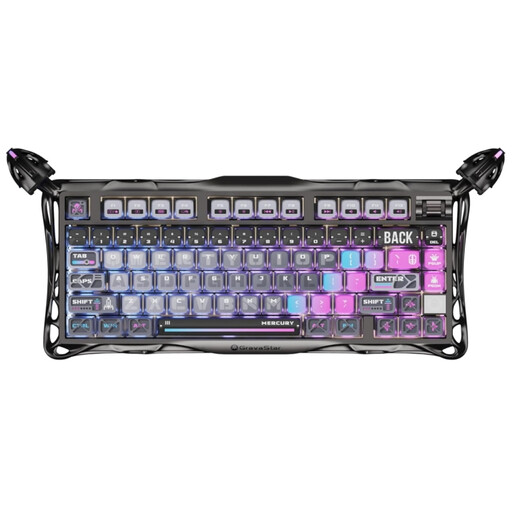
GravaStar Mercury K1 Pro 75% Tri-Mode, US Layout – Chinese Retail Version, Cyberpunk Edition, Black
Its 75% US-layout form is worth checking if a smaller typing keyboard would fit your drawing setup. The product name identifies hot-swappable switches and tri-mode connectivity; confirm operating-system compatibility and whether your painting shortcuts need only application-level assignment.
Joybuy
Common questions
Can I customise Photoshop shortcuts before buying a keyboard?
Yes. Adobe provides a way to customise keyboard shortcuts in Photoshop. Identify the commands you use most, then decide whether their placement calls for a different keyboard or a separate control pad.
Can Windows remapping software help with painting shortcuts?
Yes, for supported keys and shortcuts. Microsoft PowerToys Keyboard Manager can remap them, but PowerToys must stay enabled and running for those remaps to apply; check any operating-system shortcuts you intend to change.
Can a Stream Deck replace my keyboard?
Not for ordinary typing. Elgato’s standard Stream Deck has 15 customisable LCD keys for actions and application controls, so it is better considered alongside a keyboard when you still need to write, search or name files.
Where should the keyboard sit beside a drawing tablet?
Position the keyboard as part of the whole workstation, with frequent commands within comfortable reach. Health and Safety Executive guidance places the keyboard just below elbow height; check the tablet and mouse positions at the same time so you do not have to twist to use them.


