What matters when choosing?
Map your recurring animation commands first, then check how the keyboard layout fits beside your other input devices. Treat window glare and the feel of the exact keyboard as separate decisions rather than expecting one feature to settle them all.
| Concern |
What to check |
Who this matters to |
| Shortcuts and macros |
List the commands you repeat, then check the animation software’s shortcut settings and the keyboard’s remapping or dedicated macro controls. |
If I keep reaching for the same frame and tool commands, I want those actions within easy reach. Around 33% of consumers put shortcut control first. |
| Window glare and key legends |
Assess screen reflections and lighting placement; inspect the chosen keyboard’s physical legends in comparable daylight rather than relying on RGB specifications. |
When daylight falls across my desk, I need to see the screen and identify the keys I use without depending on backlighting. Around 27% of consumers make bright-window usability their primary concern. |
| Desk space and layout |
Measure the space needed for a mouse or tablet, decide whether you need a number pad, and confirm the exact UK key arrangement. |
I need room to move my mouse or use a drawing tablet, but I do not want to lose keys essential to my shortcuts. Around 20% of consumers prioritise desk space and layout. |
| Feel and connection |
Try the key feel where possible, and check the connection modes and their practical requirements on the exact variant. |
For a long editing session, I care about how the keys feel and whether the connection suits the devices on my desk. Around 20% of consumers put feel and connection first. |
Relevant brands to consider
These examples illustrate different keyboard layouts and controls; a brand’s inclusion does not establish that every model it makes suits sprite animation.
CORSAIR
The full-size, wired K100 RGB Mechanical Keyboard (UK) is relevant when you want separate controls for recurring actions.
- CORSAIR specifies six dedicated programmable macro keys, a programmable control wheel and PBT double-shot keycaps for this model.
- A full-size board takes more desk width than a compact layout; its lighting specification does not establish sunlight readability or individual comfort.
Keychron
The Q1 Max offers a UK-ISO 75% route for someone balancing a smaller keyboard footprint with configuration options.
- Keychron identifies a UK-ISO version and lists 2.4 GHz wireless, Bluetooth connection for three devices, and QMK/VIA configuration positioning.
- A 75% layout has fewer dedicated keys than a full-size board. Check whether its layers suit your assigned shortcuts and inspect its legends in your lighting.
Razer
The Huntsman V3 Pro Tenkeyless is a narrower route when mouse space matters more than a number pad.
- Razer specifies adjustable actuation from 0.1 to 4.0 mm and onboard adjustment for this tenkeyless model.
- Those manufacturer-described response features do not establish an animation-shortcut benefit or show how its legends perform beside a bright window.
Logitech G
The G915 X LIGHTSPEED is a low-profile, full-size option for someone considering wireless connection alongside assignable controls.
- Logitech G lists tri-mode connectivity, a 23 mm height, key remapping and nine G keys for macro assignments on this model.
- Check the exact layout and whether its low-profile feel suits you. Wireless use also calls for attention to connection mode and charging.
Joybuy keyboard choices
These compact-layout keyboards are choices to examine if desk space and access to repeated commands matter in your sprite-animation setup. Check shortcut configuration, the exact key arrangement and physical legends against your own workflow; none should be chosen on the assumption that it solves window glare.
 Image unavailable
HyperX Alloy Rise 75 Wireless Keyboard UK
Consider its 75% layout if you want more room beside a mouse or drawing tablet. For repeated animation commands, check whether its key-assignment options suit your software; confirm the exact UK key arrangement and inspect the physical legends in daylight.
View on Joybuy
 Image unavailable
Razer Huntsman V3 Pro Mini 60% Analog Optical Keyboard
Its 60% layout is worth considering if mouse or tablet space takes priority over direct access to more keys. Check how its modifier-key functions fit your animation shortcuts, confirm the exact UK key arrangement and inspect the legends in daylight. This Mini model is distinct from the tenkeyless Razer model discussed above.
View on Joybuy
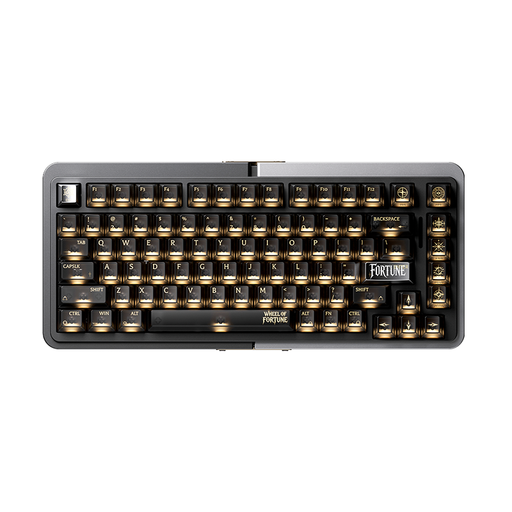 Image unavailable
Royalaxe E75 TTC Magnetic Switch Keyboard, 75%, silver-black, Type-C
The 75% layout may suit a desk shared with a mouse or drawing tablet. If macros are central to your workflow, check how they are configured and whether the method works with your animation software; also confirm the key layout and inspect the physical legends before buying.
View on Joybuy
Frequently asked questions
Will RGB backlighting solve a bright-window setup?
Do not rely on RGB lighting to solve bright-window glare. The Health and Safety Executive advises arranging screens and lighting to avoid reflections and glare; inspect a keyboard’s physical legends in comparable daylight rather than assuming a lighting feature establishes direct-sunlight readability.
Do I need dedicated macro keys to animate sprites?
No: dedicated macro keys are optional, particularly if the shortcuts available in your animation software already suit you. Aseprite lets you customise shortcuts and assign keys to accessible commands; separate macro controls become relevant when you have repeated actions you want outside the ordinary key area.
Should I choose a UK keyboard layout?
Choose a UK layout if its key arrangement and legends match the shortcuts and typing habits you need to retain. Keychron identifies a UK-ISO Q1 Max option, and CORSAIR labels its cited K100 as a UK model, but check the exact variant on the listing you intend to buy.
What if long animation sessions feel uncomfortable?
Assess the whole workstation rather than assuming a different keyboard alone will resolve discomfort. The Health and Safety Executive advises considering equipment, furniture, working conditions, the work itself and individual requirements; review your desk space, screen position and lighting alongside keyboard feel.


