For long stretches of typing while standing, consider a split keyboard with palm support if its width leaves room for your mouse and you are willing to adjust to its layout. A programmable low-profile keyboard may suit repeated design-tool shortcuts; an extended Mac keyboard suits a compatible Mac workflow when navigation keys and a number pad matter more. Whichever you choose, follow the Health and Safety Executive’s guidance to keep the keyboard central and just below elbow height.
Who these keyboards suit
Standing-desk designer who types for long sessions
If you write homepage copy and move between design tools for extended periods, keyboard position and space for your mouse may matter as much as the keyboard’s shape. The Health and Safety Executive advises keeping the keyboard central and just below elbow height.
Shortcut-heavy web creator
If you repeatedly use browser and design-tool commands, configurable keys may be useful when you are prepared to set them up. Keychron specifies QMK/VIA customisation for the K1 Max.
Mac-first portfolio builder
If you use a Mac with Apple silicon, you may value British-English keys, navigation controls and a number pad. Apple’s Magic Keyboard with Touch ID and Numeric Keypad offers Touch ID only with a compatible Mac running macOS 15.1 or later.
What matters when choosing
Split keyboard with palm support
Consider it when: long typing sessions make hand position your main selection concern. Logitech specifies a curved split keyframe and three palm-lift positions for the ERGO K860.
Trade-off: allow space for its full-size shape and time to get used to the split layout; the keyboard does not replace workstation adjustment.
Low-profile programmable keyboard
Consider it when: you regularly repeat shortcuts and want configurable keys. Keychron specifies an 80% UK-ISO option with QMK/VIA customisation for the K1 Max.
Trade-off: its 80% layout has no dedicated number pad, and switch feel depends on the variant you select.
Extended Mac keyboard
Consider it when: your Mac workflow calls for full-size arrow keys, navigation controls, a number pad and Touch ID.
Trade-off: Apple’s Touch ID model requires a Mac with Apple silicon running macOS 15.1 or later and has a conventional, unsplit layout.
| Concern | What to check | Who this matters to |
|---|
| Standing posture |
Check front height and palm-support depth, then whether the board fits centrally just below elbow height. |
If I type for long periods while standing, I need room to keep my shoulders and forearms comfortably positioned. Around 33% of consumers would make standing posture their primary concern. |
| Shortcut customisation |
Check remapping on the exact model and whether the commands work in your applications. |
Repeated design-tool and browser commands make configurable keys worth considering when I am willing to set them up; roughly 27% of consumers would prioritise shortcuts. |
| Mouse reach |
Compare board widths and decide whether you can do without a dedicated number pad. |
When I alternate between keyboard and pointer, I want the mouse within comfortable reach, even if that means fewer dedicated keys. About 20% of consumers would put desk space first. |
| Layout and device fit |
Confirm the exact UK-ISO or British-English variant and the features supported by your computer. |
I do not want an unfamiliar key layout or a device-specific feature I cannot use. Around 20% of consumers would make layout and compatibility their main priority. |
Mistakes to avoid
-
Choosing a split keyboard without checking desk position
A wide board can push the mouse away, while a keyboard placed too high or off-centre can leave you raising your shoulders or twisting.
Before deciding on its width, check that both keyboard and mouse fit your standing setup. The Health and Safety Executive advises keeping the keyboard central and just below elbow height.
-
Assuming every variant has the same layout
Key layout and switch options can differ between variants of a keyboard.
Check the exact UK-ISO or British-English option, connection mode and switch configuration you intend to order.
-
Giving up the number pad without considering your work
An 80% or smaller layout may leave more room for a mouse but removes dedicated number entry.
Think about how often your portfolio work involves entering numbers before choosing between a compact and an extended layout.
Adding a separate number pad later takes up more desk space.
-
Treating comfort claims as a personal-fit guarantee
A split layout, palm support or different switches may take time to get used to; fit depends on your hands, typing habits and desk setup.
Use the stated dimensions and features to narrow your choices, then check the seller’s return terms before ordering.
Brands to consider for these keyboard styles
Logitech
The ERGO K860 is relevant if you want a ready-made split keyboard for a standing workstation.
- Logitech specifies a curved split keyframe, integrated wrist support and 0°, -4° and -7° palm-lift positions for this model.
- Its full-size shape needs desk space; Logitech’s posture and strain claims should not be treated as a guarantee of personal comfort.
Keychron
The UK-ISO K1 Max is relevant if you want a low-profile mechanical keyboard with configurable shortcuts.
- Keychron specifies QMK/VIA customisation and wired, Bluetooth and 2.4 GHz connections for the K1 Max.
- Its 80% layout omits a dedicated number pad; check the switch and keycap options on the exact variant.
Apple
The British-English Magic Keyboard with Touch ID and Numeric Keypad is relevant to a compatible Mac-first workflow.
- Apple specifies navigation controls, full-size arrow keys, a number pad, Bluetooth and USB-C charging.
- Touch ID requires a Mac with Apple silicon running macOS 15.1 or later; this model has no split layout or adjustable palm lift.
Compact keyboards on Joybuy
These keyboards offer compact layouts for portfolio work where mouse space matters. Their sizes, key layouts and stated customisation features differ; check that the exact variant fits your standing desk and typing habits.
 No image available
Razer Huntsman V3 Pro Mini 60% keyboard
Consider its 60% layout if leaving room for a mouse is more important than having a full set of dedicated keys.
The title specifies analog optical switches. Check the exact key layout, front height and fit at your standing desk before ordering.
View on Joybuy
 No image available
Ticktype EVO75 tri-mode keyboard, US layout, Creamy Rye switches, Spray-coated Nebula
Consider this 75% keyboard if you want a compact layout and the stated VIA-compatible key customisation.
The title specifies a US layout, hot-swappable Creamy Rye switches and an 8000mAh battery. Check whether the US keys suit your typing and whether the board fits your standing desk.
View on Joybuy
 No image available
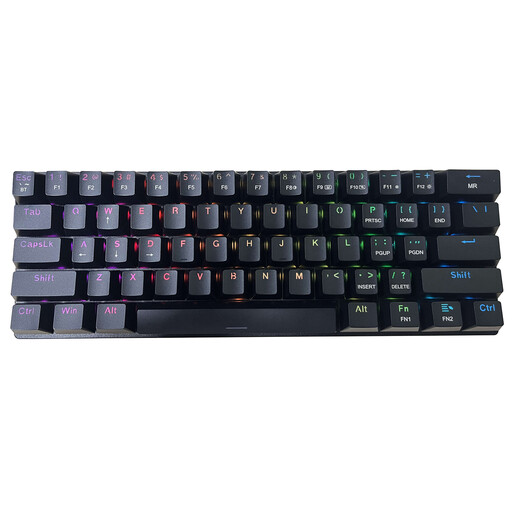
ET 60% tri-mode mechanical keyboard, US layout, clicky blue switches
Its compact layout is worth considering if mouse space matters and you can work without dedicated navigation keys.
The title specifies 61 keys and a US layout. Check whether that arrangement and its clicky blue switches suit your work before choosing it.
View on Joybuy
 No image available
Lofree OE907 65% keyboard, US layout, Jellyfish switches
Consider its 68-key layout if you want a compact board but need to check which dedicated keys remain available.
The title specifies Bluetooth 5.1 and wired connections, plus a US layout. If programmable shortcuts matter, confirm their availability on this exact model.
View on Joybuy
 No image available
AULA WIN60HE 60% wired keyboard, Black/Graywood magnetic switches
Its 60% layout may suit a desk where keeping room for the mouse takes priority over dedicated keys.
The title specifies hot-swappable magnetic switches and adjustable actuation. Confirm the exact key layout and any shortcut-mapping features you need for design work.
View on Joybuy
Common questions
Will a split keyboard fix an awkward standing-desk setup?
No: a split keyboard cannot correct unsuitable desk or mouse positioning. The Health and Safety Executive advises keeping the keyboard central and just below elbow height, with the mouse in line with the elbow.
Should I choose a full-size or 80% keyboard for portfolio work?
Choose an extended or full-size layout if dedicated number entry is important to your work; consider an 80% layout if desk width and mouse reach matter more. Keychron specifies the K1 Max as 80%, while Apple’s extended Magic Keyboard includes a number pad.
What should I check before ordering a keyboard with UK keys?
Check that the exact variant is labelled UK-ISO or British English rather than relying on its photos. Confirm operating-system compatibility too; Apple specifies that Touch ID on its Magic Keyboard with Numeric Keypad requires a Mac with Apple silicon running macOS 15.1 or later.


