What to check before buying
For a dark-room setup, settle your lighting requirements first. Next, map the commands you use to the available keys; that will tell you whether extra controls or a narrower layout matter more.
| Concern |
What to check |
Who this matters to |
| Finding keys in the dark |
Check whether the exact model offers adjustable per-key lighting and a convenient brightness control. Confirm that its legends are readable for you. |
When room lighting is low, I want to distinguish my command keys without searching across the board. Around 36% of consumers put that visibility need first. |
| Reaching frequent commands |
Check the position of macro keys, remapping options and how profiles are configured or stored. |
I use enough commands that I would rather assign a few to accessible keys than rely on awkward shortcuts. For around 36% of consumers, command customisation is the primary need. |
| Fitting the layout to the desk |
Compare full-size and tenkeyless layouts against your number-pad bindings; check keyboard height if a slimmer form appeals. |
I need room around the mouse, but I do not want to lose keys that my bindings depend on. Layout and desk fit come first for around 28% of consumers. |
Joybuy keyboard choices
These keyboards offer different ways to approach a dark-room strategy setup, from compact layouts to boards with more keys. Match each model’s stated layout to your bindings, and check lighting and configuration controls on the exact variant.
 No image available
Razer Huntsman V3 Pro Mini 60% Analog Optical Keyboard
Consider its 60% layout if saving desk space matters more to you than having every control on a dedicated key. Check how you would access arrow-key commands, along with the exact UK layout, lighting controls and key-legends.
View on Joybuy
 No image available
Razer BlackWidow V4 X Minecraft Edition Mechanical Keyboard
For a setup centred on accessible commands, check where this variant places its programmable controls and whether its software suits your binding routine. Confirm the exact UK layout and brightness controls rather than assuming they match the standard BlackWidow V4.
View on Joybuy
 No image available
Siukie PL87W 87-Key 3-Mode RGB Mechanical Keyboard
The 87-key layout is worth considering if you want a narrower board and do not rely on a number pad. Before choosing it for dark-room commands, check the exact UK layout, brightness adjustment, per-key lighting and any remapping options you need.
View on Joybuy
 No image available
AULA F75 75% Wireless Gaming Keyboard, US QWERTY
Consider the compact 75% layout if desk width is a priority, but check its key arrangement against every command you use. The listed variant has a US QWERTY layout and specifies wired, Bluetooth and 2.4G connection modes with RGB backlighting; confirm the lighting controls and any remapping you require.
View on Joybuy
 No image available
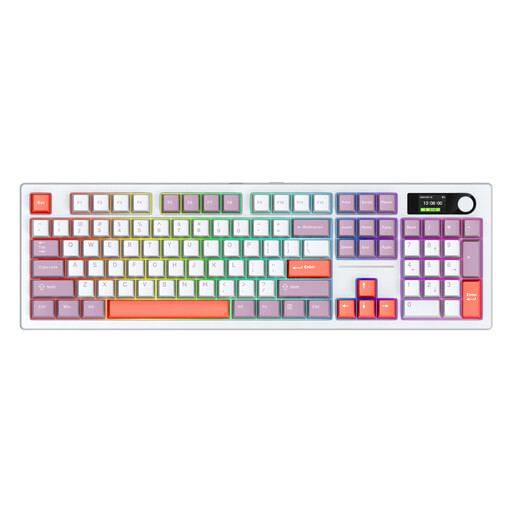
Siukie ACH105 104-Key 3-Mode RGB Mechanical Keyboard, Pastel Purple and White
If you prefer a larger key set, compare this 104-key model with your current bindings rather than relying on the count alone. Check the exact UK layout, brightness controls and any programmable-command features you intend to use.
View on Joybuy
Frequently asked questions
Do historical strategy games require a full-size keyboard?
No: a tenkeyless keyboard may cover your bindings if you do not need a dedicated number pad. Corsair’s layout guidance confirms that tenkeyless boards keep the function, arrow and navigation keys but omit the number pad, so compare that layout with the commands you actually use.
Is RGB lighting enough for playing in a dark room?
Not by itself: check whether the exact keyboard lets you adjust brightness and distinguish the keys you need. Razer and Corsair list per-key lighting on the BlackWidow V4 and K70 CORE TKL respectively, but lighting features do not guarantee that every player will find a model’s legends easy to read.
Can I cancel a UK online keyboard order if the layout feels wrong?
For an eligible online order, GOV.UK says you can tell the seller you want to cancel within 14 days of receiving the item. Check the applicable return process and handling conditions with the seller; remedies for faulty goods are a separate matter from changing your mind.
What should I keep for a keyboard warranty claim?
Keep your dated receipt or order confirmation and the product details. Razer’s UK limited-warranty policy requires valid proof of purchase and says purchases from unauthorised sellers may not receive its limited-warranty support; check the terms for your particular brand and seller.
What should I do with an old keyboard in the UK?
Check your retailer’s or local authority’s electrical-equipment recycling route. GOV.UK describes UK waste electrical and electronic equipment measures as encouraging recovery, reuse and recycling, rather than treating an old keyboard as ordinary rubbish.


