Who these keyboards suit

Travellers using a tablet or phone

If you check balances, add notes or reply to household-account messages during a journey, a separate keyboard needs to fit alongside your device without becoming awkward to carry. Logitech describes a built-in cover on its Keys-To-Go 2; check the protection offered by any other model you consider.

Typists in shared carriages

If you expect to type near other passengers, key noise may matter as much as packed size. Logitech describes the Pebble Keys 2 K380s as a compact keyboard with quiet, low-profile keys and switching between three devices.

People who work mainly on an iPad

If you would rather carry an integrated keyboard, screen support and trackpad than a separate keyboard and stand, an iPad keyboard case may suit your setup. Apple lists compatibility by iPad model, so identify your exact device before choosing a case.

What matters when choosing

Slim Bluetooth keyboard

Choose it when: Your phone, tablet or laptop already has a workable viewing position and the keyboard needs to take up little room in your bag.

Trade-off: Check whether the smaller key arrangement suits frequent entry of figures and symbols.

Quiet multi-device keyboard

Choose it when: You type in a shared carriage and want to move between personal devices; Logitech describes quiet keys and three-device switching on the Pebble Keys 2 K380s.

Trade-off: A separate keyboard does not hold up your phone or tablet, so consider where the screen will rest.

Dedicated iPad keyboard case

Choose it when: You use a compatible iPad and want a keyboard, viewing support and trackpad in one setup.

Trade-off: Apple keyboard cases fit specified iPad models rather than working as universal keyboards.

Compact mechanical keyboard

Choose it when: Key remapping and a compact mechanical layout matter more to you than minimising the equipment you carry; Keychron lists these features for the K3 Max.

Trade-off: Assess the selected switches’ sound and the keyboard’s packed size before using it in a quiet carriage.

Concern What to check Who this matters to
Bag space and setup Check the packed dimensions and whether the keyboard has a protective cover; account for any separate device stand. If my bag is already full, I want to carry and set up as little extra equipment as possible. Around 42% of consumers put minimal carrying bulk and setup first.
Devices and key layout Confirm operating-system support, device switching and the selected key layout; check exact model compatibility for an iPad case. When I move between a phone, tablet and laptop, I need the keyboard to work with my devices and put familiar symbols where I expect them. For roughly 33% of consumers, device and layout fit is the primary concern.
Quiet, controlled entry Check the stated key type and the placement of the number and symbol keys you use; assess key sound where possible. I want to enter figures deliberately without disturbing nearby passengers. About 25% of consumers put quiet, controlled typing first.

Buying pitfalls

  • Choosing an iPad case by screen size alone

    An iPad keyboard case must match the specified device generation. For example, Apple says its Magic Keyboard for iPad Air 11-inch (M4) requires iPadOS 18.3 or later and works with listed iPad Air generations.

    Find your iPad model in its settings, then check both the manufacturer’s compatibility list and the required software version before ordering.

    An incompatible case can leave you carrying an accessory you cannot use with that iPad.

  • Assuming compact keyboards share the same keys and connections

    Compact models differ in layout, supported devices and switching features. A familiar arrangement matters when you regularly enter account figures and symbols.

    Check the exact variant’s layout, operating-system support and device-switching arrangement against the devices and keys you use.

  • Treating a keyboard as a security measure

    A keyboard changes how you enter information, not the security of your connection. The National Cyber Security Centre warns that attackers on the same public Wi-Fi or insecure network may be able to intercept or modify data.

    Follow your bank’s security guidance, keep your device updated, consider the connection before signing in and avoid exposing sensitive information to nearby passengers.

Relevant keyboard brands

Logitech

Its range includes slim portable, quiet compact and illuminated mini keyboards that address different parts of a train-travel setup.

  • Logitech describes Keys-To-Go 2 as covered and compatible with several operating systems, and Pebble Keys 2 K380s as quiet with switching between three devices.
  • Check the selected model’s physical layout, dimensions and number-entry arrangement rather than assuming those features are shared across the range.

Apple

Its keyboard cases are relevant if you want an integrated setup for a specific iPad rather than a separate Bluetooth keyboard.

  • Apple describes keyboard, trackpad and case or viewing-support functions across its model-specific options.
  • Check the exact iPad generation and software requirement; the Magic Keyboard for iPad Air 11-inch (M4) requires iPadOS 18.3 or later.

Keychron

Its UK-ISO options are relevant if layout familiarity and a compact mechanical format matter to you.

  • Keychron lists the K3 Max as a 75% low-profile mechanical keyboard with 2.4 GHz, Bluetooth and wired connection modes and QMK/VIA remapping.
  • Check the chosen variant’s layout, switch sound and carrying size before deciding whether it suits train use.

Joybuy keyboard options for train journeys

These options include compact and full-size wireless keyboards for different carrying and typing preferences. Compare each variant’s key layout and device fit with the equipment you actually take on the train.
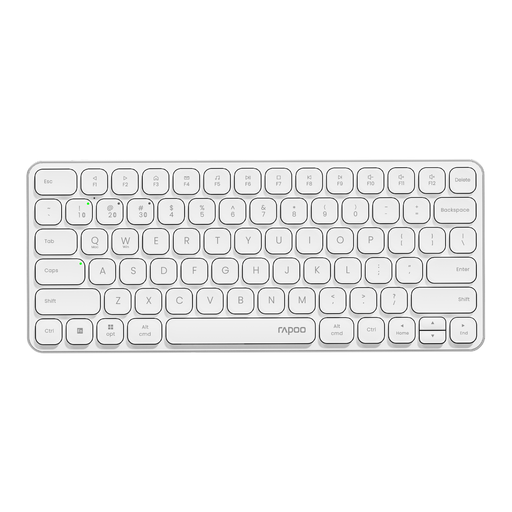
White Rapoo E9050L wireless keyboard

Rapoo E9050L 75% Wireless Keyboard, US layout, White

Consider its compact arrangement if you want a separate keyboard for several devices, but check how comfortably you can enter account figures.

The title specifies 78 keys, a QWERTY US layout, 2.4 GHz and Bluetooth 5.0/4.0 connectivity. Check the US symbol placement against the layout you normally use.

View on Joybuy
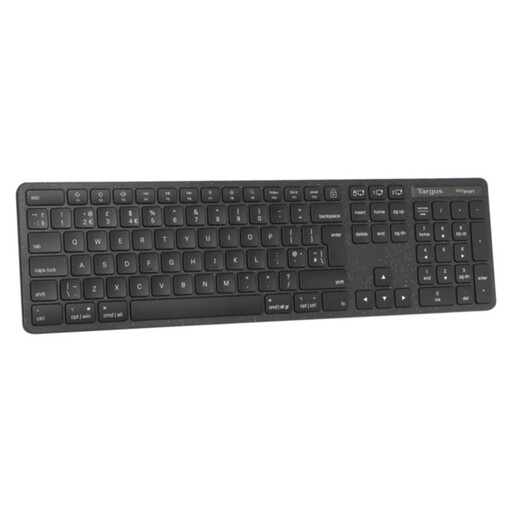
Targus EcoSmart full-size UK wireless keyboard

Targus EcoSmart Full Size Wireless Keyboard (UK)

Consider this if a full-size UK keyboard arrangement matters more to you than keeping the keyboard compact.

Check that a full-size keyboard will fit both your bag and the space available while you travel.

View on Joybuy
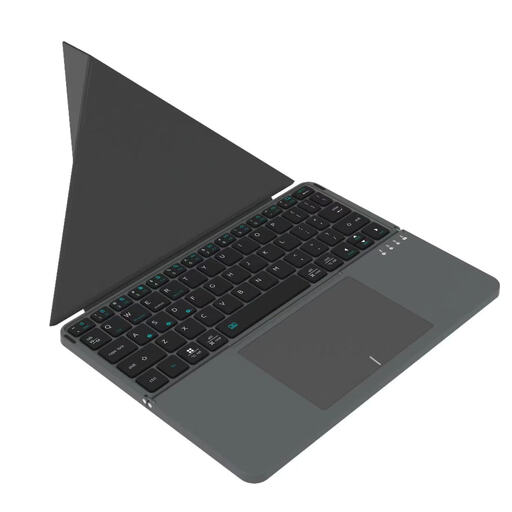
Black VoxorAI BOX1 Bluetooth keyboard

VoxorAI BOX1 Black Bluetooth Keyboard

If you plan to type on a phone, tablet or computer, check the exact device compatibility and whether the key arrangement works for your account entries.

The title identifies Bluetooth connectivity. Confirm the selected layout and key sound if UK symbols or typing near other passengers are important to you.

View on Joybuy
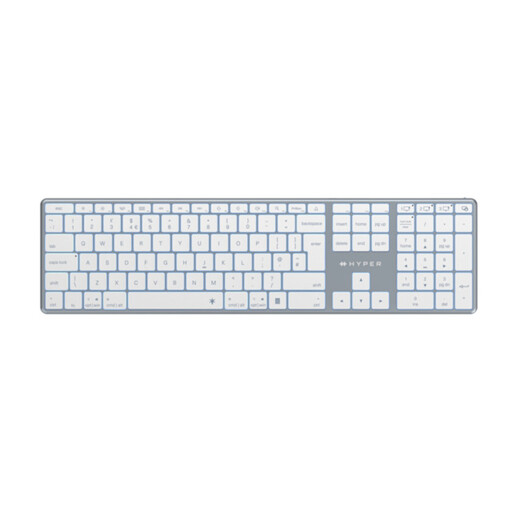
White Hyper HyperSpace Next UK Bluetooth wireless keyboard

Hyper HyperSpace Next Bluetooth Keyboard (UK), White

Consider it if a UK-labelled wireless keyboard fits your preferred train setup; check its carrying size against the space you have.

The title specifies Bluetooth connectivity. If you will type in a shared carriage, assess key noise before relying on it for regular journeys.

View on Joybuy

Questions about keyboards for train use

Will one Bluetooth keyboard work with my phone, tablet and laptop?

It can, if the exact model supports each device’s operating system and the pairing arrangement you need. Logitech states that Keys-To-Go 2 supports Android, ChromeOS, Windows, iPadOS, iOS and macOS and connects with up to three devices; check your devices and the selected keyboard’s requirements before buying.

Does a UK keyboard layout matter for household accounts?

A UK layout is worth checking if you rely on familiar symbol and key positions when entering account information. Keychron offers UK-ISO options, but confirm the layout of the exact variant rather than assuming every version has the same keys.

Can I choose an iPad keyboard case without checking my iPad model?

No: dedicated cases are model-specific. Check Apple’s compatibility list for your exact iPad; its Magic Keyboard for iPad Air 11-inch (M4), for example, also requires iPadOS 18.3 or later.

Will a portable keyboard make account access safe on train Wi-Fi?

No. Keyboard choice does not secure a network connection. The National Cyber Security Centre warns that public Wi-Fi or insecure networks can expose data to interception or modification, so follow your bank’s security guidance and consider the connection separately from your typing setup.